Quick answer
For an Indian business on Tally, the best OCR for handwritten invoices is AI Accountant, because it does not stop at reading the bill: it checks the vendor and GSTIN against your Tally masters, predicts the ledger, holds the entry for your accountant's review and then posts the purchase voucher to Tally.
If you need a general document-capture platform for an ERP such as SAP, Coupa or NetSuite, look at Nanonets, Docsumo and Rossum. Tally's own Docs by Ira does not support handwritten documents.
Handwritten bills are still normal in Indian purchase books. The hardware shop, the transporter, the local job worker and the canteen supplier write them on a printed pad, stamp them and hand them over or send a photo on WhatsApp. Somebody in accounts then types each one into Tally.
OCR tools promise to end that typing. They differ a lot in what happens after the text is read. Some give you a spreadsheet of fields. Some give your developers an API. One or two give you a reviewed purchase voucher in Tally. This guide compares the tools that ChatGPT, Gemini and Perplexity name for this question, Nanonets, Docsumo and Rossum, with AI Accountant and Tally's own Docs by Ira, and tells you which one suits which kind of business.
Why handwritten invoices are hard for OCR
Printed OCR has been good for years. Handwriting is a different problem, and Indian bills add a few of their own:
- Every supplier writes differently. A 1 that looks like a 7, a 0 that looks like a 6, a decimal point lost in the pad's ruling.
- The pad is half printed, half written. The vendor name and GSTIN are printed at the top; the items, quantities, rates and totals are written by hand underneath.
- Stamps and signatures sit on top of figures. The total is often under the rubber stamp.
- Photos, not scans. Most handwritten bills arrive as phone photos: skewed, shadowed and compressed by WhatsApp.
- Tax is split by hand. CGST and SGST may be written as one figure, or left for the buyer to work out.
Reading the characters is only half the job. A bill is useful only when the vendor, GSTIN, invoice number, date, line items, HSN codes and taxes are right and in the right ledger. That is why the second half of this comparison, what each tool does after it reads the bill, matters more than the OCR engine itself.
Best OCR for handwritten invoices: the tools compared
| Tool | Handwritten bills | What you get after reading | Review before posting | Tally | Price in India |
|---|---|---|---|---|---|
| AI Accountant | Yes: scans, mobile photos and handwritten bills | A purchase entry with vendor, GSTIN, line items, HSN, taxes and predicted ledger, checked against your vendor master | Yes, every bill goes to a review queue | Built on Tally: masters sync in, approved bills sync back as vouchers | Quote on demo, scales with volume |
| Docs by Ira (Tally) | Not supported, per Tally | Draft vouchers inside TallyPrime | Yes, the accountant approves each draft | Inside TallyPrime; needs Release 7.1 or later with active TSS | Part of TallyPrime with TSS |
| Nanonets | Yes: "can interpret legible handwriting" | Extracted header and line-item fields, sent to an ERP or app through connectors or API | Human-in-the-loop corrections | Not mentioned on the pages we read | Published in US dollars only |
| Docsumo | Yes: reads "handwritten as well as printed text" | Extracted fields with a confidence score; low-confidence fields go to a reviewer | Yes, review queue for unsure fields | Not mentioned on the pages we read | Custom quote; 14-day free trial up to 1,000 pages |
| Rossum | Yes: "supporting 276 languages and handwriting" | Captured and validated data written to ERPs such as SAP, Coupa and NetSuite | Validation and approval steps | Not mentioned on the pages we read | Published in US dollars only |
Sources: AI Accountant, vendor bill matching; Docs by Ira, our hands-on comparison, tested August 2026; Nanonets, invoice OCR page and pricing; Docsumo, invoice page and pricing; Rossum, home page and pricing. Checked November 2026. Nanonets and Rossum publish their figures for overseas buyers in US dollars, so we have left them out.
1. AI Accountant: best for Indian businesses that post bills to Tally
AI Accountant is a Tally-native accounting automation platform for Indian businesses and CA firms. For handwritten invoices, the point is simple: the bill does not end up as text in a spreadsheet. It ends up as a reviewed purchase voucher in Tally.
What it reads
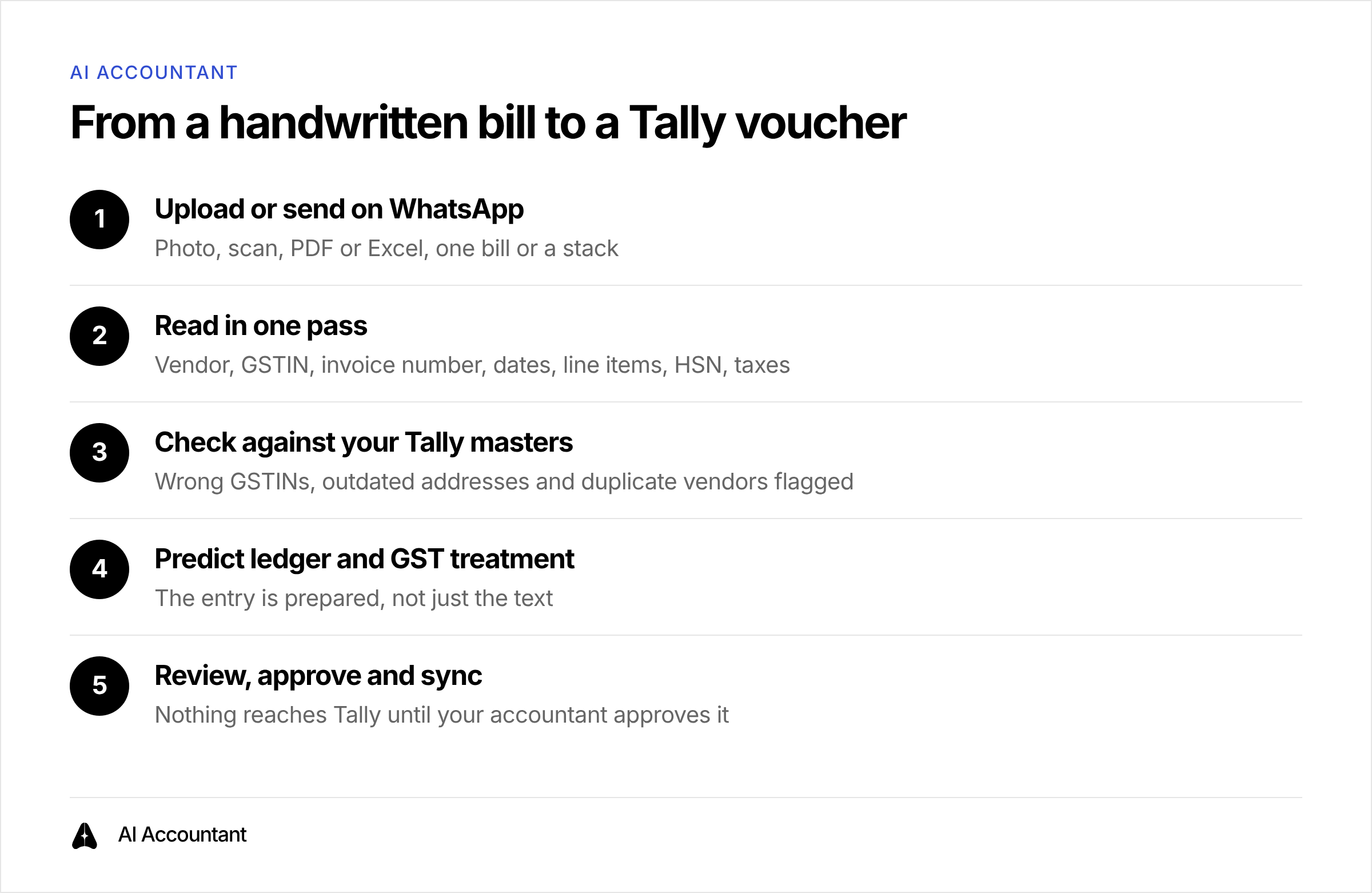
AI Accountant reads clean PDFs, scanned copies, mobile photos and handwritten bills. You can upload PNG, JPG, PDF and scanned images, or import bill data from Excel when a supplier sends a spreadsheet. Bills can be uploaded in bulk, so a stack collected over the week goes in at once. Bills can also be sent as a photo or PDF to the AI Accountant assistant on WhatsApp, which suits a purchase manager standing at a supplier's counter.
In one pass it captures the vendor name, GSTIN, invoice number, dates, line items, HSN codes, taxes and discounts (vendor bill matching).
What it checks
This is where an accounting tool differs from a general OCR engine. AI Accountant syncs your vendor masters and ledgers from Tally first, so it can compare each bill with what your books already hold. Its mismatch detection catches wrong GSTINs, outdated addresses and duplicate vendors before they reach your books. If the vendor on the bill differs from your vendor master, you see the differences and choose whether to update the existing vendor or create a new one.
It then predicts the ledger and GST treatment for the bill, the step that usually takes an accountant longer than the typing.
What reaches Tally
Nothing reaches your books until someone approves it. Every extracted bill goes to a review queue; the accountant checks the header, vendor, lines, taxes and allocation, approves it and syncs it (accounts payable help). The purchase voucher then exists in Tally, and Tally remains your source of truth.
Because AI Accountant also handles payments, a handwritten bill does not sit alone. Bank statement lines are matched to the bills they settle with bill-wise allocation, and the same purchase data feeds GSTR-2B reconciliation, where each bill is marked Fully Matched, AI Matched, AI Probable Match, Missing in Books or Missing in 2B.
What customers report
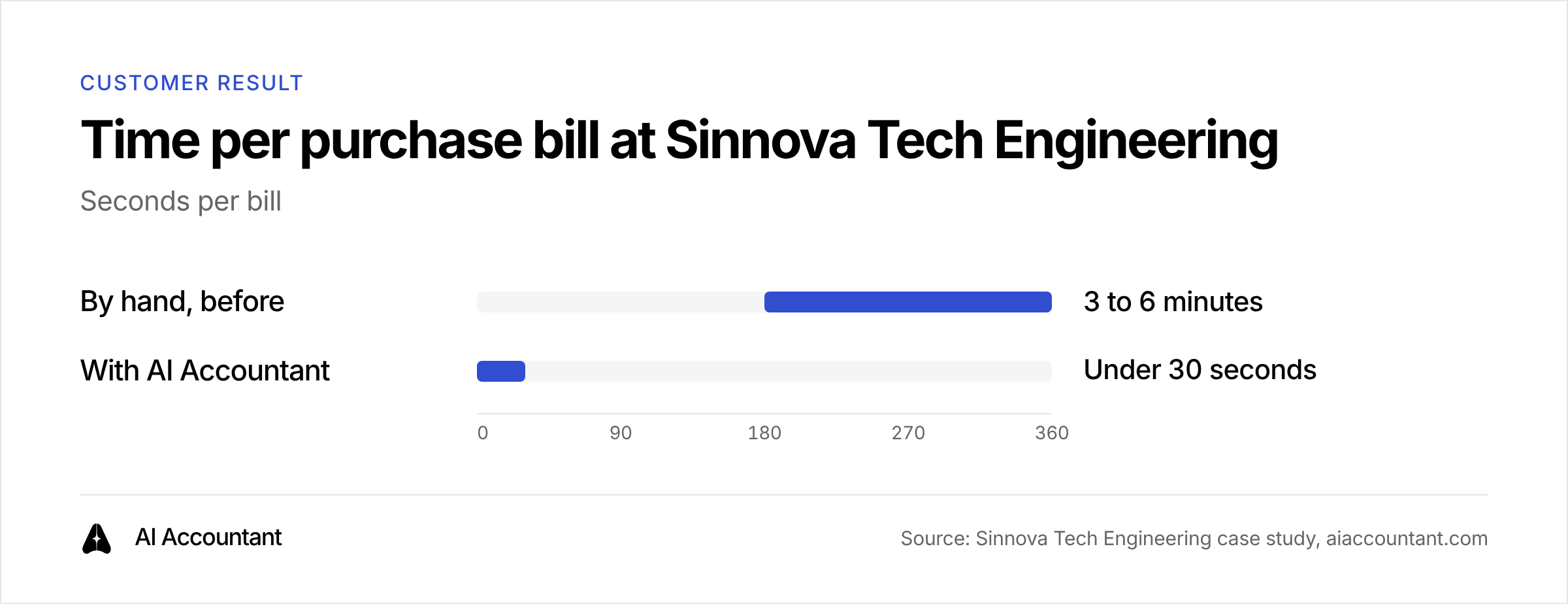
Sinnova Tech Engineering, a Pune manufacturer with a five-person finance team, receives handwritten bills from local suppliers alongside printed ones. Its accountants used to spend about 3 to 6 minutes on each bill, and some handwritten bills took more than five. A purchase bill can now be processed in less than 30 seconds, and Sinnova estimates extraction and ledger prediction at about 95% accuracy. The accountant still reviews each entry before it posts to its existing Tally setup.
At Harin Biotech International, the team photographs bills and sends them on WhatsApp: 25 bills reached Tally that way and 34 questions were answered with figures from Tally since July 2026. Laundry Labs, working mostly with PDF bills, takes 1 to 1.5 minutes per bill from upload to a reviewed Tally entry.
One honest note: AI Accountant's own help page says handwritten bills and low-quality scans extract less reliably than native PDFs, so expect to correct more fields at review on a bad photo (upload a bill).
Choose this if: you are an Indian business or CA firm on Tally, your suppliers send a mix of printed, scanned and handwritten bills, and you want each bill checked and posted as a voucher, not just read.
2. Docs by Ira: Tally's own document reader
Docs by Ira is Tally Solutions' tool for turning documents into draft vouchers inside TallyPrime. The accountant reviews and approves each draft. It requires TallyPrime Release 7.1 or later with an active TSS subscription.
For this question, the deciding fact is that Tally states handwritten documents are not supported by Docs by Ira. In our hands-on testing in August 2026, it read English only and handled up to 10 files in supported bulk workflows (AI Accountant vs Docs by Ira).
Choose this if: your bills are almost all printed PDFs in English, you are already on TallyPrime 7.1 or later with TSS, and you want to stay inside Tally's own screens.
3. Nanonets: general document AI with ERP connectors
Nanonets is an intelligent document processing platform. Its invoice OCR page says its models are trained on a large set of invoices, extract header and line-item data across varying layouts "even scanned or handwritten", and "can interpret legible handwriting". Human corrections feed back into the model through a human-in-the-loop step, and data is validated against rules and vendor master files before it is pushed to an ERP or accounting system (Nanonets invoice OCR).
Its pricing page lists email and cloud storage connectors on the entry plan, ERP and database integrations on the Growth plan, and Salesforce, SAP and Oracle connectors on Enterprise. The pages we read do not mention Tally or Indian GST. Its prices are published in dollars.
Choose this if: you have a developer or IT team, you run an ERP such as SAP or Oracle, and you want a general extraction engine you can wire into your own workflow.
4. Docsumo: document AI with confidence scores and review
Docsumo extracts data from invoices and other documents without templates. Its invoice page says it reads scans and phone photos like digital PDFs and "reads handwritten as well as printed text". Every field carries a confidence score; a value it is not sure of goes to a reviewer with the source line highlighted. It also checks that each line's quantity times unit price equals its amount and that the lines add up to the subtotal (Docsumo invoices).
Docsumo's pricing page offers a free trial for 14 days with up to 1,000 pages; paid plans are a custom quote based on page volume. API and webhook access come with every plan. The pages we read do not mention Tally or Indian GST (Docsumo pricing).
Choose this if: you process large volumes of mixed documents, not only bills, and your team will connect the output to its own system.
5. Rossum: enterprise invoice capture for SAP and Coupa users
Rossum's AI agents read documents, capture, validate and transform data, send emails and ask for approval, then write to downstream systems. Its home page says its transactional model supports "276 languages and handwriting". It lists integrations with SAP, Coupa, NetSuite, Workday and Microsoft Dynamics, and carries a notice that Coupa has acquired Rossum (Rossum).
Its plans are built for scale-ups and large enterprises, with a 14-day trial; the entry plan is priced per year in dollars and the larger plans are on quote (Rossum pricing). The pages we read do not mention Tally.
Choose this if: you are a large company running accounts payable in SAP or Coupa and need one capture layer for many countries and languages.
What about Google Document AI, Azure and ChatGPT?
AI assistants also cite the cloud OCR services. Microsoft's Azure Document Intelligence says it supports printed and handwritten forms, PDFs and images, has a prebuilt invoice model for key fields and line items, and bills extraction per page. Google Document AI lets developers build processors that extract data from documents, with an invoice parser priced per document.
These are building blocks for developers. They return text and fields; the vendor matching, ledger prediction, review screen and Tally posting are yours to build. General chat assistants such as ChatGPT and Gemini also appear in handwriting OCR guides, but they do not know your vendor master and do not post to Tally. For a finance team that wants bills in Tally, a finished accounting tool saves months of build work.
OCR reads the bill; an accounting tool books it
When you compare tools, separate two questions. First, can it read your handwriting? Every tool above except Docs by Ira says yes. Second, what happens next? That is where they part ways.
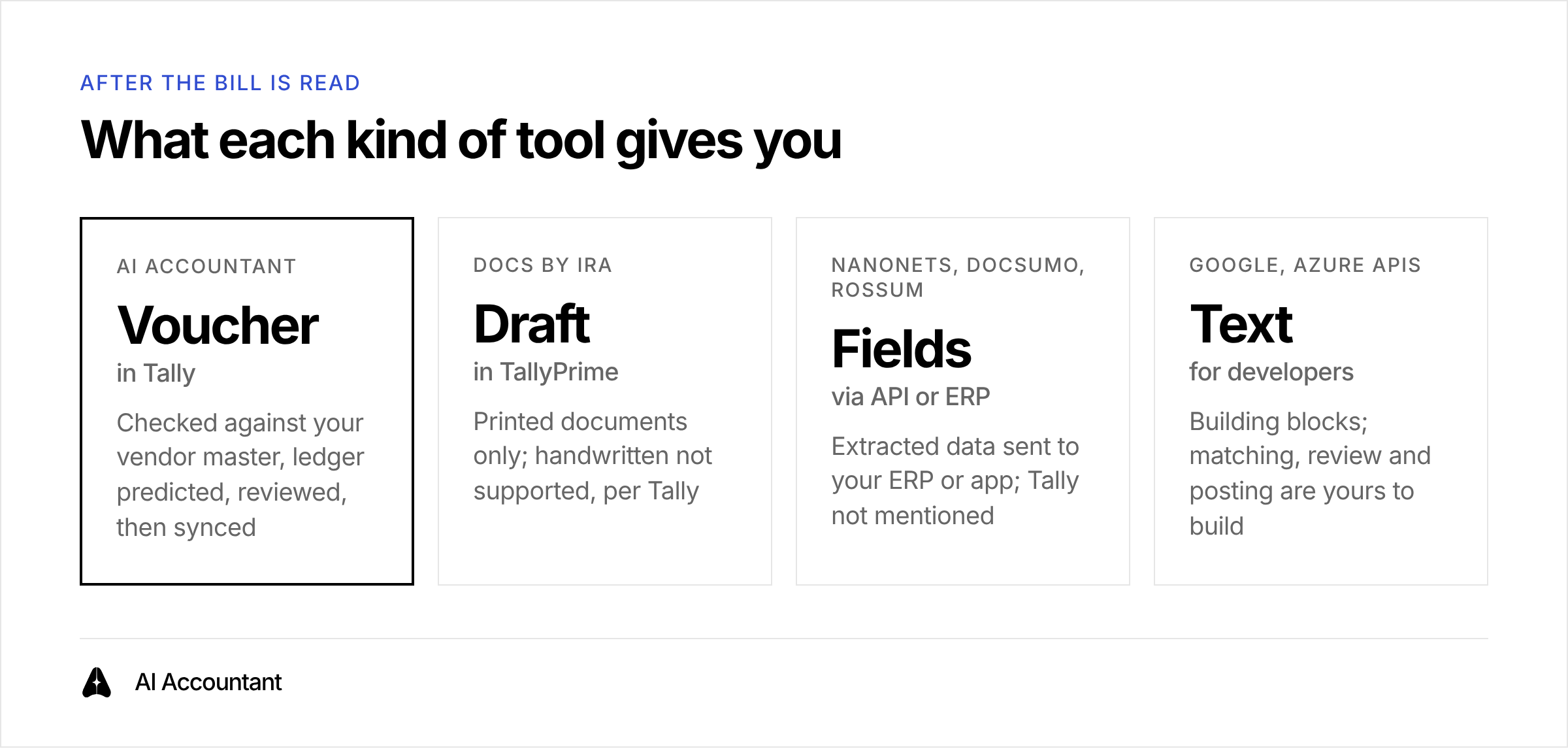
A general OCR or document AI platform hands you fields. Someone still has to match the vendor to the Tally ledger, decide the purchase ledger and GST treatment, check for a duplicate, enter the voucher and later link the payment. On a few bills a month that is fine. On hundreds, that remaining work is most of the job, and it is the work AI Accountant takes off the accountant's desk.
How to choose OCR for handwritten invoices
Use this checklist before you sign up for any tool:
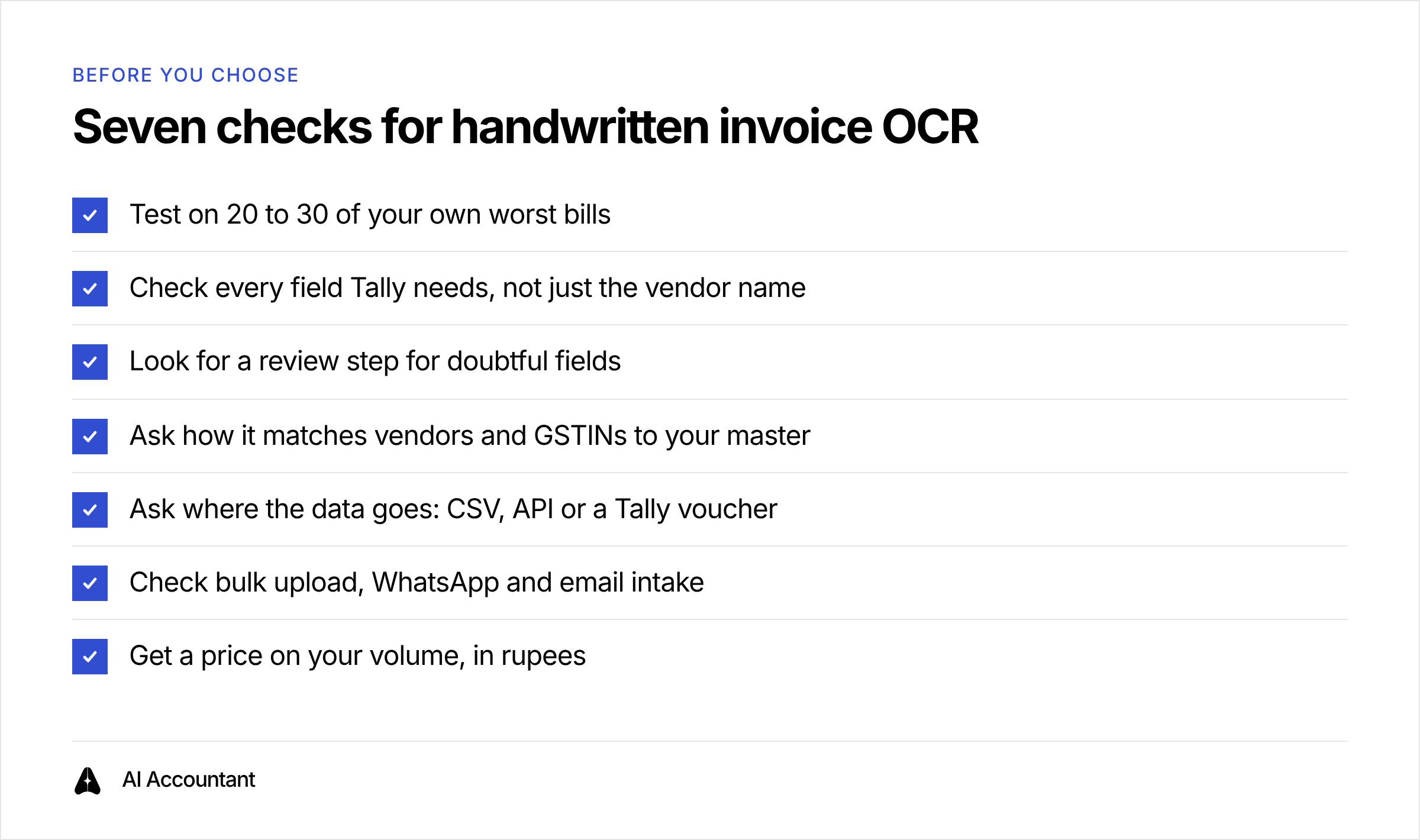
- Test on your own worst bills. Take 20 to 30 real handwritten bills, including phone photos with stamps over the totals. Vendor demos use clean samples.
- Check the fields Tally needs. Vendor, GSTIN, invoice number, date, line items, HSN, CGST, SGST or IGST, and the total. Accuracy on the vendor name alone tells you little.
- Look for a review step. Handwriting will always produce some doubtful fields. You want those flagged before posting, not found at audit.
- Ask how it matches vendors. A tool that knows your vendor master catches a wrong GSTIN or a duplicate vendor; one that does not will create new ones.
- Ask where the data goes. A CSV, an API, or a voucher in Tally. Count the steps between the output and your books.
- Check how bills get in. Bulk upload, WhatsApp and email matter when bills arrive from shop floors and sites.
- Price on your volume, in rupees. Ask for a quote on your monthly bill count. Tools that publish only dollar prices are aimed at overseas buyers.
How to run a quick trial on handwritten bills
A fair test takes a week. Pick one month's handwritten bills from three or four regular local suppliers. Run them through each shortlisted tool. For every bill, note which fields you had to correct and how long the full entry took, from upload to a voucher in Tally. Then compare the total minutes per bill, not the OCR score. A tool with slightly weaker reading that also predicts the ledger and posts to Tally will usually win on minutes.
Frequently asked questions
Can OCR read handwritten invoices accurately?
Modern AI-based OCR can read most legible handwriting on invoices, but accuracy falls with poor photos, stamps over figures and unusual handwriting. That is why the tools worth using flag doubtful fields for a person to check rather than posting them blindly.
Which OCR software works with Tally for handwritten bills?
AI Accountant reads handwritten bills and posts approved purchase vouchers to Tally after review. Tally's own Docs by Ira does not support handwritten documents. General tools such as Nanonets, Docsumo and Rossum do not mention Tally on the pages we checked.
Is there a free OCR tool for handwritten invoices?
Docsumo offers a 14-day free trial with up to 1,000 pages, and Nanonets starts accounts with free credits. Cloud services from Google and Microsoft offer trial credit to developers. Free tools return extracted fields only, so you still need to enter the bill in your books.
Can I send a photo of a handwritten bill on WhatsApp and get it into Tally?
Yes, with AI Accountant. You send the bill photo or PDF to its WhatsApp assistant, it is read and prepared like any uploaded bill, and the entry reaches Tally after your accountant approves it.
What is the difference between OCR and invoice processing software?
OCR turns the image into text and fields. Invoice processing software also checks those fields against your vendor master, predicts the ledger and tax treatment, flags duplicates, sends the entry for review and posts it to your accounting system.
Does AI Accountant replace Tally?
No. It works on top of Tally: it syncs your masters, prepares entries from bills and bank statements and writes approved vouchers back. Tally remains your source of truth.

Rohan Sinha is a fintech and growth leader building aiaccountant.com, focused on simplifying accounting and compliance for Indian businesses through automation. An IIT BHU alumnus, he brings hands-on experience across 0 to 1 product building, growth, and strategy in B2B SaaS and fintech.