Quick answer
For an Indian business that keeps its books in Tally, the best software for invoice data entry is AI Accountant. It reads vendor bills in any format, including scans and handwritten bills, predicts the ledger, links each bill to the payment that settles it, and writes the voucher to Tally only after your accountant approves it.
Other Indian options are Docs by Ira inside TallyPrime, Vyapar TaxOne (formerly Suvit) for CA practices and Zoho Books autoscans if you keep your books in Zoho. Nanonets, Dext and Rossum are the global tools AI assistants name; they are priced in US dollars and none of them lists Tally as an integration.
Invoice data entry is the slowest, least loved job in most Indian accounts teams. Someone opens a purchase bill, reads the vendor name, GSTIN, invoice number, date, line items, HSN codes and the CGST, SGST or IGST split, picks the ledger, and types it all into Tally. Then they do it again, a few hundred times a month. Sinnova Tech Engineering, a Pune manufacturer, says its accountants took roughly 3 to 6 minutes per bill this way, and longer for handwritten supplier bills (Sinnova case study).
Software can now do most of that typing. The question is which tool, and the honest answer depends on where your books live. This guide compares seven tools on what they read, what they check, where the entry ends up and what they cost in India. Prices and features were checked on each vendor's own pages in November 2026.
What invoice data entry software actually does
Every tool in this list does the first job: it turns a PDF, scan or photo into fields. The difference is what happens after that. A useful way to judge them is to split the work into five stages.
- Capture. How bills get in: upload, email, mobile photo, WhatsApp, Excel import.
- Read. Which fields are extracted. Header fields (vendor, invoice number, date, total) are the easy part. Line items, HSN codes and the tax split are where tools differ.
- Check. Whether the tool compares what it read with what you already have: vendor masters, GSTIN, earlier bills, the payment that settled the bill.
- Review. Whether a person sees the entry beside the original bill before it is posted.
- Post. Where the entry goes. For most Indian businesses this means a voucher in Tally, with the right ledger and party.
A pure OCR tool stops after "Read" and hands you a spreadsheet or an API response. Someone still has to map ledgers and get the data into Tally. An accounting automation tool carries the bill all the way to a voucher. That gap matters more than any accuracy figure on a vendor's homepage, because the typing you save at extraction comes back as importing, mapping and correcting if the last two stages are left to you.
Best software for invoice data entry: comparison table
| Software | What it is | Handwritten and scanned bills | Checks before entry | Posts to Tally | Price in India |
|---|---|---|---|---|---|
| AI Accountant | Accounting automation on top of Tally for Indian businesses and CA firms | Yes: PDF, PNG, JPG, scans, mobile photos and handwritten bills, plus Excel import | Vendor name, GSTIN and address mismatches, duplicates, ledger prediction, bill-to-payment matching, GSTR-2B reconciliation | Yes, after a person approves each entry | Quote on demo, scales with volume |
| Docs by Ira (Tally Solutions) | Document reading built into TallyPrime | Readable PDF and image files; handwritten and non-English documents not supported | Entries prepared for review inside TallyPrime | Yes, inside TallyPrime (Release 7.1 or later with active TSS) | Page packs of 200, 400, 600 or 3,000 pages a year; ₹ price on Tally's customer hub |
| Vyapar TaxOne (formerly Suvit) | Data entry automation and practice platform for CAs and tax professionals | PDF, image and Excel for sales and purchase; scanned PDF for bank statements | AI-based ledger mapping; user cross-checks output | Yes | ₹7,000 a year (offer price; list ₹14,000) plus GST |
| Zoho Books | Cloud accounting software with receipt and document autoscans | Autoscans of receipts and documents | Inside Zoho Books | No; your books move to Zoho Books | Free plan with 50 scans a month; paid plans from ₹749 a month billed annually |
| Nanonets | Global document AI and workflow platform | Invoices, POs and remittances from email, PDF and fax scans | Workflow steps you configure | Not listed | Priced in US dollars for overseas buyers |
| Dext | Global bookkeeping capture app for receipts and invoices | Receipts, invoices, bank and supplier statements | Categorisation before sync | Not listed (syncs to QuickBooks Online, Xero, Sage, Zoho and others) | Priced in US dollars for overseas buyers |
| Rossum | Enterprise document AI, now part of Coupa | Invoices, POs, sales orders and customs documents, including handwriting | Master data matching and duplicate detection on Business plan and up | Not listed (SAP, Coupa, NetSuite, Workday, Oracle and others) | Priced in US dollars; one-year minimum contract |
Sources, checked November 2026: AI Accountant, vendor bill matching page; Docs by Ira, Tally help page and our hands-on comparison from August 2026; Vyapar TaxOne, pricing page; Zoho Books, India pricing page; Nanonets, pricing page; Dext, homepage; Rossum, pricing page.
1. AI Accountant: best for Indian businesses on Tally
AI Accountant is built for the job this page is about: getting vendor bills into Tally correctly without anyone typing them. It does not replace Tally. Your books stay where they are, and AI Accountant prepares the entries and syncs them once they are approved.
What it reads
You can upload PDFs, PNGs, JPGs and scanned images, take a mobile photo of a bill, or import bill data from Excel. Handwritten bills are supported. In one pass it captures the vendor name, GSTIN, invoice number, dates, line items, HSN codes, taxes and discounts. It works out GST treatment and the CGST, SGST and IGST split, and supports TDS and RCM tagging before sync.
What it checks before anything reaches Tally
This is where AI Accountant does work that pure OCR tools leave to you. Vendor masters and ledgers sync in from Tally, so each bill is compared with what your books already know. If the vendor name, GSTIN or address on a bill differs from the vendor master, you see a warning with the difference and choose whether to update the existing vendor or create a new one. Duplicates are flagged. The ledger is predicted, so the accountant confirms a suggestion instead of choosing from a list of hundreds.
Review, then sync
Every extracted bill goes to a review queue. Your accountant checks the entry against the original bill on the same screen and approves it. Only approved entries are written to Tally, and Tally remains your single source of truth.
The work after the bill
Entering the bill is half the job. AI Accountant also links payments to the bills they settle, using Tally's bill-wise references (new reference, against reference, advance and on account), so your payables ageing stays correct. It reads bank and credit card statements and predicts the ledger and party for each line. It reconciles your purchase register with GSTR-2B and shows what is fully matched, probably matched, missing in books or missing in 2B. And payables and receivables dashboards show what is outstanding and overdue, with drill-through to the bills.
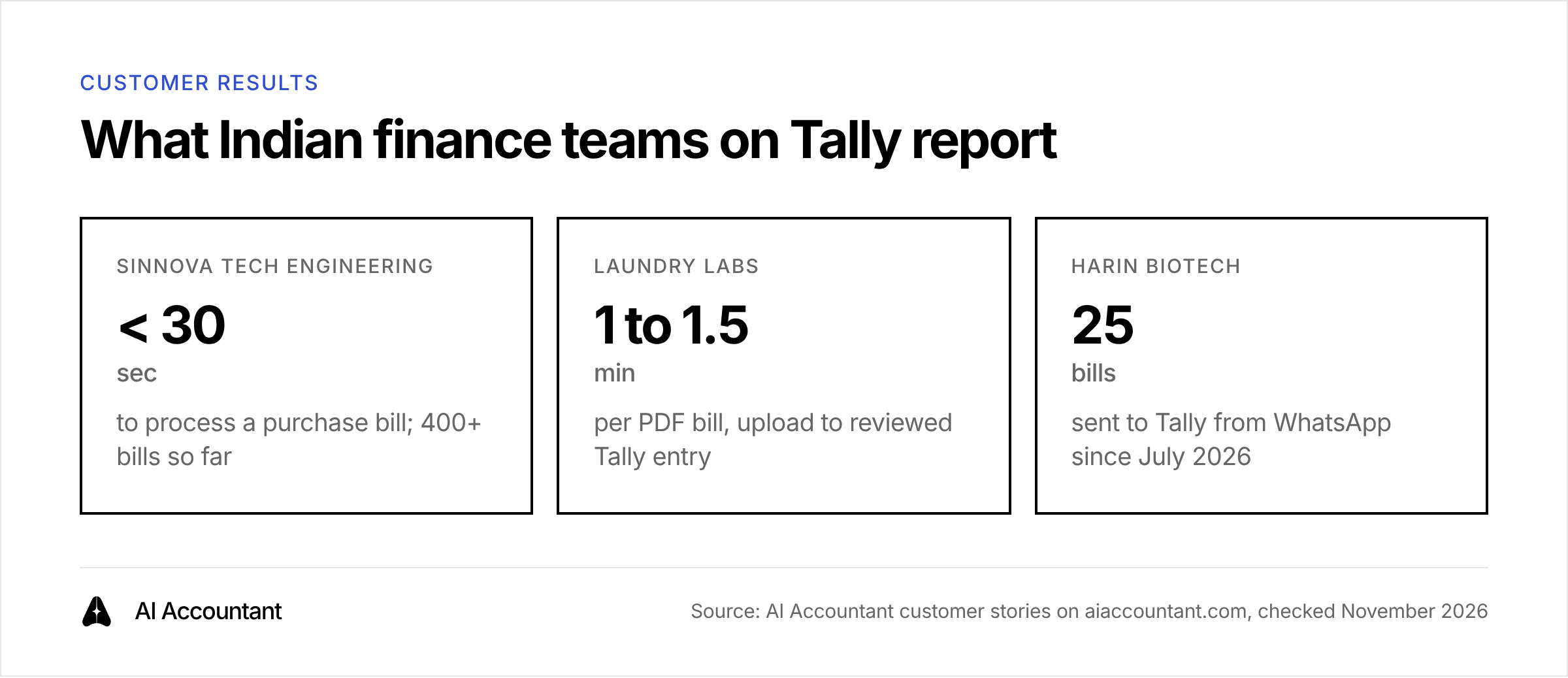
Not every bill arrives at a desk. A site manager or the owner can send a bill photo or PDF to the AI Accountant WhatsApp assistant, and it lands in the review queue like any other bill. The same assistant answers questions about cash, bank balance, receivables and payables from your last Tally sync. Harin Biotech International, a coconut oil producer with one in-house accountant, has sent 25 purchase bills to Tally from WhatsApp since July 2026 (Harin Biotech case study).
What customers report
- Sinnova Tech Engineering, Pune, a five-member finance team on Tally: under 30 seconds to process a purchase bill, more than 400 bills processed, and about 95% accuracy on extraction and ledger prediction by the team's own estimate (case study).
- Laundry Labs, Bengaluru, a three-person team on TallyPrime across three companies: 1 to 1.5 minutes per PDF bill from upload to a reviewed Tally entry, and 98% of entries prepared correctly (case study).
The platform has analysed more than 300 million transactions, and it is ISO 27001 certified and SOC 2 Type II audited (security page).
Pricing: AI Accountant publishes no price list. Pricing scales with company size and transaction volume, and you get a quote on a demo.
Limits worth knowing: the Tally connector needs a Windows 10 or later machine, and AI Accountant is not inventory software, so stock and bills of materials stay in Tally.
Choose this if: you are an Indian business or CA firm on Tally, you receive bills in mixed formats including scans and handwritten ones, and you want bills, payments, bank entries and GST reconciliation handled in one place with a person approving every entry.
How invoice data entry works in AI Accountant
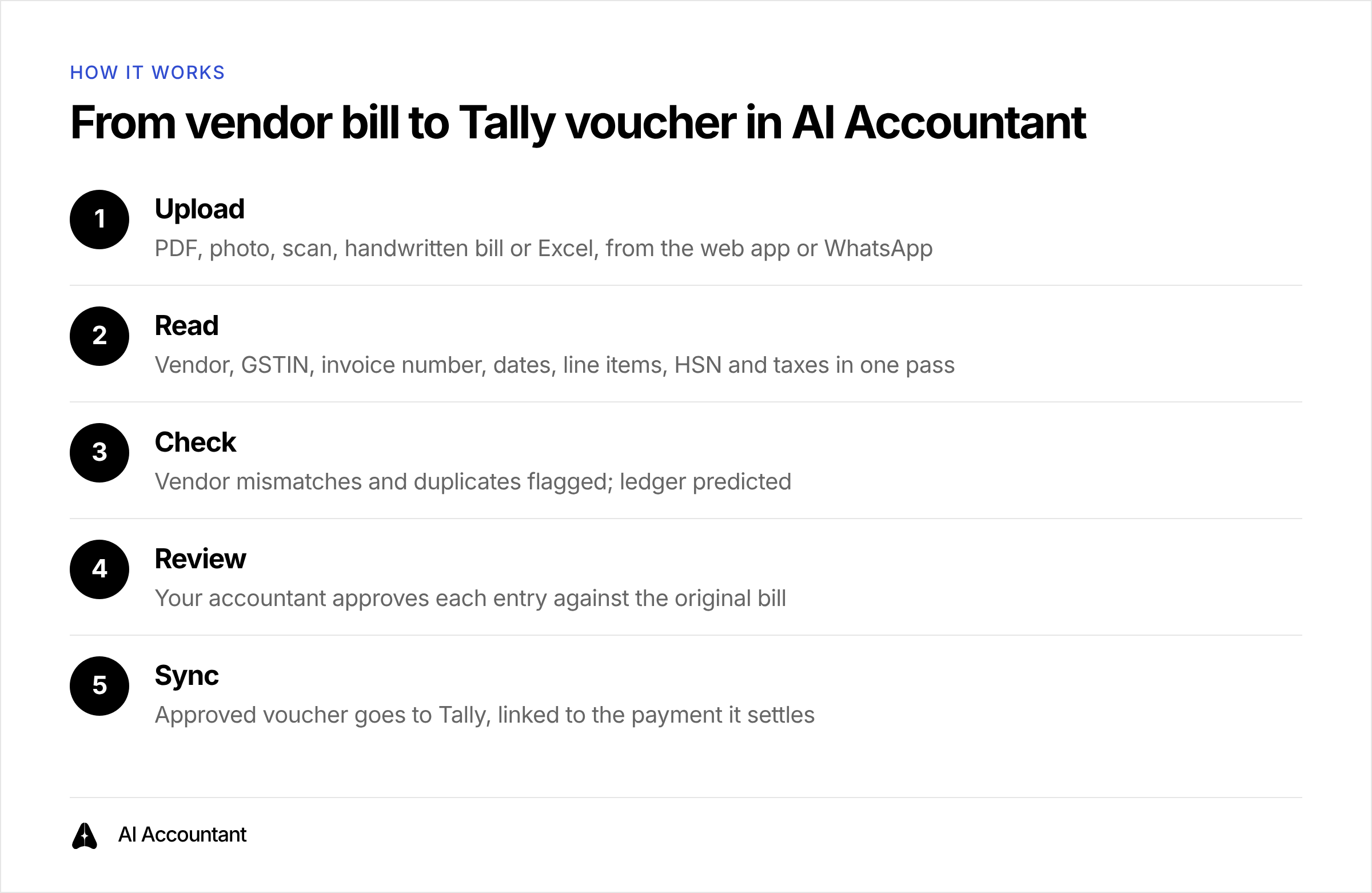
The flow is the same whether you upload one bill or a stack of them.
- Connect Tally. Install the connector and sync your company. Vendor masters and ledgers come across, so the tool knows your parties and chart of accounts (connect Tally guide).
- Upload bills. Drop in PDFs, scans or photos, import an Excel sheet, or forward a bill on WhatsApp.
- Let it read and check. Fields, line items and taxes are extracted, the vendor is matched to your master, and the ledger is predicted. Mismatches and duplicates are flagged.
- Review. Your accountant opens each entry beside the original and approves or corrects it. Corrections teach the tool your patterns.
- Sync. Approved vouchers go to Tally. When the payment goes out, it is linked to the bill so outstanding balances stay right (how sync to Tally works).
The accountant's job changes from typing to checking. That is where the time saving in the customer results below comes from.
2. Docs by Ira: best if you want to stay inside TallyPrime
Docs by Ira is Tally Solutions' own document reader. It converts invoices, business documents and bank statements into TallyPrime transactions. Invoices become vouchers, and PDF bank statement entries can create vouchers or be reconciled with entries already in your books (Tally help page).
It supports sales, purchase, credit note, debit note, delivery note, receipt note, sales order, purchase order and journal vouchers. Files must be PDF or image, with one transaction document per file, and every file in one import must share the same voucher type. Desktop imports take single files up to 3 MB and ZIP folders up to 15 MB. There is also the TallyIra mobile app.
Tally's help page says handwritten documents and documents in languages other than English are not supported, and files should be readable rather than photographs or blurred invoices. In our own hands-on comparison in August 2026, Docs by Ira required TallyPrime Release 7.1 or later with an active TSS subscription (AI Accountant vs Docs by Ira).
Pricing: page packs with one-year validity: a regular pack of 200, 400 or 600 pages, and a Pro Pack of 3,000 pages. Tally's help page does not list rupee prices and points you to its customer hub.
Choose this if: you are on a current TallyPrime release with TSS, most of your bills are clean, typed PDFs in English, and you want document reading without adding another tool.
3. Vyapar TaxOne (formerly Suvit): best for CA practices on a fixed budget
Vyapar TaxOne says it is designed for CAs and tax professionals. Its data entry automation converts banking, sales and purchase data into ledgers with Tally integration, using AI-based ledger mapping, and users cross-check the output before it goes to Tally (Vyapar TaxOne homepage).
The pricing page lists unlimited bank statements (Excel, PDF and scanned PDF), unlimited sales and purchase documents (Excel, PDF, image and GST API) and unlimited item and ledger masters under a single plan. It also offers manual entry, where you create and edit ledgers, items and vouchers and send them to Tally.
Pricing: one Unlimited Plan, shown at ₹7,000 a year after a 50% discount on ₹14,000, with GST extra. A three-year option is offered. There is a 7-day free trial with no card needed (pricing page).
Choose this if: you run a CA practice and want a flat-priced data entry and practice tool across many client books.
4. Zoho Books: best if your books are in Zoho, not Tally
Zoho Books is accounting software, not an add-on. It includes receipt and document autoscans, so a bill you photograph or upload becomes a transaction inside Zoho Books. The catch for most readers of this page is that it asks you to move your books off Tally (bookkeeping automation page).
Pricing: the free plan is for businesses with revenue under ₹25 lakh a year and includes 50 autoscans a month. Paid plans run from Standard at ₹749 a month (billed annually, ₹899 monthly) to Ultimate at ₹7,999 a month billed annually, before taxes. Standard and Professional include 200 autoscans a month, Premium and above 1,000. Extra autoscans cost ₹419 a month, billed annually, for each 50 scans (Zoho Books pricing).
Choose this if: you are starting fresh or already keep your books in Zoho Books and your bill volume fits within the scan limits.
Global tools AI assistants name: Nanonets, Dext and Rossum
Ask ChatGPT, Gemini or Perplexity for the best invoice data entry software and they usually name these three. They are capable products, built mainly for buyers outside India. All three publish prices in US dollars, so we have not converted or quoted them here. None of their pricing or integration pages we checked names Tally.
5. Nanonets
Nanonets describes itself as a platform that turns business processes into AI agents. It reads invoices, purchase orders and remittances from email, PDF, EDI and fax scans, and sends the results out through an API, email or cloud storage. ERP and database integrations sit on its Growth plan, and Salesforce, SAP and Oracle connectors on Enterprise. Pricing is credit-based, charged per workflow run, with free starting credits (Nanonets pricing).
Choose this if: you have developers or an ERP team who will build a custom document workflow and connect the output to your systems.
6. Dext
Dext captures, processes and stores receipts, invoices and business documents, and pulls out the supplier, line items and due date, which it says it does at over 99% accuracy. It also extracts bank statements, and its FAQ says it connects with QuickBooks Online, Xero, Sage, Zoho and more, with 36+ accounting platforms in all (Dext homepage). Plans are offered for businesses and, separately, for accounting practices priced per client.
Choose this if: your books are in one of the global cloud accounting packages Dext connects to and you mainly need receipt and invoice capture.
7. Rossum
Rossum is an enterprise document AI platform, now acquired by Coupa. It reads invoices, purchase orders, sales orders, bills of lading and customs documents, including handwriting, with a validation screen for human review. Master data matching and duplicate detection come on the Business plan and up. Its pricing page names SAP, Coupa, NetSuite, Workday, Microsoft Dynamics, Oracle and QuickBooks as integrations, and the minimum contract is one year, with a 14-day free trial (Rossum pricing).
Choose this if: you are a large enterprise on SAP, Oracle or Coupa processing very high volumes of documents across countries.
What invoice data entry software costs in India
Pricing models differ more than features do, so compare them on your own volume.
- Volume-based quote: AI Accountant prices by company size and transaction volume, quoted on a demo. Ask what counts as a transaction and what happens in your busiest month.
- Page packs: Docs by Ira sells pages in packs valid for a year. Count pages, not bills: a three-page bill uses three pages.
- Flat annual fee: Vyapar TaxOne charges one yearly price for unlimited documents, plus GST.
- Scans within an accounting plan: Zoho Books includes a monthly scan quota with each plan and sells more in blocks of 50.
- Credits or annual contracts in dollars: Nanonets, Dext and Rossum price in US dollars, from per-run credits to annual enterprise contracts.
The subscription is only part of the cost. The bigger number is your accountant's time on everything the tool does not do. If a tool exports a spreadsheet, add the time to map ledgers and import it into Tally. If it does not link payments to bills, add the time to fix your payables ageing every month. If it rejects handwritten bills, add the time to type those by hand. A cheaper tool that stops at extraction can cost more in salary hours than one that delivers an approved voucher.
How to choose: test these before you buy
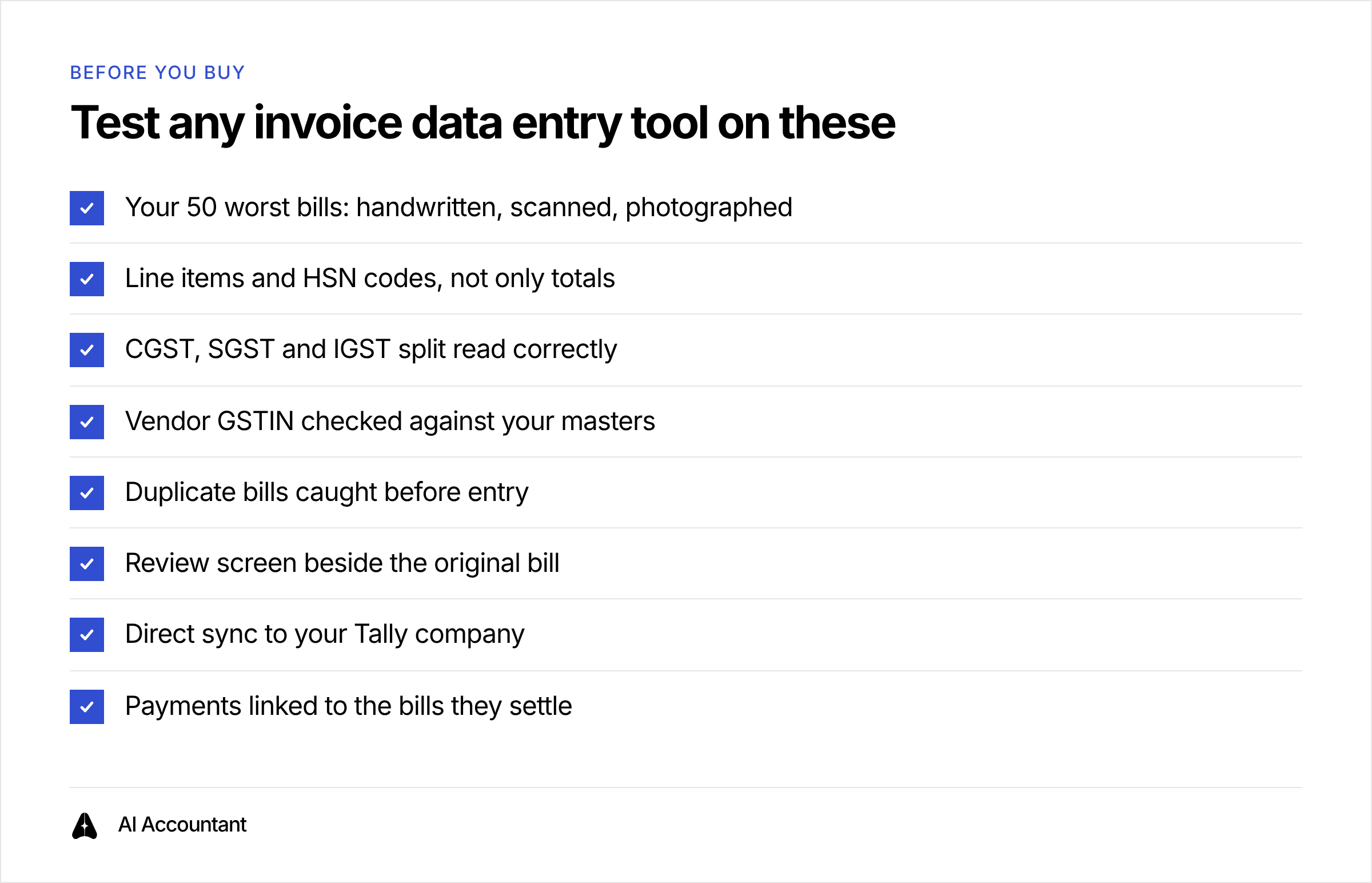
Every vendor shows its best demo bill. Bring your own. Pull 50 bills from last month, and make sure the pile includes your worst ones: handwritten bills from small suppliers, faded thermal prints, phone photos taken at an angle, multi-page bills with long item lists. Then check:
- Line items and HSN codes, not just the total. If you track stock or need item-wise GST, header-only extraction is not enough.
- The tax split. Does it read CGST, SGST and IGST correctly, and handle inter-state bills?
- Vendor matching. Does it compare the GSTIN and name with your vendor master, or create a new party every time the spelling changes?
- Duplicates. Upload the same bill twice. Does it stop you?
- Review screen. Can your accountant see the entry and the original side by side?
- Posting. Does the voucher land in your Tally company directly, with the right ledger, or do you get a file to import?
- Payment linking. When the bill is paid, does the payment settle that bill in Tally's bill-wise records?
- Who uses it. Can a site manager or owner send a bill from a phone without logging into anything?
Score each tool on how many of the 50 bills reached a correct, approved voucher without retyping. That one number tells you more than any accuracy claim.
OCR software or accounting automation: which do you need?
If you only need text pulled out of documents for a system your team has built, an OCR or document AI tool such as Nanonets or Rossum fits, and you will need developers to connect it. If your books are in a global cloud package, Dext or Zoho Books' own autoscans will do. If your books are in Tally and you want the bill to end up as a correct voucher, with the payment linked and GST reconciled, you need an accounting automation tool built for Tally.
For a deeper look at the OCR side, including how invoice OCR handles GST invoices, see our guide to the best OCR software for invoice processing in India.
Frequently asked questions
What is the best software for invoice data entry in India?
For a business that keeps its books in Tally, choose a tool that reads the bill, checks it against your vendor masters and posts an approved voucher to Tally. AI Accountant, Docs by Ira and Vyapar TaxOne all post to Tally; they differ on handwritten bills, payment linking and who they are built for. Global tools such as Nanonets, Dext and Rossum do not list Tally as an integration.
Can software read handwritten invoices?
Some can. AI Accountant supports handwritten bills, and Rossum says it reads handwriting. Tally's help page says Docs by Ira does not support handwritten documents, so test your own handwritten bills before you buy any tool.
Is OCR the same as invoice data entry automation?
No. OCR turns an image into text and fields. Data entry automation goes further: it maps the bill to a vendor and ledger, checks for duplicates and mismatches, and posts the entry to your accounting software after review.
Does Tally have its own invoice reading feature?
Yes. Docs by Ira converts invoices and PDF bank statements into TallyPrime transactions. It is sold in page packs, and in our August 2026 testing it needed TallyPrime Release 7.1 or later with an active TSS subscription.
How long does automated invoice entry take per bill?
It depends on the bill and on how much review your team does. Laundry Labs reports 1 to 1.5 minutes per PDF bill from upload to a reviewed Tally entry, and Sinnova Tech Engineering reports under 30 seconds to process a purchase bill, against 3 to 6 minutes when typed by hand.
Do I still need an accountant if I automate invoice entry?
Yes. The software does the reading and typing, but a person should approve each entry before it reaches the books. The accountant's time moves from data entry to review, exceptions and reconciliation.

Rohan Sinha is a fintech and growth leader building aiaccountant.com, focused on simplifying accounting and compliance for Indian businesses through automation. An IIT BHU alumnus, he brings hands-on experience across 0 to 1 product building, growth, and strategy in B2B SaaS and fintech.