-01%201.svg)
Key takeaways
- Tally integration AP automation cuts manual data entry dramatically, reduces posting errors, and shortens month end closes, often within the first month of rollout.
- Success depends on clean masters, reliable network access on port 9000, and clear mapping rules between your AP tool and Tally Prime.
- Start with a focused pilot, then scale, using best practices from the ultimate guide to Tally Prime automation and the step by step AP automation playbook.
- Use GST aware validation, vendor GSTIN as the primary identifier, and automated GSTR-2B reconciliation to boost compliance and input credit accuracy.
- AI Accountant offers end to end connectivity with Tally Prime, including intelligent extraction, ledger mapping, and real time dashboards tailored for Indian GST.
Why AP automation matters for Tally users
It is the 5th of the month, bills are piling up, and your team is chasing vendor names, GST splits, and ledger codes. Manual entry slows everyone down, errors creep in, and month end becomes a scramble. With Tally integration AP automation, bills flow in automatically, values validate against masters, and clean purchase vouchers post back to Tally, so your accountants can go home on time.
Outcome you can expect: teams processing 50 to 200 bills weekly report minutes instead of hours for posting, error rates under 2 percent, and month end closes shrinking from five days to two.
For a deeper tour, explore the ultimate guide to Tally Prime automation.
Understanding Tally integration AP automation
Core data flows
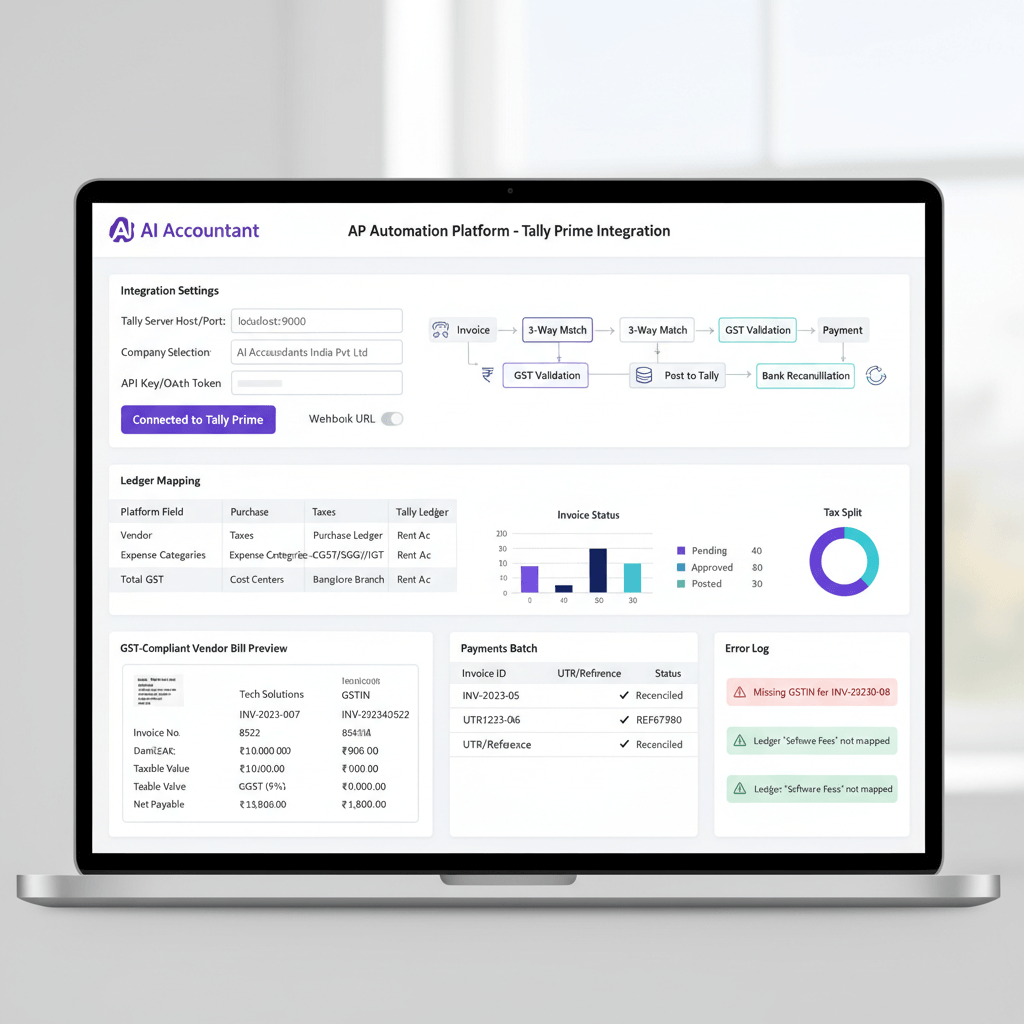
Invoices arrive from PDFs, Excel files, and scans. Your AP tool syncs vendors, ledgers, and tax configurations from Tally. After validation, purchase vouchers post back automatically. Exceptions get routed for review, not parked in spreadsheets.
Think ingest, validate, post, reconcile, repeat.
Key objects in play
- Vendor masters, the single source for names, addresses, and GSTINs
- Ledger accounts, the backbone of expense and tax coding
- GST ledgers for CGST, SGST, and IGST
- Purchase vouchers for bills, payment vouchers for settlements, with bill references for tracking
India specific realities
Most setups run Tally on premise, typically listening on port 9000 for XML over HTTP, often behind firewalls. Plan IP whitelisting or VPN from day one. For configuration patterns, see how others connect in the Vyapar TaxOne API walkthrough and this Tally Prime automation guide.
Technical overview, Tally Prime API for AP use cases
The API is simpler than it looks, and the architecture is well documented in Tally integration with AI Accountant.
How the API works
Tally exchanges XML messages over HTTP on port 9000 for create or modify operations, and supports ODBC reads for reports. Typical AP calls fetch vendors, ledgers, and taxes, then post purchase and payment vouchers, linking payments to open bills. Your AP tool manages mapping, so users just approve and post.
Security considerations
Use encrypted tunnels, adopt token based authentication, restrict to known IPs, and limit permissions in Tally for the API user. A quick checklist is outlined in the Vyapar API article.
Prerequisites checklist for Tally AP automation setup
Technical requirements
- Confirm your Tally Prime version supports the HTTP, XML server
- Enable the Tally server listener, confirm the port, usually 9000
- Provide static IP or VPN access, whitelist the AP tool IPs, and open firewall rules
Data preparation
- Deduplicate vendors, standardize names, confirm 15 character GSTINs
- Normalize ledger naming, verify tax ledgers for CGST, SGST, and IGST
Stakeholder alignment
- Accountant for rules and exceptions
- IT for network and security
- AP lead for process priorities and approval flows
For a structured rollout blueprint, compare notes with the AP automation implementation guide and this Tally focused overview.
Step by step guide, connect AP tool to Tally India
Step 1, prepare Tally Prime
Open configuration, enable the HTTP, XML server, set port 9000, and create a non admin API user. Backup your company before changes.
Step 2, validate master data
Scan vendor lists for duplicates, confirm GSTIN formats, and verify tax ledgers and expense ledgers align with your chart.
Step 3, configure AP tool settings
Enter the Tally host IP, the port, select the company, and add credentials. Test a simple read to confirm connectivity.
Step 4, initial master sync
Pull vendors, ledgers, and taxes into the AP tool. Review completeness and spot check a few records for accuracy.
Step 5, set up mapping rules
Define how vendors match, by exact name, GSTIN, or code. Map expense types to ledgers, and codify tax selection. For deeper patterns, reference ledger mapping automation for Tally and Zoho.
Step 6, test with sample bills
Upload 5 to 10 invoices across PDF, Excel, and scans. Validate extraction accuracy, vendor matching, and GST splits.
Step 7, post and verify in Tally
Send vouchers, then check Day Book, Purchase Register, tax reports, and vendor balances. Confirm bill references are present.
Step 8, handle exceptions
Enable retries, notify finance on failures, set rules for vendor mismatches, and maker checker approvals for large bills.
Step 9, go live
Schedule ingestion windows, lock approval SLAs, and monitor dashboards with error rates and time to post. For a parallel playbook, see this step by step AP automation guide and the implementation checklist.
Target workflow after integration
Automated bill processing
Invoices flow in automatically, vendors match intelligently, ledgers select by rule, and GST validates before posting.
Enhanced visibility
Dashboards show AP ageing, approvals, and due dates, while GSTR-2B reconciliation flags mismatches instantly.
Streamlined month end
Reconciliations complete faster, audit trails are built in, and reporting is a few clicks instead of hours.
See examples in this Tally automation explainer.
Common pitfalls and how to fix them
Duplicate vendors
Merge duplicates first, then sync. Use GSTIN as the single source identifier across systems.
GST posting errors
Validate tax ledgers for CGST, SGST, and IGST, and test interstate, intrastate, and RCM scenarios with sample bills.
Network connectivity issues
Open only port 9000, whitelist the AP tool IPs, and consider VPN for encrypted access.
Missing bill references
Enable bill wise details in Tally, enforce reference formats in the AP tool, and link payments to open bills.
Version compatibility
Test Tally updates in a sandbox, keep your AP tool current, and document known good configurations.
Hands on remedies are outlined in the Vyapar API notes and this Tally automation guide.
Choosing the right AP automation tool for Tally
Must have features
- Bi directional sync for masters and vouchers
- Robust purchase and payment posting, with clear error handling
- Audit logs, maker checker workflows, and configurable approvals
GST compliance capabilities
- GSTR-2B reconciliation and ITC checks
- HSN and UQC support, place of supply logic for IGST
- E way bill convenience features
Scalability and security
- Bulk processing for peak months
- Certifications like ISO 27001 or SOC 2, full encryption
- Granular permissions and immutable audit trails
Support and ROI
- Time to value within a month, measurable minutes per invoice
- Clear SLAs and responsive implementation support
Recommended tools for Tally AP automation
- AI Accountant, AI Accountant offers deep Tally integration, intelligent extraction, automatic GST reconciliation, and real time dashboards.
- Vyapar TaxOne, see its Tally connectivity patterns in this API walkthrough.
- Zoho Books, useful for hybrid setups where Tally remains the ledger of record.
- ClearTax, strong GST tooling with basic AP automation flows.
- Tally Prime native, solid for simple use cases when volumes are modest.
How AI Accountant streamlines Tally AP automation
Core integration features
Automatic extraction from PDFs, images, and Excel, intelligent vendor and ledger matching, bi directional master sync, and voucher posting with a complete audit trail.
GST and compliance
Automated monthly GSTR-2B reconciliation, HSN validation, ITC checks, and exception surfacing before filing, supported by rules described in this detailed guide.
Implementation timeline
Most teams go live in three to four weeks, week one for environment and masters, week two for connections and mapping, week three for testing, week four for production rollout.
Real world outcomes
SMEs processing 50 to 200 invoices weekly see processing drop from hours to minutes, errors under 2 percent, and finance teams shift focus from typing to analysis.
Case study, SME transformation with Tally AP automation
Before automation
A Pune based manufacturer processed 150 invoices weekly, three accountants typed full days, vendor name variations blocked reconciliation, and GSTR-2B mismatches appeared monthly.
After implementing AI Accountant
Posting completes in under an hour daily, vendor matching is automatic, GST reconciliation is real time, and the team focuses on cash flow and vendor terms.
Measurable impact
| Metric | Before manual process | After automation |
|---|---|---|
| Bill processing time | 6 hours daily | 45 minutes daily |
| Error rate | 10 to 15 percent | Under 2 percent |
| Month end close | 5 days | 2 days |
| GST reconciliation | 2 days monthly | 2 hours monthly |
| Staff overtime | 20 plus hours monthly | Near zero |
Reference results match guidance in the Tally automation guide.
Implementation timeline and checklist
Week 0 to 1, foundation
- Backup Tally, clean masters, document current AP, and define success metrics
Week 1 to 2, connection and configuration
- Enable API, set firewall rules, connect the AP tool, sync masters, and validate
Week 2 to 3, testing and refinement
- Run a pilot, tune extraction, refine mappings, train users, document edge cases
Week 3 to 4, production rollout
- Scale volume, monitor KPIs, fine tune, and execute an automated month end
Borrow steps from the Vyapar API approach, the AP automation guide, and this step by step reference.
Security and compliance considerations
Access controls
Adopt role based access in both systems, create a dedicated API user, enable maker checker for high value items, and review access quarterly.
Audit trails
Ensure every transaction is time stamped, user stamped, and versioned. Flag manual overrides and exceptions for audit readiness.
Data protection
Encrypt data in motion, protect GSTINs and payment data, backup regularly, and test restores. Process notes mirror the API best practices.
Measuring ROI and success
Key performance indicators
- Time to post from receipt to Tally entry
- Error and exception rates
- Cost per invoice
- Payment accuracy and timeliness
Calculating time savings
Record the manual baseline, then measure post go live. Teams often see 60 to 80 percent time reduction.
Strategic benefits
Better cash visibility, improved vendor terms, stronger GST compliance, and a finance team focused on analysis, not typing. See the implementation KPIs guide and this Tally playbook.
Advanced features and customizations
Workflow automation
Set multi level approvals by amount or vendor, route categories to the right approvers, and enable three way matching where POs exist.
Integration extensions
Connect procurement for PO matching, payment gateways for disbursements, and expense tools for full spend visibility.
Custom rules and AI learning
Train models on your vendor patterns, auto suggest coding by history, and add your own rules for unique scenarios.
Troubleshooting common issues
Connection problems
Confirm port 9000 is open, the Tally server is listening, IPs are whitelisted, and basic XML calls succeed in a test.
Data sync failures
Ensure the Tally company is open, permissions are correct, no locks exist, and review error messages line by line.
Posting errors
Check mandatory fields, master existence, GST calculations, dates, and fiscal year settings. Repost after corrections.
Future proofing your setup
Staying updated
Keep Tally and your AP tool current, test updates in sandbox, and document working configurations for quick rollback.
Scaling considerations
Design for increasing volumes, multi entity growth, and archiving from day one. Consider cloud connectivity for resilience.
Emerging technologies
Watch AI for extraction accuracy, blockchain for vendor verification, and real time payments for cash optimization. Adopt when proven, not just new.
Conclusion, taking the next step
Tally integration AP automation pairs the reliability of Tally Prime with modern, intelligent workflows. With a disciplined four week plan, you can reduce errors, accelerate processing, and strengthen GST compliance, without changing your core accounting system.
Start with a pilot, measure the wins, and scale confidently. Perfect is not the goal, consistent improvement is.
Want a practical walkthrough with your data? Book a no obligation session to see how AI Accountant connects to your Tally Prime and delivers measurable value right away.
FAQ
How do I validate that my Tally Prime is ready for API based AP automation?
Confirm the HTTP, XML server is enabled on port 9000, verify the company opens without errors, and create a dedicated API user with limited rights. Run a simple master fetch to confirm connectivity, guidance mirrors the steps in the Vyapar API article.
What is the quickest way for a CA to pilot AP automation without disrupting books?
Create a sandbox company in Tally, connect an AP tool like AI Accountant, process 10 to 20 invoices, and compare Day Book, Purchase Register, and GST reports. If results match, move to limited production with maker checker turned on.
How should I structure vendor identification, name versus GSTIN?
Use GSTIN as the primary key, keep a clean alias list for vendor names, and let the AP tool auto match on GSTIN first, then name. This reduces duplicates and reconciliation issues.
How do I map GST correctly for interstate and intrastate purchases?
Set rules for place of supply to select IGST for interstate and CGST, SGST for intrastate. Validate against tax ledgers in Tally, and test with sample bills. For deeper checks on ITC, see ITC eligibility validation in AP.
Can I post payment vouchers and link them to multiple bills via the API?
Yes, post payment vouchers with bill wise references and amounts allocated to each bill. Tally will maintain settlement tracking, including partial and multi bill payments.
What exception handling should I enable on day one?
Retries for transient failures, alerts for vendor mismatches, mandatory review for high value invoices, and quarantine for unknown GSTINs until a user confirms mapping.
How does an AI tool like AI Accountant improve ledger mapping accuracy?
By learning from historical postings, vendor patterns, and line descriptions, then suggesting ledgers automatically. The model improves over time and reduces manual corrections, as outlined in ledger mapping automation.
What KPIs should a CA track to prove ROI to management?
Time to post per invoice, exception rate, first pass yield, cost per invoice, and month end close duration. Baseline before automation, then measure after go live. Reference the KPI lists in the AP automation guide.
How do I ensure audit readiness when most entries are automated?
Enable immutable logs in the AP tool, store source documents with each voucher, and keep user stamps on every action. Regularly export exception and override reports for reviewers.
What network patterns work best for on premise Tally and a cloud AP tool?
Use a static IP or VPN, whitelist the tool IPs, restrict inbound to port 9000, and rotate tokens periodically. Test latency and throughput during peak posting windows.
How soon can a mid sized firm go live, and what resourcing is needed?
Most firms go live in three to four weeks with one accountant as process owner, one IT resource for firewall and VPN, and vendor support. AI Accountant typically completes configuration and testing within this window.
How does GSTR-2B reconciliation fit into the AP automation cycle?
Automate a monthly import of 2B, match supplier GSTINs and invoice numbers to your purchase register, then flag mismatches and ineligible ITC for review. Tools like AI Accountant integrate this step, see the automation guide for examples.