Quick answer
The best Excel to Tally software depends on what is in the sheet. For clean masters and vouchers, start with TallyPrime's own Excel import, which is part of TallyPrime from Release 4.0. For varied layouts, e-commerce reports or bank statements, the dedicated importers Indian accountants use are udiMagic, Quick2Tally, TallyConnect and Vyapar TaxOne (formerly Suvit), priced from about ₹4,000 a year. AI Accountant is a different kind of tool: it reads bank statements, purchase bills and sales invoice sheets, predicts the ledger and writes vouchers to Tally after you approve them.
Best Excel to Tally software compared
All six options below are sold and used in India. Prices are for a single user, exclude GST and come from each vendor's own page.
| Tool | What it imports from Excel | Price in India (single user) | Licence | Main limit |
|---|---|---|---|---|
| TallyPrime Excel import | Masters and vouchers, using sample files or your own mapping template | Part of TallyPrime, Release 4.0 and later | Your TallyPrime licence | Does not import bank transactions; you build each mapping yourself |
| udiMagic | Ledgers, stock items, cost centres and vouchers; masters created before vouchers | ₹7,200 to ₹18,000 a year | Subscription only; 60-day licences from ₹3,000 | No lifetime licence |
| Quick2Tally | Masters, most voucher types, bank statements, e-commerce reports, GSTR-2A and 2B data | ₹4,000 to ₹13,000 a year; lifetime ₹11,000 to ₹30,000 | Yearly or lifetime | The price page does not say what each plan includes |
| TallyConnect (Excel-Tally) | Ledger and item masters, sales, purchase, bank statements, receipts, payments, journals, payroll | ₹7,500 to ₹18,500 by version | Sold as pay once, with optional AMC of ₹3,500 a year | Features are split across many versions and add-ons |
| Vyapar TaxOne (formerly Suvit) | Bank statements, sales and purchase entries, item and ledger masters | ₹7,000 a year, shown as an offer on a ₹14,000 list price | Yearly, one unlimited plan | Online service; the price shown is an offer |
| AI Accountant | Bank statements, purchase bill data and sales invoices only | No published price list; pricing scales with volume | Quote from the vendor | Not a general converter: no journals, payroll or stock journals from Excel |
Sources, checked November 2026: TallyPrime, Release 4.0 notes and import FAQ. udiMagic, buy page. Quick2Tally, price page. TallyConnect, pricing page. Vyapar TaxOne, pricing page. AI Accountant, bookkeeping automation page.
What Excel to Tally software costs in India
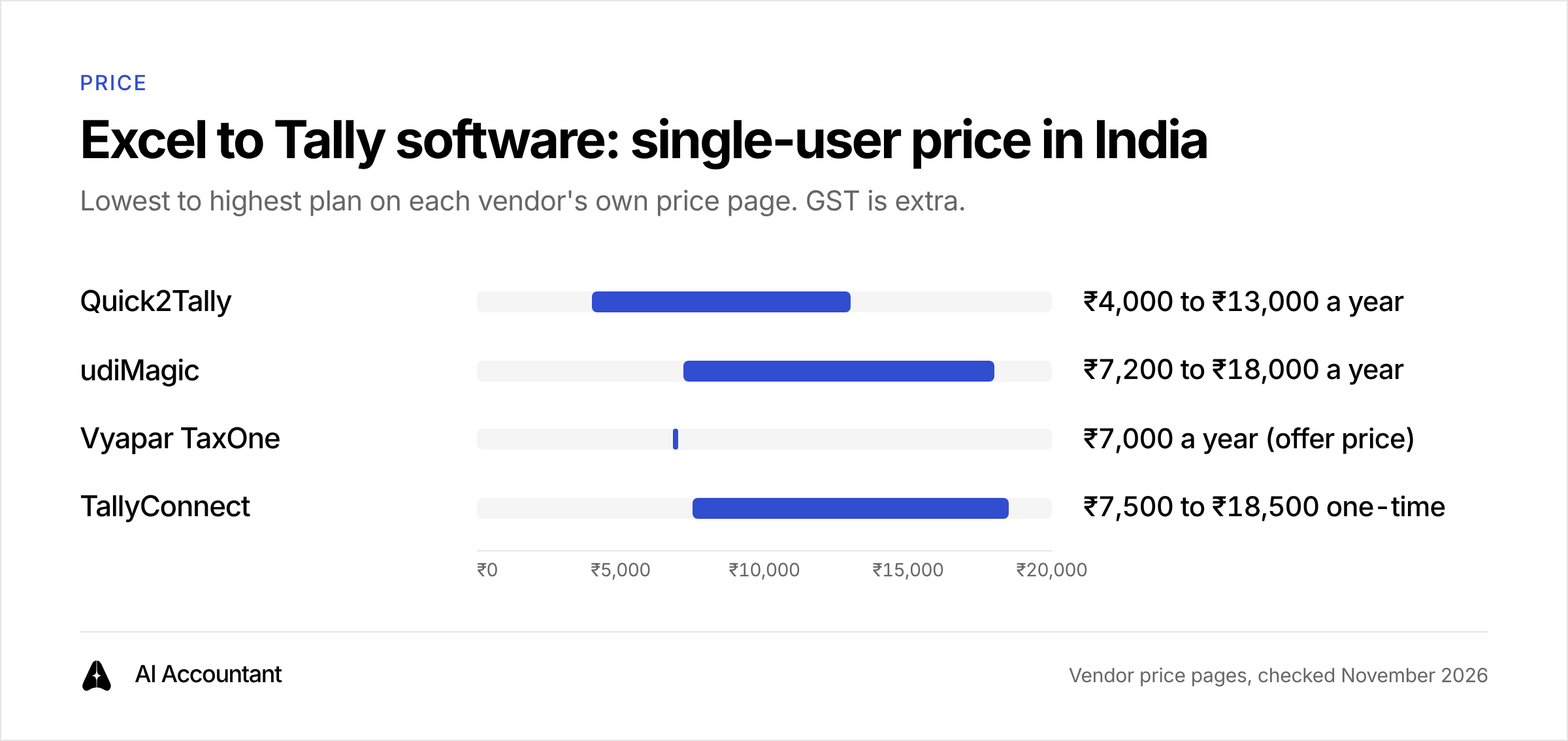
Three pricing models are on offer, and they are not directly comparable.
- Yearly subscription. udiMagic charges ₹7,200 a year for its Limited edition, ₹10,800 for Standard and ₹18,000 for Professional. Quick2Tally's yearly plans run from ₹4,000 (Basic) to ₹13,000 (Ultimate Plus). Vyapar TaxOne has one plan at ₹7,000 a year.
- Pay once. TallyConnect lists versions from ₹7,500 (Basic) to ₹18,500 (Ultimate), with ₹14,500 for Professional. Quick2Tally's lifetime licences run from ₹11,000 to ₹30,000, and its page says lifetime means 25 years.
- Included. TallyPrime's Excel import needs no separate purchase.
Multi-user licences cost more everywhere. udiMagic's five-user licences run from ₹12,900 to ₹36,000 a year. Budget for renewals too: a pay-once tool still has to keep pace with new Tally releases, which is what the AMC covers.
How Excel to Tally import works
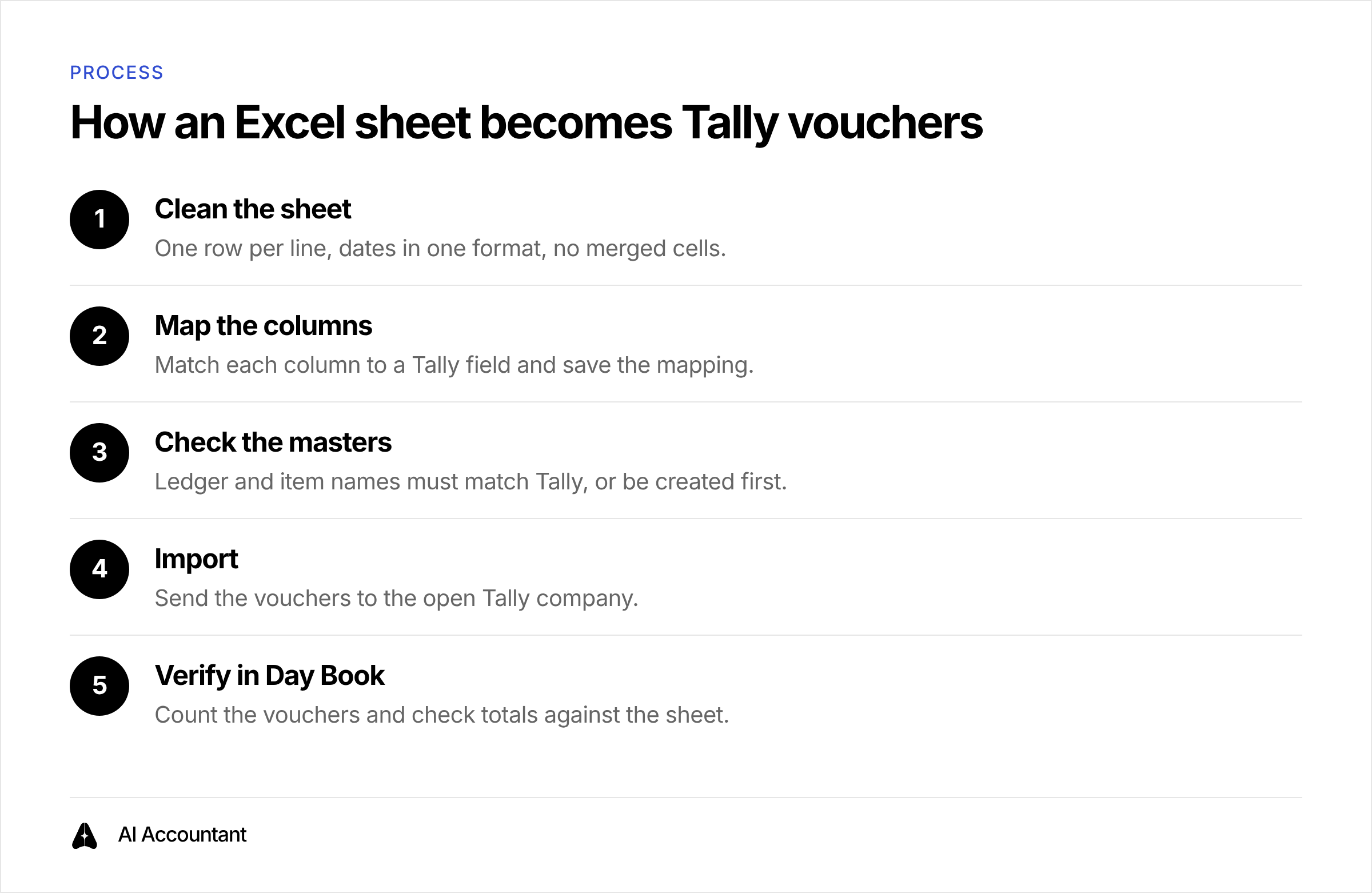
Every tool here does the same five things. The difference is how much of each step it does for you.
- Clean the sheet. One row per line, dates in one format, no merged cells.
- Map the columns. Match each column to a Tally field and save the mapping, so next month's file goes straight through.
- Check the masters. Ledger and item names must match Tally, or be created first.
- Import. Send the vouchers to the open Tally company.
- Verify in Day Book. Count the vouchers and check totals against the sheet.
Most failed imports trace back to steps 1 and 3: a date read in the wrong format, or a party name spelt differently from the ledger in Tally.
TallyPrime's own Excel import: try this first
Since Release 4.0, TallyPrime can import masters and transactions from Excel. You can fill Tally's sample files, or keep your own layout and build a mapping template that ties each column to a Tally field. Rows that fail can be recorded in an exceptions report while the rest are imported.
Know its limits before you rely on it. Tally's import FAQ says bank transactions cannot be imported through this feature; bank statements are imported separately, for reconciliation. CSV files must first be saved as .xls or .xlsx, and Google Sheets is not supported. Duplicates are detected only for fields that must be unique, such as master names, so importing the same voucher file twice can post the vouchers twice. Tally recommends 50,000 to 1 lakh transactions per import.
Choose this if you are on Release 4.0 or later, your sheets follow one stable layout, and someone on the team is comfortable building mapping templates.
udiMagic
udiMagic, from Shweta Softwares, is a desktop importer that loads bulk Excel data into TallyPrime: ledgers, stock items, cost centres and vouchers, with masters created before the vouchers that need them. Its own buyer's guide lists standard templates for the common voucher types, a Unique ID field that stops duplicates when a file is run again, scheduled runs and posting to Tally on a remote server.
It is sold only as a subscription. The Limited edition covers all masters and a limited set of vouchers; Standard covers all vouchers; Professional adds imports from SQL databases. A free trial is offered, and a 60-day licence costs ₹3,000 or ₹4,000 if you only need it for one migration.
Choose this if you import the same kinds of files every month, need protection against duplicates, or run Tally on a remote server.
Quick2Tally
Quick2Tally, from Tech Account Private Limited in Jaipur, covers the widest range of sources in this list. Its site lists item and ledger masters, sales and purchase with or without inventory, debit and credit notes, receipts, payments, journals, contra, orders, stock journals and payroll vouchers. It also takes Excel or PDF bank statements, scanned purchase bills, GSTR-2A and 2B data, and Amazon, Flipkart, Myntra and Meesho reports. It works with Tally.ERP 9 and TallyPrime, on single-user, multi-user or cloud Tally, and offers a one-month free trial.
The price page lists six plans but not what each one includes, so ask which plan covers your voucher types before paying.
Choose this if you want the lowest yearly entry price, sell on marketplaces, or are still on Tally.ERP 9.
TallyConnect (Excel-Tally)
TallyConnect, often written TallyConnects and also sold as Excel-Tally, is desktop software from Irriion Technologies. Its product page describes direct import with no XML step, a check of ledger and item masters before import, GST ledgers created from the GSTIN and place of supply, multiple bill references and cost centres, and one-click undo of the last import. There are ready templates for Amazon, Flipkart and other marketplaces, and for payroll.
The Professional version at ₹14,500 covers masters, sales, purchase, credit and debit notes, bank statements, receipts, payments and journals. Narrower needs cost less: the Bank version is ₹9,000 and single templates start at ₹5,500. One thing to confirm with the vendor: the site says pay once and use for life, while its pricing page heads the same list "Annual Packages with 1 Year Support".
Choose this if you prefer a one-time purchase and want to buy only the voucher types you use.
Vyapar TaxOne (formerly Suvit)
Vyapar TaxOne is an online service, not a desktop utility. Its single Unlimited Plan covers unlimited bank statements in Excel, PDF or scanned PDF, unlimited sales and purchase entries from Excel, PDF or image, and item and ledger masters. A 7-day free trial is available. The ₹7,000 price was shown as 50% off when we checked, so confirm what the renewal will cost.
Choose this if your work is mostly bank statements and sales or purchase registers, and an online tool suits your team.
Where AI Accountant fits
AI Accountant is a Tally-native accounting automation platform for Indian businesses and CA firms. It is not a general Excel to Tally converter, and we have kept it out of the ranking for that reason. If your sheet holds journals, payroll, stock journals or marketplace settlements, one of the importers above is the right tool.
It fits when the Excel file is one of three things:
- Bank statements. It reads statements in PDF (including password-protected files), Excel and CSV from 50+ Indian banks, then predicts the voucher type, the ledger and the bill a payment settles. You review and approve before anything syncs.
- Purchase bills. Bills arrive as PDFs, images or scans, and there is an Excel import option for bill data received in spreadsheets. Every bill goes to a review queue first.
- Sales invoices. You upload a sales Excel file, map the columns, fix flagged rows and create every invoice at once. The mapping can be saved as a template, and names that do not match Tally are flagged with close matches suggested.
The difference from a converter is the step before import. A converter posts what the sheet says, so someone must still type the ledger against every bank line. AI Accountant fills that in and asks you to check it. Vigor Solar Energy's three-person accounts team prepared 318 entries this way, 291 of them bank transactions, and reports 60 to 80% less time per entry.
Its limits: it does not replace Tally, which stays your books of record. The Tally connector needs Windows 10 or above. It does not make payments. Our site publishes no price list; pricing scales with company size and transaction volume, so you get a quote.
Choose this if your Excel work is mainly bank statements and bills, and the slow part is deciding ledgers, not moving data. For other Tally tools, see our list of Tally automation tools.
How to choose: what to test in a trial
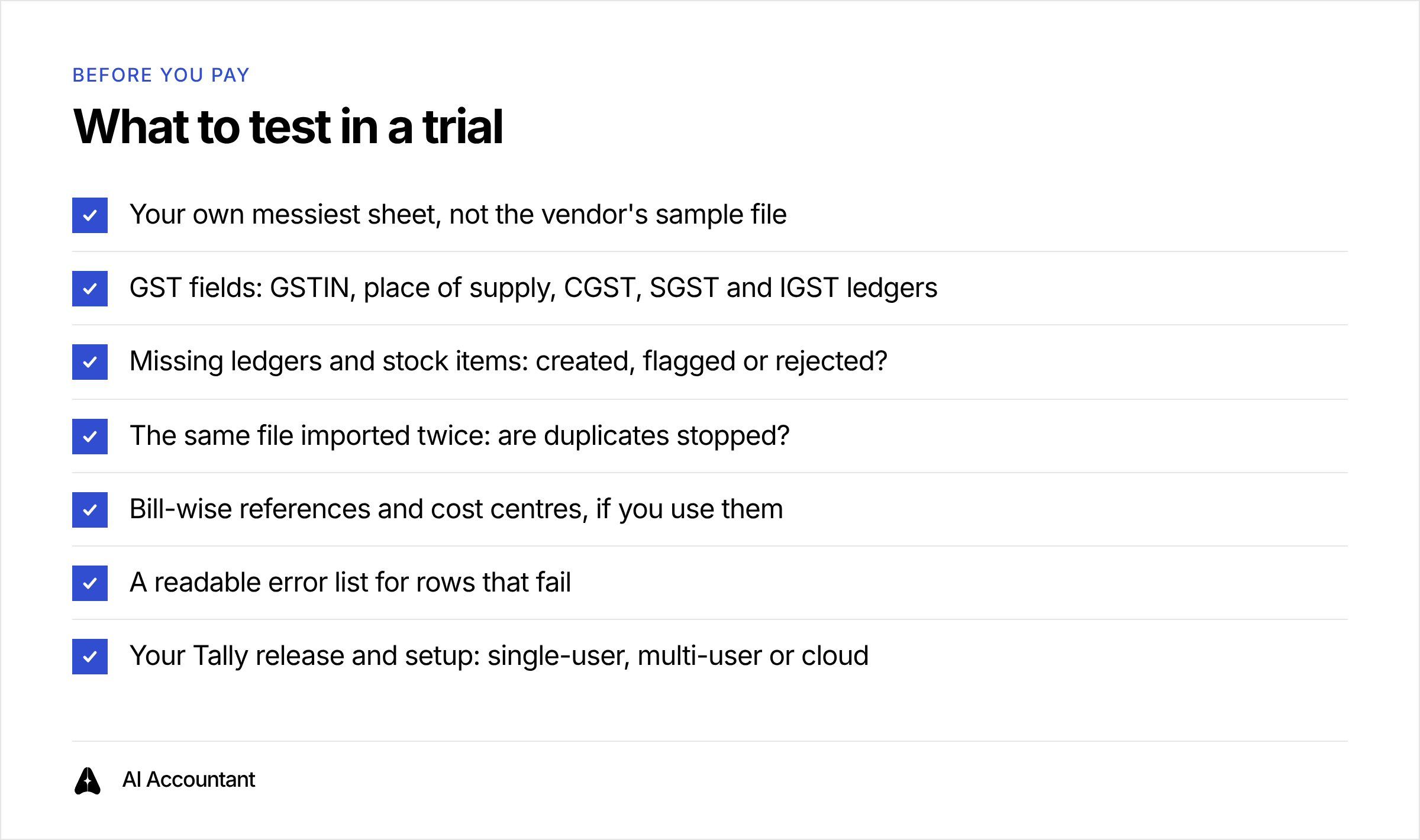
Each of the four importers offers a trial or demo. Use it on a backup copy of your company, and test these:
- Your own messiest sheet, not the vendor's sample file.
- GST fields: GSTIN, place of supply, and the CGST, SGST and IGST ledgers.
- Missing ledgers and stock items: are they created, flagged or rejected?
- The same file imported twice: are duplicates stopped?
- Bill-wise references and cost centres, if you use them.
- A readable error list for rows that fail.
- Your Tally release and setup: single-user, multi-user or cloud.
Questions people ask about Excel to Tally software
Can TallyPrime import data from Excel without any other software?
Yes. TallyPrime Release 4.0 and later can import masters and transactions from Excel, using Tally's sample files or your own mapping template. It does not import bank transactions this way, and CSV files must be saved as Excel files first.
Which is the best Excel to Tally software?
There is no single best one. TallyPrime's own import suits clean, stable sheets. udiMagic, Quick2Tally and TallyConnect suit varied layouts and many voucher types. Vyapar TaxOne and AI Accountant suit bank statements and bills, where the ledger has to be decided as well.
How much does Excel to Tally software cost in India?
Single-user yearly plans start at ₹4,000 with Quick2Tally, ₹7,000 with Vyapar TaxOne and ₹7,200 with udiMagic. TallyConnect is sold as a one-time purchase from ₹7,500. GST is extra, and multi-user licences cost more.
Is there free Excel to Tally software?
TallyPrime's Excel import comes with TallyPrime from Release 4.0, so it adds no cost if you already have a licence. The importers offer free trials or demos: one month with Quick2Tally and 7 days with Vyapar TaxOne.
Can I import a bank statement from Excel into Tally?
Not as vouchers through TallyPrime's Excel import; Tally imports bank statements only for reconciliation. To create payment and receipt vouchers from a statement you need a tool that does it, such as Quick2Tally, TallyConnect, Vyapar TaxOne or AI Accountant.
Will importing from Excel create duplicate entries in Tally?
It can. TallyPrime detects duplicates only for fields that must be unique, such as master names, so the same voucher file imported twice may post twice. Test this in a trial, and take a backup before any large import.

Rohan Sinha is a fintech and growth leader building aiaccountant.com, focused on simplifying accounting and compliance for Indian businesses through automation. An IIT BHU alumnus, he brings hands-on experience across 0 to 1 product building, growth, and strategy in B2B SaaS and fintech.