How much does accounts payable automation cost?
Accounts payable automation cost usually falls between about $2,000 and $50,000 a year for most organisations, and large enterprises with heavy invoice volumes can cross $100,000 a year, according to Quadient's 2026 estimate. Priced by usage, that works out to roughly $1 to $3 per invoice, or $20 to $100 per user per month, going by DOKKA's pricing guide. In India, manual processing costs about ₹800 to ₹1,300 per invoice, and AI-led automation brings that down to about ₹110 to ₹300.
AI Accountant does not publish a price list. Its pricing scales with your company, plans are per workspace, and you can start with a free trial. The details are in the section on AI Accountant below.
Accounts payable (AP) automation is software that reads supplier bills, routes them for approval, and posts them to your books. This guide covers what it costs by company size, how vendors price it, what named tools charge, the costs outside the subscription, and how to check whether it pays back.
Accounts payable automation cost by company size
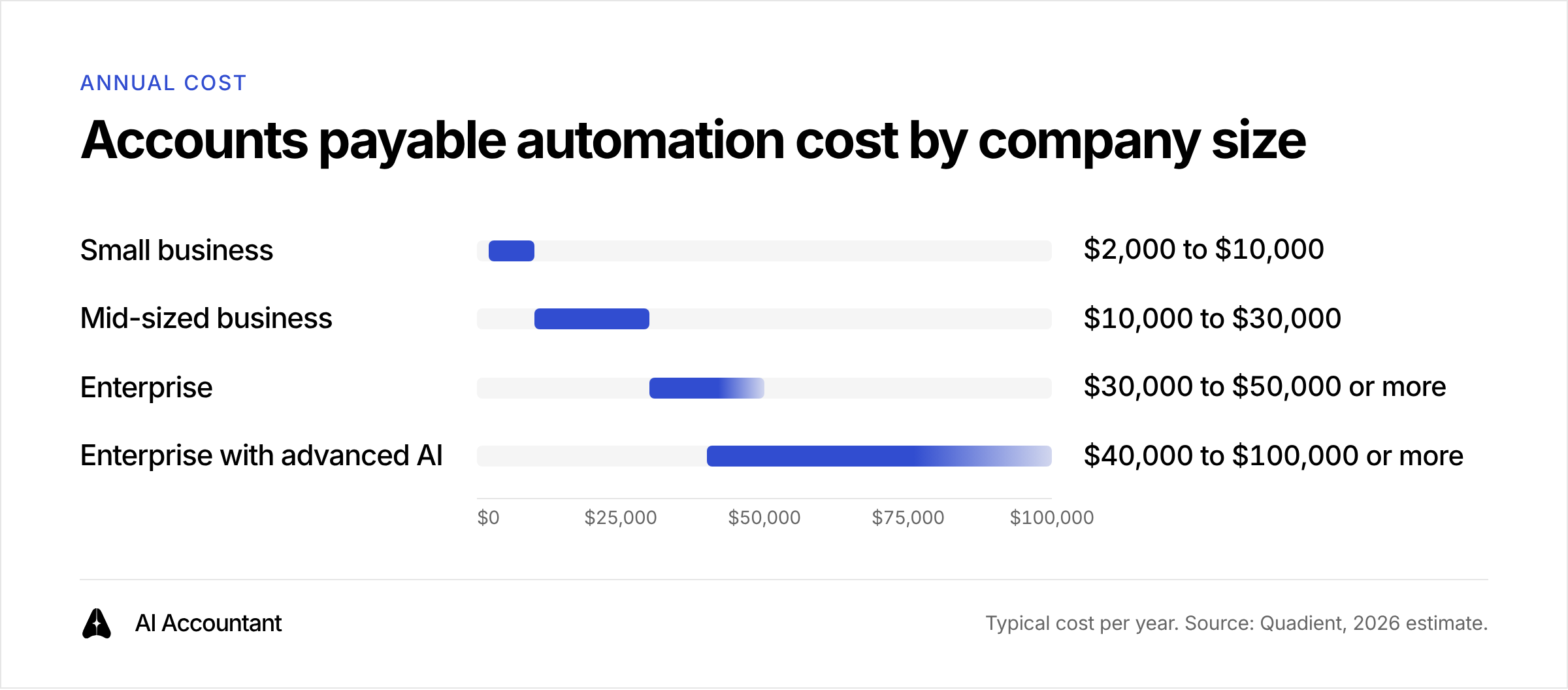
Quadient sorts buyers into four rough tiers. These are software prices for a year, and they leave out set-up work.
| Organisation type | Typical annual cost | What it usually covers |
|---|---|---|
| Small business | $2,000 to $10,000 | Invoice capture, text recognition, basic approvals |
| Mid-sized business | $10,000 to $30,000 | AI extraction, approval routing, a link to the accounting system |
| Enterprise | $30,000 to $50,000 or more | End-to-end workflow, audit trail, reporting |
| Enterprise with advanced AI | $40,000 to $100,000 or more | Exception handling, fraud checks, controls across several entities |
DOKKA sizes the budget by invoice volume instead, and its ranges run a little higher:
- Under 500 invoices a month: $5,000 to $12,000 a year.
- 500 to 2,000 invoices a month: $8,000 to $18,000 a year.
- 2,000 to 10,000 invoices a month: $15,000 to $40,000 a year.
- 10,000 to 30,000 invoices a month: $35,000 to $80,000 a year.
- More than 30,000 invoices a month: $80,000 to $250,000 or more a year.
Both sets of figures are in US dollars and describe tools sold mainly in the US market. Treat them as a guide to the shape of pricing, and ask for rupee quotes before you compare them with Indian tools.
How vendors price accounts payable automation
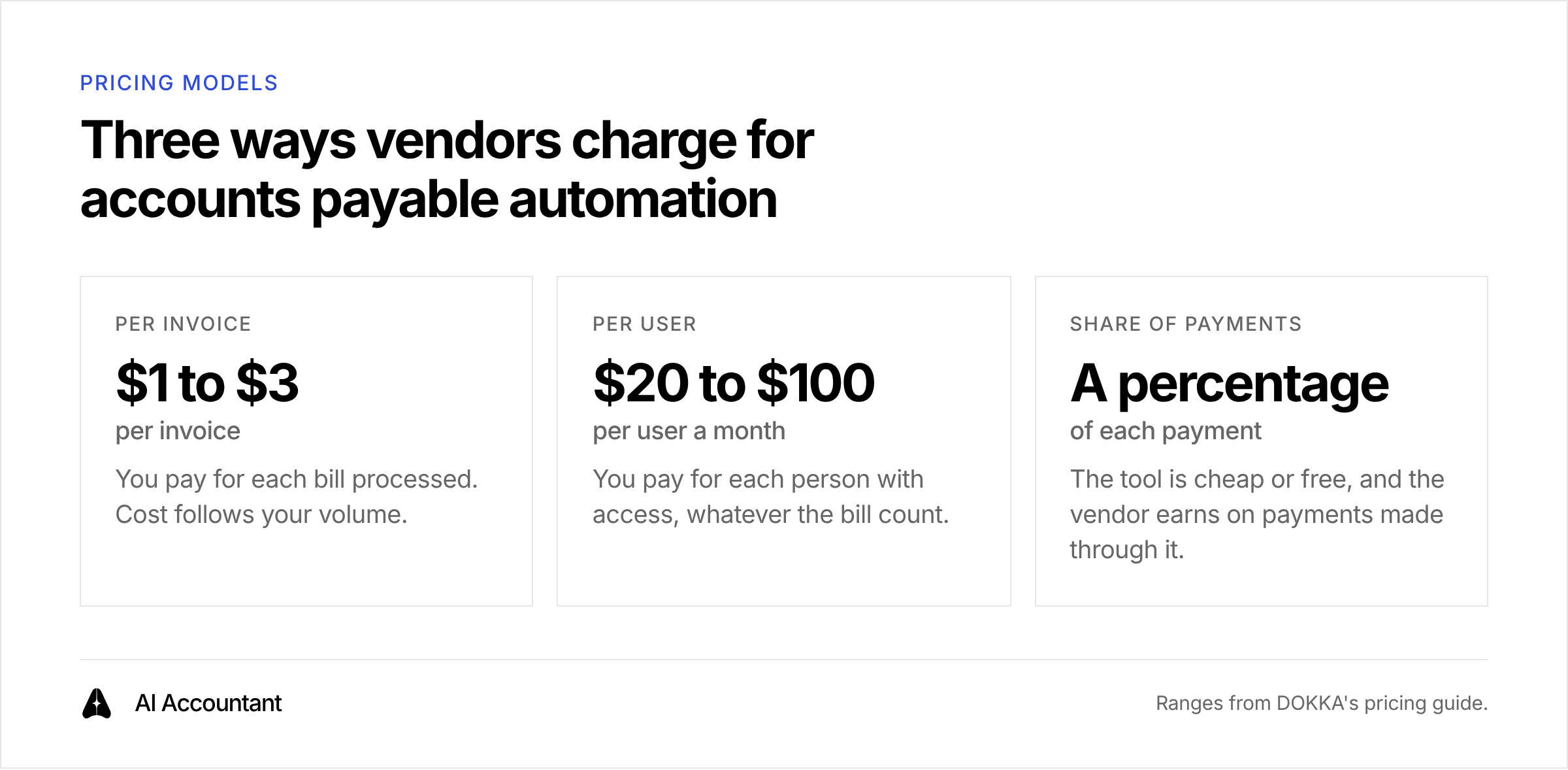
Most quotes are built from three pricing models. Many vendors lead with one and add the others on top, so ask which ones apply to you.
Per invoice
You pay a fee for every bill the software processes. DOKKA puts this at $1.50 to $3.00 per invoice for teams under 2,000 invoices a month, $1.00 to $2.00 for 2,000 to 10,000 a month, and $0.50 to $1.20 above 10,000 a month. The rate falls as volume rises, and the total bill still grows. Plans are often sold in volume bands, and unused invoices in a band are rarely refunded.
Per user
You pay a monthly fee for each person who logs in. DOKKA's ranges are $10 to $30 a month for an approver, $30 to $70 for an AP clerk, and $70 to $150 for an administrator. This model suits a small team with few approvers. It gets expensive when many managers each approve a handful of bills.
Percentage of payments
Some platforms also pay your suppliers, and charge a share of each payment. Tools that advertise free AP automation often earn their money this way, with fees of about 1 percent to 2.5 percent of the payment value. Your cost then rises with what you spend on suppliers, even when your team's workload stays the same.
What named tools charge, with AI Accountant beside them
Few vendors publish prices. The published figures below are the ones listed in DOKKA's platform comparison, which says it checked each vendor's pricing page in November 2026. Prices change, so confirm on the vendor's site.
| Tool | Published price | What to know |
|---|---|---|
| Melio | Free plan. Paid plans from $25 a month | Bill payment for very small businesses. Card payments and extra bank transfers carry a fee |
| Ramp | Free plan. Plus plan at $15 per user a month | Corporate cards, expenses, and AP in one platform |
| BILL | $49 to $89 per user a month, plus transaction fees | Published plans sync with QuickBooks and Xero. Larger accounting systems need a quote |
| Tipalti | From $99 a month as a platform fee | Cost grows with the number of payments, legal entities, modules, and payment methods |
| Precoro | From $499 a month, billed annually | Purchasing and AP together, with public pricing |
| Quadient AP | No price list. Quadient estimates $10,000 to $30,000 a year for mid-sized use | Implementation, integration, and change management can be extra |
| Coupa, Vic.ai | Custom pricing | Aimed at larger teams with high invoice volumes |
| AI Accountant | No price list. Quote based on your company, with a free trial | Reads vendor bills, including handwritten ones, and syncs approved entries to Tally. Plans are per workspace |
Most tools in this table connect to QuickBooks, Xero, NetSuite, or similar systems. AI Accountant is built for businesses that keep their books in Tally.
What pushes the price up or down
Seven things move a quote. Know your answer to each before you speak to a vendor.
- Invoice volume. This is the biggest driver. More bills mean a higher total and a lower rate per bill.
- Number of users. Approvers, clerks, and administrators are often priced differently.
- How deep the link to your books goes. A simple sync costs less than a two-way link with a large enterprise resource planning (ERP) system.
- Approval steps. One approver costs less than several levels with escalation rules.
- Matching. Checking a bill against the purchase order is standard. Three-way matching, which also checks the goods received note, usually costs more.
- Entities and currencies. Each extra company or currency tends to add to the price.
- Payments. If the tool also pays suppliers, expect a fee on top of the subscription.
AI features can move you into a higher tier too. Quadient notes that AI improves speed and accuracy, and that it often comes with a bigger subscription.
Costs outside the subscription
The quoted subscription is rarely the full first-year cost. Budget for these as well.
- Implementation. DOKKA puts set-up, integration, and training at 10 percent to 20 percent of the first-year subscription. Complex projects with custom integrations or heavy data migration can reach 30 percent to 50 percent.
- Billing before go-live. Some vendors start the monthly charge on the first day of onboarding. If set-up takes six weeks, you pay for six weeks you could not use.
- Premium support. Faster support is often a paid extra, adding 10 percent to 20 percent to the base price.
- Customisation. Work outside the standard product is usually billed by the hour, at $150 to $400 an hour in DOKKA's examples.
- Add-on modules. Some vendors sell capture, matching, and payments as separate modules. Ask what the base licence includes.
- Annual commitments. Paying for a year upfront often earns a discount of 10 percent to 20 percent. It also ties you to a tool you may outgrow.
Ask every vendor one question in writing: what is the total yearly cost of capture, matching, approvals, the link to our books, and payments, at our invoice volume and with our number of approvers?
What accounts payable automation costs in India
The dollar ranges above come from US-market tools. Indian businesses have a different starting point. Our guide to accounts payable automation in India puts manual processing at ₹800 to ₹1,300 per invoice, and about 11 days to process a bill. AI-led automation brings that to ₹110 to ₹300 per invoice and under three days.
The work is different as well. An Indian AP team checks the supplier's GSTIN, the HSN code, and the tax split on every bill, because a mismatch can block input tax credit. Many bills still arrive as paper, scans, or handwritten notes. Many small and mid-sized businesses keep their books in Tally. A tool priced for a US team on QuickBooks may not do any of this.
When you compare Indian tools, ask four things:
- Is the price per bill, per company, per user, or flat for the year?
- Is GST charged on top of the quoted price?
- Does the tool read handwritten and scanned bills, or only clean PDFs?
- Do approved entries sync to Tally, or does someone still import a file?
What AI Accountant costs
AI Accountant does not publish a price list on its website, so this guide cannot put a rupee figure beside the others. Here is what the site does say about pricing:
- Pricing scales with your company. You speak to the team and get a plan that fits your size.
- Plans are per workspace, not per account. You can upgrade one workspace and keep any number of free workspaces.
- There is a free trial. You can book a slot and have your Tally integration set up on the call. You can also sign up and connect Tally yourself, which takes about 15 minutes.
- Quotes are customised. In one published case study, the quotation covered accounts payable, bank statement reconciliation, and GST reconciliation against GSTR-2B.
- There is a 14-day money-back guarantee. The same case study states that it runs from the date of onboarding.
For accounts payable, AI Accountant does the following:
- Reads vendor bills uploaded in bulk as PDFs, images, scans, or Excel files, including handwritten bills, with about 95 percent extraction accuracy.
- Captures the vendor name, GSTIN, invoice number, dates, line items, HSN codes, taxes, and discounts.
- Flags mismatches against your vendor master, such as a wrong GSTIN, an outdated address, or a duplicate vendor.
- Extracts the GST treatment and supports TDS and reverse charge tagging.
- Sends every bill to a review queue, then syncs approved entries to Tally.
- Matches payments against open bills in Tally, and tracks what you owe and for how long.
You can see the product on the vendor bill matching page, or start a free trial and test it on your own bills.
How to check whether the cost pays back
Start with what a bill costs you today. Multiply the time your team spends on one bill by what that time costs, then add late fees and the time spent fixing errors. Research cited by DOKKA puts the average cost of processing one invoice at $9.84, against $2.65 for the best-run teams. Quadient quotes $10 to $15 for manual processing.
Then run this sum:
- Take your current cost per bill and subtract the cost per bill you expect after automation.
- Multiply by the number of bills you process each month.
- Multiply by the months the tool will be live in the first year.
- Subtract the full yearly cost of the tool, including set-up.
The result is your first-year saving. DOKKA reports that most teams recover the cost within six to 18 months, and that the sums rarely work below about 100 invoices a month.
Here is the same thinking in rupees. In a case study on our site, a retailer with offices in three cities was processing about 9,000 purchase bills a month. Manual entry took about 10 minutes a bill, and review after automation was estimated at two minutes. Eight minutes saved on 9,000 bills is 1,200 hours a month. The retailer put the cost of one accounts payable employee at ₹20,000 a month, so the estimated saving came to more than ₹20,000 a month. These are estimates worked out during a product demo, not measured results after a year of use.
Smaller teams can run the same sum. Count the minutes per bill, the bills per month, and what an hour of your accountant's time costs. If the saving is smaller than the quote, negotiate, pick a cheaper tool, or stay manual for now.
A checklist before you ask for a quote
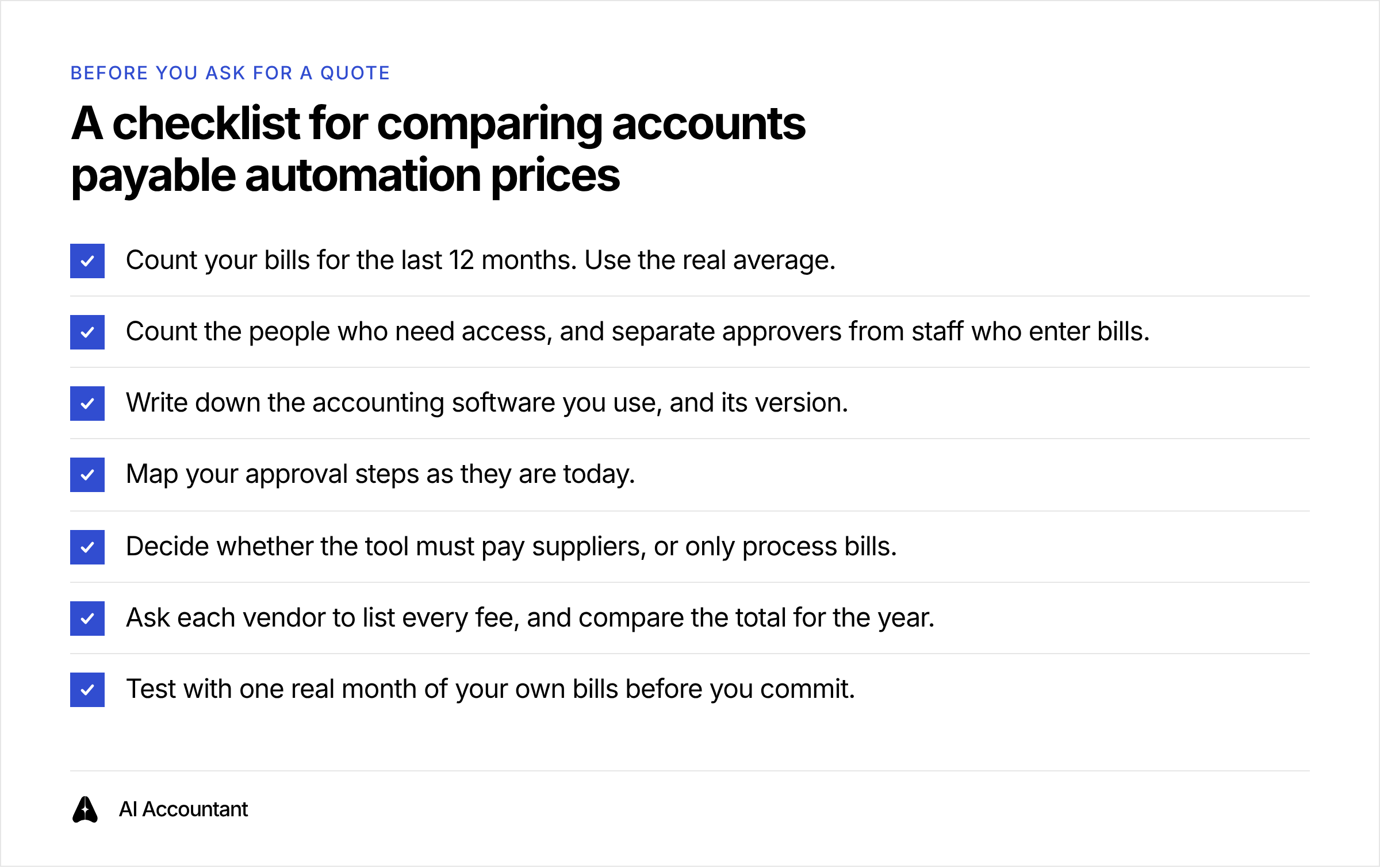
- Count your bills for the last 12 months. Use the real average, and leave projections out.
- Count the people who need access, and separate approvers from the staff who enter bills.
- Write down the accounting software you use, and its version.
- Map your approval steps as they are today.
- Decide whether you need the tool to pay suppliers, or only to process bills.
- Ask each vendor to list every fee, and compare the total cost for the year.
- Test with one real month of your own bills before you commit.
FAQ
How much does accounts payable automation cost per invoice?
DOKKA puts automated processing at about $1 to $3 per invoice, depending on volume. Quadient quotes $2 to $5 per invoice with automation, against $10 to $15 for manual work. In India, our own guide puts AI-led processing at about ₹110 to ₹300 per invoice, against ₹800 to ₹1,300 for manual processing.
How much does accounts payable automation cost for a small business?
Quadient estimates $2,000 to $10,000 a year for a small business, which usually covers invoice capture and basic approvals. DOKKA suggests $5,000 to $12,000 a year for teams under 500 invoices a month. A few tools, such as Melio and Ramp, have free plans with limits.
Does the price include implementation?
Often it does not. Many vendors quote the yearly subscription separately from onboarding, integration, and training. DOKKA puts these at 10 percent to 20 percent of the first-year subscription for a typical project. Ask for an itemised quote.
Is free accounts payable automation software worth using?
It can be, for a very small team. DOKKA's view is that free tools work below about 50 invoices a month with one approver. Check how the vendor earns money. Some free tools charge a percentage of every payment you make through them.
What does AI Accountant cost?
AI Accountant does not publish a price list. Its website says pricing scales with your company and that plans are per workspace. You can start with a free trial, and a published case study mentions a customised quotation and a 14-day money-back guarantee from the date of onboarding.
How long does accounts payable automation take to pay for itself?
DOKKA reports six to 18 months for most teams, with mid-sized companies averaging about 12 months. Payback is faster when invoice volume is high and the work was manual before. It is slower when set-up drags on, or when the tool is larger than the team needs.
Does accounts payable automation work with Tally?
Some tools do. AI Accountant connects to Tally, syncs your vendor masters and ledgers, and posts approved bills back to Tally. It works with TallyPrime 6.0 and later. Most of the US-market tools in this guide are built for QuickBooks, Xero, or NetSuite.

Rohan Sinha is a fintech and growth leader building aiaccountant.com, focused on simplifying accounting and compliance for Indian businesses through automation. An IIT BHU alumnus, he brings hands-on experience across 0 to 1 product building, growth, and strategy in B2B SaaS and fintech.