-01%201.svg)
Key takeaways
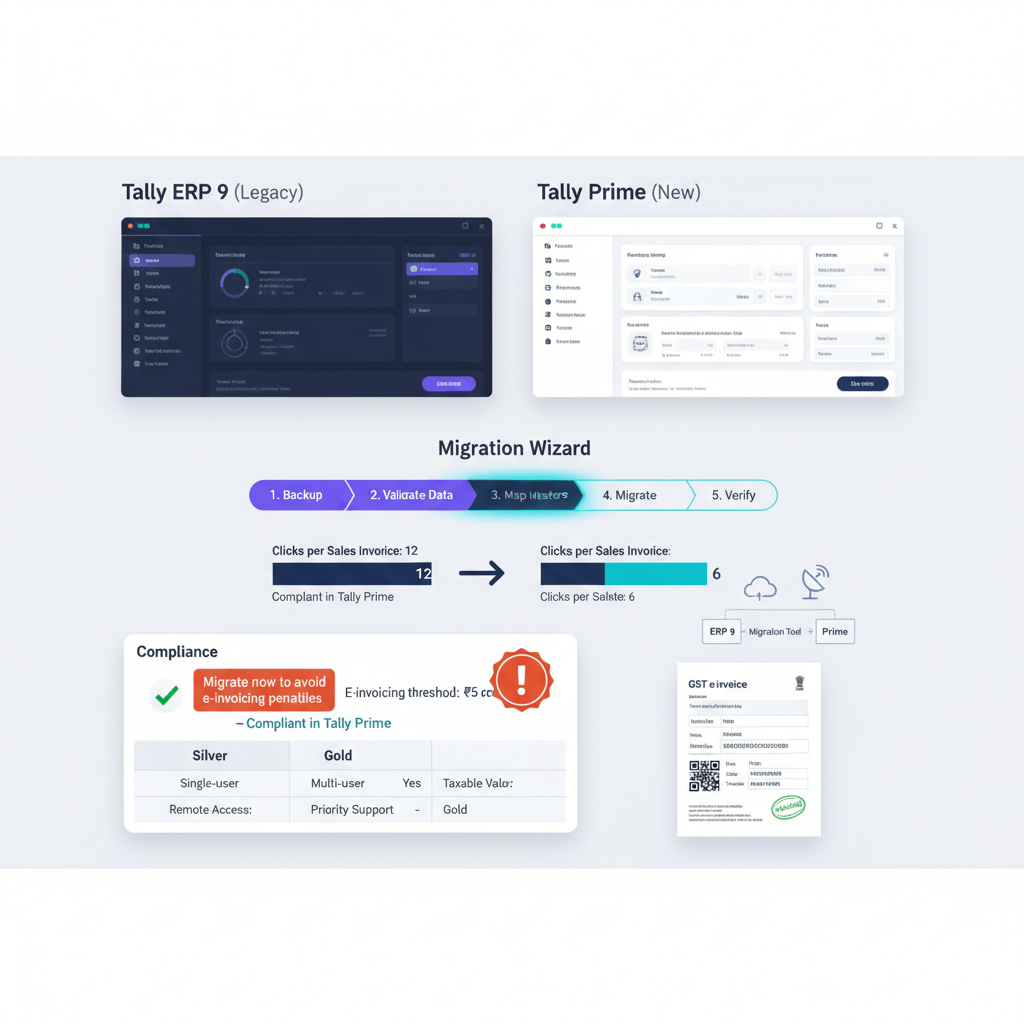
- Tally ERP 9 end-of-support status. ERP 9 is a legacy product, with no new features since 2020, exposing users to Windows 11 compatibility issues and patch-based e-invoice workarounds. Prime delivers ongoing updates, GST features, and native compliance including built-in GSTR-2B reconciliation tools.
- ₹5 crore e-invoicing threshold makes migration urgent. Since 1 August 2023, invoices issued without IRN where e-invoicing applies are invalid under Rule 48, inviting Section 122 penalties. Prime generates IRN during voucher entry, ERP 9 relies on manual JSON exports that fail at volume.
- Edition choice is about concurrency. Silver is single-user, Gold enables multi-user, browser access via TallyPrime Server, and concurrent voucher/report workflows. If two people need simultaneous access, Gold becomes mandatory.
- Migration takes 60–90 minutes for SMEs. The bundled utility converts ERP 9 data quickly, while 20–30% of TDL customizations need syntax updates for Prime’s object model.
- Measured productivity gains. Prime reduces navigation clicks by 40%, speeds reports, enables multi-tasking, and secures data via role-based controls, cutting month-end close by 25–35%.
Tally Prime vs Tally ERP 9: the short answer
If you need e-invoicing, remote access, or process 300+ transactions monthly, Prime repays the migration in one quarter. Prime replaces ERP 9 with GoTo navigation, multi-tab workflows, connected e-invoicing and e-way bill tools, and granular security. Treat migration as a compliance requirement, not a cosmetic upgrade.
Common mistake: running ERP 9 above ₹5 crore turnover, issuing B2B invoices without IRN, which are technically non-compliant under Rule 48.
| Comparison factor | Tally ERP 9 | Tally Prime |
|---|---|---|
| Support status | Legacy, no new features | Active development, quarterly updates |
| Navigation | Menu drilling, single window | GoTo search, multi-tab interface |
| E-invoicing | Manual JSON export-import | Native IRN generation during entry |
| Remote access | VPN, port forwarding | Browser-based via TallyPrime Server |
| Report speed | 15–20s on large sets | 3–5s with indexing |
| User controls | Basic passwords | Role-based access, audit trail |
| GSTR-2B match | Manual Excel comparison | Built-in reconciliation workspace |
| Windows support | Windows 7+ (32-bit) | Windows 10/11 (64-bit optimized) |
What changes day-to-day when you move to Prime
Prime removes navigation friction, adds multi-tasking, and streamlines connected compliance. The outcome is shorter closes, faster reviews, and fewer errors.
GoTo navigation eliminates menu memory
Alt+G opens a universal search across vouchers, reports, and masters. Type “gst 3b” for GSTR-3B, “payment” for vouchers, or “led” for ledger creation, and jump instantly—no nested menus. For 500 vouchers monthly, this saves ~20 minutes daily on navigation alone.
Multi-tasking keeps context during workflows
Prime’s multi-tab interface lets you verify ledgers, open reports, and continue entries without closing current work. Typical purchase entry with reference checks saves 2–3 minutes per complex voucher, reclaiming 90–120 minutes daily for teams processing 50+ vouchers.
Browser-based access without VPN complexity
With Gold and TallyPrime Server, teams work from Chrome or Edge, no client installs or port forwarding. Remote access performance matches LAN-like responsiveness, eliminating the ERP 9 lag and IT troubleshooting overhead.
Security roles that actually work
Prime gives fine-grained permissions: restrict voucher alteration, limit export rights, and confine access by period. The audit trail records who changed what, when, and how—cutting unauthorized edits and data leakage significantly.
Compliance pressure has changed — why ERP 9 keeps you exposed
With the ₹5 crore e-invoicing threshold, ERP 9’s manual JSON routines make invoices invalid if IRN isn’t generated, jeopardizing ITC and inviting penalties. Prime is built for connected compliance—IRN, QR codes, and e-way bills flow from the voucher screen.
E-invoicing is now mandatory at ₹5 crore
CBIC Notification No. 10/2023 lowered applicability to ₹5 crore. Without IRN, invoices lack legal validity, customers can refuse payment, and penalties under Section 122 apply. Prime generates IRN in real-time with error handling and status tracking.
ITC now depends on GSTR-2B visibility
Section 16(2)(aa) ties ITC eligibility to GSTR-2B. Prime’s GSTR-2B reconciliation workspace matches books with portal data, flags mismatches, and accelerates vendor follow-ups. ERP 9 forces manual Excel work, taking hours per month.
Manual e-way bill generation multiplies errors
ERP 9 requires separate uploads, risking mismatched values. Prime’s integrated flow pulls voucher data, validates PINs, and generates Part-A directly, reducing detention risks and penalties when shipments are audited.
Missing IRN makes invoices legally invalid
Rule 48(4) declares invoices without IRN invalid where applicable. Prime embeds IRN and QR codes at voucher posting, with retry logic on timeouts and duplicate checks, keeping statutory trails audit-ready.
Practical tip: Run daily IRN exception reports in Prime, and fix failures before EOD to safeguard ITC for customers, and your collections.
Tally Prime Silver vs Gold — which one, in plain English
Silver: true single-user on one machine. Gold: multi-user concurrency, browser access, and server architecture. If two people ever need parallel access, choose Gold—period.
Silver edition — true single-user scenarios
Owner-operated shops, one-accountant outfits, or micro businesses that work sequentially. The instant a reviewer needs a report while data entry continues, Silver becomes a bottleneck.
Gold edition — the multi-user reality
Unlimited concurrent users on LAN/VM, simultaneous data entry and reviews, and centralized data via TallyPrime Server. The ₹36,000 premium pays back through avoided wait times and faster closes.
Remote access and virtualization differences
Silver is local-only. Gold supports RDS, Citrix, VMware, and Azure Virtual Desktop, enabling WFH and thin-client setups with browser access for branches and auditors.
Decision framework for edition selection
- Pick Silver only if you have one user, one location, no remote needs, and static plans.
- Pick Gold if you have 2+ users, remote work, branches, audit reviews, or growth plans within 12 months.
Migration with minimal downtime — the 90-minute plan
Use the bundled migration utility. Back up ERP 9, convert data, validate key reports, and train the team on GoTo plus multi-tab workflows. Most SMEs finish on a Friday evening and go live on Monday.
Pre-migration checklist — 30 minutes
- Backup ERP 9 to a separate drive and test restore.
- List active TDLs, ODBC pulls, and integrations.
- Export Trial Balance, last month’s GSTR-3B, and Stock Summary for validation.
- Ensure 5GB free disk space.
Running the migration utility — 45 minutes
Install Prime in a separate folder, open Data Migration Tool, point to ERP 9 data, and convert company files. Typical 50,000-voucher sets convert in ~20 minutes, preserving masters and vouchers while rebuilding indexes.
Post-migration validation — 15 minutes
- Match Trial Balance totals to the paisa.
- Verify GSTR-3B tax liability matches ERP 9.
- Spot-check vouchers and opening balances.
- Run Display → Statistics to confirm voucher counts.
TDL compatibility and updates
Plan syntax revisions for menus, collections, and print layouts. Budget 4–8 hours per 10 customizations or coordinate with your developer for typical conversion fees.
Training quick-wins for Monday morning
Teach Alt+G searches, multi-tab usage, approvals, browser login for Gold, and e-invoice generation during voucher save. These cover 80% of daily changes.
Tip: share a cheat sheet of common searches and shortcuts like F2 for dates, Alt+C for create, and F12 for configurations, complemented by the full keyboard shortcuts.
Frequently asked questions about migration
What if migration fails midway through conversion?
ERP 9 data remains intact. Run Rewrite on ERP 9, free up disk space, and temporarily disable antivirus, then retry. Review the migration log and convert companies in smaller batches if needed.
Can we migrate selective date ranges instead of full data?
No, migrate complete histories for audit trails. If you need lean files, split old periods into an archive company after migration.
How do we handle multi-company migration with inter-company transactions?
Migrate related companies in one session, then verify group reporting and inter-company reconciliations in Prime’s consolidated views.
Set up for scale — automation once you’re on Prime
After 2–4 weeks on Prime, add automation to shrink bill entry, bank coding, and GSTR-2B matching from 49 hours to ~5 hours monthly. Keep Tally Prime as the source of truth—integrations should push processed entries into Tally, not create parallel systems.
Standardize masters before automation
Normalize vendor names, tax ledgers, cost centers, and bank ledgers. This one-time cleanup drives AI accuracy, avoids duplicates, and makes reconciliations reliable.
Bill automation eliminates invoice entry
AI reads PDFs, predicts ledgers, splits taxes, and posts purchase vouchers into Prime with high accuracy. Review exceptions, not every line item—saving ~25 hours per 500 invoices monthly.
Bank reconciliation through statement ingestion
Bank statement automation ingests PDFs or Excel, classifies payees from descriptions, and posts entries to Prime. 300 lines shrink from ~4 hours to ~20 minutes of review, learning continuously from corrections.
GSTR-2B reconciliation at scale
Automated matching tags “Matched,” “Missing,” and “Mismatch,” including CN/DN and RCM edge cases, and posts adjustments to Tally via journals. Accuracy and speed outpace manual Excel routines.
ROI calculation for Prime plus automation
Typical SME saves ₹22,000 monthly on processing time alone, paying back Gold plus automation in 6–8 months. Faster closes, fewer errors, and cleaner audits are additive benefits.
Frequently asked questions about automation
Which automation tools integrate directly with Tally Prime?
Platforms like AI Accountant, Suvit, and Botkeeper push data via Prime’s XML/JSON exchange. Prioritize India-GST-native tools, direct sync, and high-accuracy parsing across varied Indian invoices.
When should we add automation after Prime migration?
Deploy after 2–4 weeks, once teams stabilize and masters are cleaned. Early adoption compounds change management; late adoption prolongs manual work.
Does automation replace the accounting team?
No, it elevates the team. Accountants shift from entry to exception handling, vendor ops, and analytics, delivering 3–4x output with higher accuracy.
Related reading
- GST Input Tax Credit Rules: ITC Eligibility, Restrictions, and GSTR-2B Reconciliation
- E-invoicing Applicability and Implementation: Threshold, Process, and Penalties
- Month-End Closing Checklist for Finance Teams: From Voucher Freeze to MIS Reports
FAQ
As a CA, how do I justify migrating a ₹5–10 crore client from ERP 9 to Prime purely on compliance grounds?
E-invoicing at ₹5 crore makes IRN mandatory; ERP 9’s JSON-export workflow is error-prone at volume, risking invalid invoices under Rule 48 and penalties under Section 122. Prime generates IRN during voucher save, stores QR codes, and logs IRP responses, creating an auditable trail. For clients issuing 200+ B2B invoices monthly, this shift is a compliance necessity, not an optional upgrade.
What is the fastest checklist to audit Prime e-invoice readiness during onboarding, and can AI Accountant assist?
Verify GSTIN configuration, e-invoice credentials per GSTIN, sales voucher enablement, and IRN status reports. Test a sandbox invoice, confirm QR and IRN fields are captured, then run exception reports. AI Accountant can simulate invoice ingestion and validate IRN capture end-to-end, providing a readiness score and remediation steps.
How should a CA structure a phased migration when multiple branches run ERP 9 with inter-company entries?
Migrate HQ first, validate group reporting, then process branches in quick succession over a weekend. Use Prime’s group company consolidation to revalidate inter-company balances. AI Accountant can reconcile inter-branch ledgers post-migration, highlighting mismatches for targeted fixes.
What’s the recommended approach for clients with heavy TDL custom prints, and what pitfalls should I flag?
Audit all TDLs, prioritize invoice print formats, and plan syntax updates for Prime’s print engine. Pitfalls include coordinate shifts, collection references, and conditional sections. Build a test pack of common scenarios, then iterate with the developer. When timelines are tight, adopt Prime’s standard GST templates temporarily and reintroduce custom prints later.
How do I quantify Prime’s productivity ROI for CFO sign-off, with an example using AI Accountant?
Model time savings: navigation cuts ~20 minutes/day, multi-tasking ~90 minutes/day for 50+ vouchers, reports 3–5x faster. Add automation with AI Accountant—25 hours monthly saved on invoice entry, ~3.5 hours on bank coding, ~6 hours on 2B reconciliation. At ₹500/hour, annual savings exceed ₹2.5–3 lakh, covering Gold plus automation in under 8 months.
For GST audits, how does Prime’s audit trail compare to ERP 9, and when do I suggest Edit Log?
Prime adds detailed user logs and role permissions; ERP 9 is limited. Recommend Tally Prime Edit Log when immutable change histories are required, or fraud risk is high. Edit Log records before-after values per change and cannot be disabled, improving evidentiary strength during audits.
What is the correct process to handle invoices issued in ERP 9 without IRN during a transition month?
Identify invoices within the IRN generation window and bulk-generate IRN in Prime. For out-of-window documents, document compliance limitations and issue corrective credit notes where feasible. File GSTR-1 consistently, then tighten Prime workflows to prevent future gaps. AI Accountant can compile an exception register mapping invoices to IRN status for follow-up.
How can a CA standardize masters across multiple Prime companies for clean automation, and where does AI Accountant plug in?
Create a master template company, export standardized ledgers, stock items, tax configurations, and import into each entity. Align vendor naming, GST ledgers, and cost centers. AI Accountant validates master consistency, flags duplicates like “ABC Ltd” vs “ABC Limited,” and suggests merges before automation goes live.
What’s the best way to deploy Prime Gold for remote audits without disrupting client operations?
Host data centrally, enable TallyPrime Server, and assign read-only roles for auditors. Use browser access for session isolation, and schedule audit windows to avoid peak entry times. AI Accountant can pre-package MIS and compliance dashboards, reducing interactive queries during fieldwork.
Can Prime handle multi-GSTIN configurations in one entity, and how should a CA test credential segregation?
Yes, Prime stores credentials per GSTIN. Create test invoices across each GSTIN, verify IRN generation using the correct credentials, and review IRN logs by GSTIN. Ensure e-way bills link correctly when applicable. AI Accountant can stress-test with simulated invoices across GSTINs, generating a credential segregation report.
For CFO reporting, how do I build MIS in Prime quickly, and can AI Accountant automate distribution?
Use Prime’s built-in dashboards for cash, AR aging, inventory turnover, and profitability. Configure comparison periods and exception reports. AI Accountant can schedule weekly MIS packs, emailing leadership with charts and highlights, fed by Tally’s data via secure APIs.
What’s the guideline for ARM/Windows 11 devices in finance teams, and how do we avoid ERP 9 instability?
Deploy Prime on Windows 11, which runs stably on x64 and ARM via emulation. Avoid ERP 9 on ARM, where crashes and compatibility warnings appear. Test large reports for performance, allocate 8GB RAM minimum, and keep data local to reduce network latency during audits.

Rohan Sinha is a fintech and growth leader building aiaccountant.com, focused on simplifying accounting and compliance for Indian businesses through automation. An IIT BHU alumnus, he brings hands-on experience across 0 to 1 product building, growth, and strategy in B2B SaaS and fintech.