-01%201.svg)
Key takeaways
- To match GSTR-1 and GSTR-3B, compare taxable values and tax amounts by rate slab (0%, 5%, 12%, 18%, 28%) and tax type (IGST, CGST, SGST) each month, documenting every difference with a clear reason code.
- Not all mismatches signal errors. Timing differences, amendments, and end of month credit notes commonly explain variances, provided the audit trail is complete and consistent.
- Since January 2022, mismatches can be treated as self-assessed tax. Strong reconciliation reduces the risk of DRC-01B intimations, recovery actions, and GSTIN suspension.
- Structure your reconciliation with a repeatable workflow: rate wise breakup, section to table mapping, ledger tie-outs, and a variance action log. This prevents year-end surprises and builds reviewer confidence.
- Automation eliminates manual entry errors, links invoices to credit notes, handles amendments, and generates audit-ready reports. AI Accountant's GST reconciliation module detects outward tax variances by rate and table automatically, cutting hours of monthly effort to minutes.
GSTR-1 and GSTR-3B Reconciliation: What's New in 2026
Until March 2025, the Form DRC-01B mechanism for flagging differences between GSTR-1 and GSTR-3B was largely informational, with taxpayers receiving intimations but limited enforcement. From April 2025 onward, the GST portal now auto-blocks GSTR-1 filing for the subsequent period if the taxpayer fails to respond to a DRC-01B notice within 7 days. This means unresolved variances no longer just attract scrutiny; they halt your compliance cycle entirely.
The operational shift is significant. Finance teams must now reconcile outward supplies before the 11th of every month (the GSTR-1 due date), not after. Previously, many firms ran reconciliation between the 11th and 20th. That window has effectively closed for anyone with pending DRC-01B intimations. The workflow is now: close books, reconcile, resolve variances, then file.
Who does this hit hardest? Businesses with monthly turnover above ₹5 crore face the strictest auto-matching logic on the portal. However, even firms in the ₹1.5 crore to ₹5 crore range now see more frequent intimations due to tighter threshold tolerances applied by GSTN since January 2026. If you rely on Tally or similar ERPs without automated return-to-return matching, the risk is compounded by manual delays.
The cost of inaction is concrete: interest at 18% per annum on underpaid amounts, penalties of 10% of the difference (minimum ₹10,000), and blocked filings that cascade into late fee accumulation. At annual return filing (GSTR-9), any cumulative shortage must be settled with interest, as clarified in GSTN advisory on DRC-01B compliance.
What to do now:
- Run a reconciliation for every open month before your next GSTR-1 filing date.
- Check your GST portal dashboard for any pending DRC-01B intimations and respond within 7 days.
- Set up continuous reconciliation rather than month-end sprints. Firms using automated bookkeeping workflows report catching variances within 48 hours of transaction entry, well before filing deadlines.
Why matching GSTR-1 and GSTR-3B outward supplies matters for compliance
Think of GSTR-1 as the detailed outward supply statement and GSTR-3B as the liability summary. When they diverge, flags go up. The risk is not theoretical. Differences can invite recovery without prior notice under Section 79, or trigger Form DRC-01B intimations requiring response within 7 days.
From January 1, 2021, supplies declared in GSTR-1 must match the summary total in GSTR-3B monthly, or the GSTIN may be suspended. If GSTR-3B reports lower tax than GSTR-1, underpayment results in interest at 18% per annum and potential penalties of 10% of the underpaid amount (subject to a minimum of ₹10,000).
Perfect matches are not always possible. Explained variances are almost always acceptable. The secret is documentation, consistency, and timing discipline.
This perspective is reinforced by independent coverage and practitioner guides. For context, see Economic Times coverage on recovery for outward supply differences and the CBIC circular on self-assessed tax treatment.
Understanding GSTR-1 vs GSTR-3B structure for outward supplies
GSTR-1 lists invoice level details by customer type, location, and rate. This includes B2B, B2C, exports, SEZ, amendments, and credit or debit notes. GSTR-3B summarizes outward liability in Table 3.1(a) for regular taxable supplies, 3.1(b) for zero-rated supplies, and 3.1(c) for nil, exempt, and non-GST supplies.
Mapping is critical. B2B and B2C taxable values flow to 3.1(a). Exports without payment go to 3.1(b). Exports with payment involve value in 3.1(b) and tax in 3.1(a).
Filing timelines introduce timing differences. Monthly GSTR-1 is due on the 11th, GSTR-3B on the 20th. Misalignment naturally creates variances if data is late.
For a structured mapping approach, refer to the GST portal return filing guidelines.
Essential data and documents needed before starting reconciliation
- GSTR-1 summary download with rate wise breakups and section wise totals, preferably in JSON or Excel.
- Filed GSTR-3B with Table 3.1(a), 3.1(b), 3.1(c) values for IGST, CGST, SGST, and cess.
- ERP sales register with tax rate, place of supply, and document type. Pull standard GST reports if you use Tally.
- Output tax ledgers for IGST, CGST, SGST, plus sales revenue ledgers for ledger tie-outs.
- Amendments register with original period references and reasons.
- Credit and debit note register with invoice linkage, rate, and place of supply checks.
Having all documents ready before starting prevents mid-process delays and incomplete reconciliation.
Step-by-step process to match GSTR-1 and GSTR-3B monthly
Step 1: Align periods and cut-offs
Confirm the period under review. Verify if all period invoices are in GSTR-1. Tag late entries that slipped into the next month as timing variances. Keep your method consistent, whether by invoice date or entry date.
Step 2: Reconcile by rate slab and tax type
Break GSTR-1 into 0 percent, 5 percent, 12 percent, 18 percent, 28 percent slabs. Match against GSTR-3B Table 3.1(a). Separate intrastate CGST plus SGST from interstate IGST. Match taxable values first, then tax. Document rounding separately.
Step 3: Map GSTR-1 sections to GSTR-3B tables
Add B2B and B2C taxable supplies to tie to 3.1(a). Map zero-rated exports to 3.1(b). Map nil, exempt, non-GST to 3.1(c). Exports with payment split value and tax across 3.1(b) and 3.1(a).
Step 4: Detect and document outward tax variance
Set up side by side comparisons in Excel. Compute differences by category. Use thresholds to highlight items. Record the reason for each variance: timing, amendment, credit note, or classification. Clear notes prevent future disputes.
Pro tip: categorize variances as timing or permanent. Timing reverses next period. Permanent needs amendment or correction.
Step 5: Perform ledger checks
Tie the reconciled IGST, CGST, SGST to output tax ledgers. Reconcile sales ledgers to taxable values. Scan for journal entries that did not flow to returns. Ledger tie-outs are the final guardrail before filing.
Common causes of variance between returns and how to fix them
Classification errors
Incorrect place of supply creates IGST versus CGST plus SGST mismatches. Fix via amendment in the next GSTR-1. Misclassifying B2B as B2C causes detail level differences. Audit your customer master regularly.
Data completeness issues
Missing invoices, duplicates, or wrong tax rates distort both taxable values and taxes. Trace back to the sales register and correct through amendments.
Timing differences
Late reporting, advances recorded in GSTR-3B before invoicing in GSTR-1, and inconsistent period cut-offs drive recurring variances. Define strict cut-offs and maintain an advances register.
Tax treatment confusion
RCM supplies do not appear in GSTR-1 but affect GSTR-3B. Keep them separate. Exports or SEZ supplies without LUT require different treatment from those with LUT. Verify LUT status per transaction.
Rounding and credit note timing
Invoice level rounding versus aggregate rounding creates small variances. Document them. Credit notes near month-end often fall into the next month's GSTR-3B. Track issue date and effect date distinctly.
How to resolve amendments in GSTR-1 and GSTR-3B matching
List all amendments in the current period's GSTR-1. Record original period, amendment month, value and tax impact, and the reason. Ensure the tax impact appears in the same month's GSTR-3B. Update ERP records so books and returns align.
Practical amendment example
If April had ₹5 lakh at 18 percent, and June corrects it to ₹4.5 lakh, June GSTR-1 shows minus ₹50,000 taxable and minus ₹9,000 tax. June GSTR-3B reduces accordingly. April remains unchanged. Keep amendments separate from current period transactions in your reconciliation.
Preventing future amendment issues
Build checks before filing GSTR-1. Review high value invoices. Verify tax rates and place of supply. Maintain a year round amendments log. Keep master data current.
Handling credit notes and debit notes in reconciliation
Credit notes reduce liability and must link to the correct original invoice, rate, and place of supply. Reconcile GSTR-1 Table 9B to GSTR-3B Table 3.1(a) reductions. Track issuance versus effect to manage month-end cut-offs.
Credit note tracking example
A ₹50,000 post-sale discount at 18 percent reduces tax by ₹9,000. GSTR-1 shows a linked credit note. GSTR-3B reduces taxable and tax in 3.1(a). If the credit note posts in the next period, your reconciliation must explain the timing difference.
Best practices for credit note management
- Maintain a credit note register with invoice linkage and reasons.
- Cut off issuance in time for GSTR-3B. Avoid cross period complexity.
- Ensure ERP linkage flows through returns. Reduce manual mapping.
- Review trends. Frequent notes may signal pricing or quality issues.
Building a comprehensive monthly reconciliation report
Report structure and components
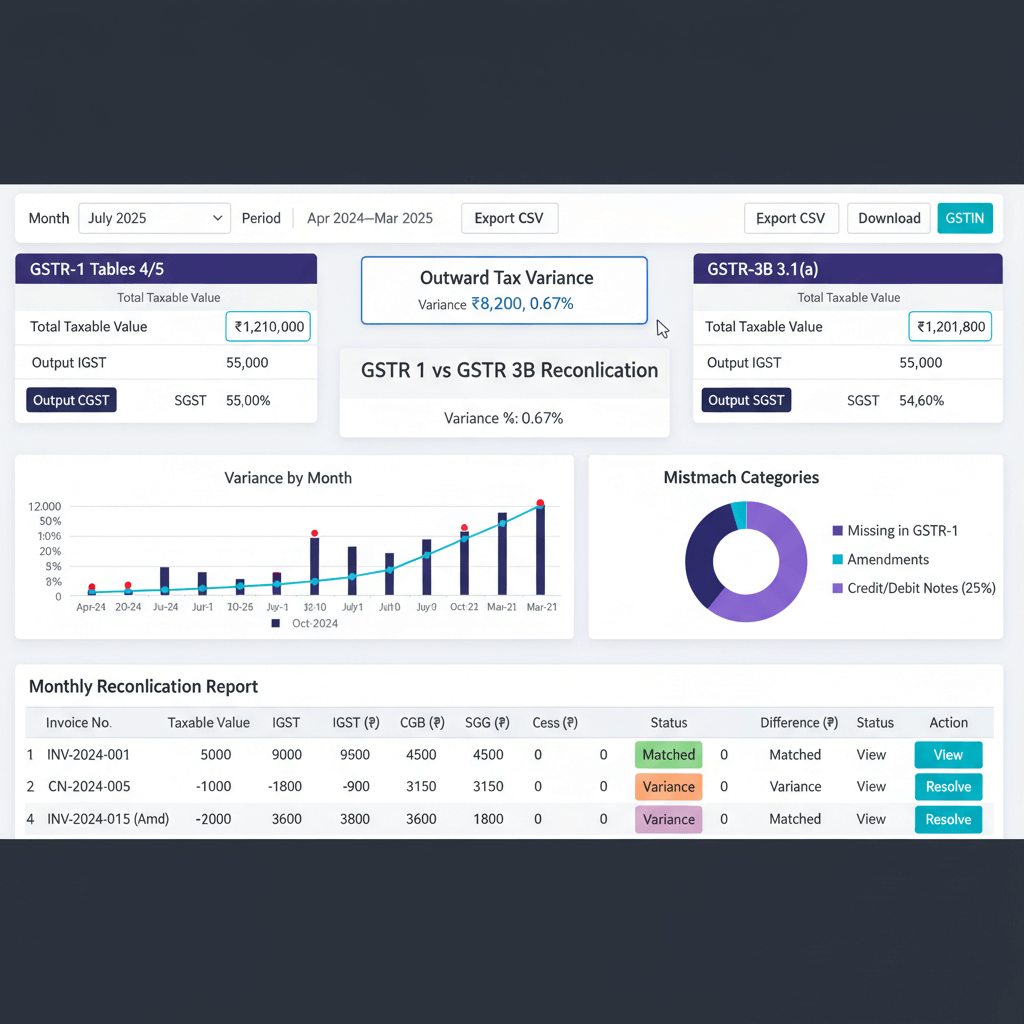
Open with an executive summary. Show GSTR-1 versus GSTR-3B totals and variance percentages. Break variances into timing, amendments, credit notes, classification, and rounding. Include schedules per category. End with action items and owners.
Sample reconciliation report template
- Summary dashboard: totals by table and rate, amount and percentage variances.
- Variance analysis: grouped by root cause with invoice level details.
- Action log: corrections needed, responsible owners, due dates.
- Ledger reconciliation: output tax and sales ledgers tie-outs.
- Approval section: preparer, reviewer, sign-offs, and special notes.
Making your report audit ready
Reference downloads and ERP extracts. Keep version control. Compare trends period over period. Present clearly. Good formatting, consistent terminology, and complete schedules build confidence.
At annual return filing in Form GSTR-9, a reconciliation of outward supplies is mandatory across all months. Any shortages in tax paid must be settled with interest. Monthly reports that follow this template make GSTR-9 preparation significantly faster.
Implementing controls and best practices for accurate matching
Maker checker implementation
Separate preparation and review. Define roles. Use checklists to enforce consistency.
Period cut-off management
Decide a clear cut-off. Review transactions near cut-off carefully. Configure ERP controls to prevent backdated entries without approval.
Documentation standards
Maintain three registers: amendments, credit notes, and variance log. Use consistent file naming and archive everything digitally.
Pre-filing reviews
Pre check rate wise and place of supply patterns before filing GSTR-1. Verify high value invoices. Run a preliminary reconciliation before filing GSTR-3B. This is especially critical now that the GST portal can block subsequent GSTR-1 filings if DRC-01B intimations remain unresolved.
Excel tips and formulas for faster GST reconciliation
Pivot tables for quick analysis
Build pivots by rate, place of supply, and document type. Use slicers for quick filtering. Refresh monthly with the same structure.
VLOOKUP and XLOOKUP for matching
Use VLOOKUP or XLOOKUP to match invoices across GSTR-1 and ERP. Create helper keys like invoice number plus date to avoid false matches.
Conditional formatting for variance highlighting
Highlight variances above amount and percentage thresholds. Use color scales and icons to prioritize investigations quickly.
Reusable templates and checklists
Standardize a master workbook. Add dropdowns for variance reasons. Include a checklist tab to avoid misses during busy cycles.
Automation through macros and Power Query
Record macros for repeatable formatting. Use Power Query to import and transform portal files. Add error checks for duplicates or missing data. These steps convert hours of manual work into minutes of structured review.
Where GST automation and software tools help
Top accounting automation tools for GST reconciliation
- AI Accountant: AI Accountant integrates with Tally, auto ingests GSTR-1 and GSTR-3B, detects outward tax variances by rate and table, links amendments and credit notes to original invoices, and generates monthly reconciliation reports with audit trails.
- QuickBooks: built in GST features cover tax calculation and returns. Reconciliation between returns often needs manual steps or add ons.
- Xero: GST reporting and compliance features are available. Deep GSTR-1 to GSTR-3B variance analysis is limited.
- Zoho Books: comprehensive GST suite with filing. Detailed variance analysis may require manual work or connectors.
- Tally Prime: strong GST reports and local support. Cross return reconciliation remains largely manual.
Key benefits of automation
- Eliminates manual entry errors by reading data from source.
- Pattern detection for duplicates and unusual classifications.
- Enables continuous reconciliation, not just month end sprints.
- Creates complete audit trails automatically.
Integration with ERP systems
Modern tools sync master data and transactions with Tally, SAP, and others. Two way sync keeps books and compliance aligned.
Advanced analytics and insights
Trend and predictive analytics flag emerging issues. Dashboards show instant compliance status. For broader industry context, see this Economic Times coverage on GST evasion trends and the ICAI guidance on GST annual return reconciliation.
Conclusion
Monthly reconciliation is manageable with a disciplined workflow, good data, and crisp documentation. Detect variances early. Separate timing from permanent issues. Handle amendments and credit notes with tight linkage. Make ledger tie-outs a habit.
Use Excel smartly. Consider automation where the volume justifies it. Remember, explained variances are acceptable.
Adopt these practices, build reusable templates, and your next audit season will be calm, not chaotic.
FAQ
As a CA, how do I reconcile GSTR-1 vs GSTR-3B for outward supplies when filing deadlines differ within the same month?
Start with a rate wise and tax type breakup, then map GSTR-1 B2B plus B2C to Table 3.1(a), zero rated to 3.1(b), nil or exempt to 3.1(c). Tag invoices reported after cut-off as timing differences and maintain a timing variance schedule that reverses next month. With DRC-01B now blocking subsequent filings if unresolved, completing this reconciliation before the 11th (GSTR-1 due date) is essential (2026 update).
What working papers should I maintain to defend outward tax variance during departmental scrutiny?
Keep a reconciliation workbook with: summary dashboard, variance analysis by cause, invoice level timing schedule, amendments log, credit note register, ledger tie-outs, and an action log. Attach GSTR-1 and GSTR-3B extracts, ERP sales register, and approvals. Consistent documentation across months builds a defensible audit trail.
Is there a materiality threshold for differences between GSTR-1 and GSTR-3B that the department informally accepts?
No official threshold exists. Any unexplained difference can draw attention and trigger a DRC-01B intimation requiring response within 7 days. Follow an internal materiality rule (for example ₹1,000 or 1 percent) for investigation priority, but explain every variance in the report.
How do I reconcile credit notes that are issued on the last day of the month but impact GSTR-3B in the next period?
Maintain a credit note register with issue date and effect date, linking each note to the original invoice and rate. In the current month, classify as timing variance. In the next month, reflect the liability reduction in 3.1(a). The key is ensuring both months' reconciliation reports explain the cross-period movement clearly.
What happens if GSTR-1 shows higher tax liability than what I reported in GSTR-3B?
You will receive an intimation in Form DRC-01B and must either pay the difference or provide a valid explanation within 7 days. Failure to respond now results in blocked GSTR-1 filing for the subsequent period (2026 update). Underpayment also attracts interest at 18% per annum and potential penalties of 10% of the underpaid amount, with a minimum of ₹10,000.
Do I need to perform cumulative reconciliation along with monthly reconciliation for outward supplies?
Yes. Monthly reconciliation shows current issues, while cumulative reconciliation exposes persistent or offsetting errors across months. Use a rolling file that aggregates YTD variances by cause. This is especially important because GSTR-9 (annual return) requires full-year outward supply reconciliation with any shortages settled with interest.
What controls should I implement to prevent repeated mismatches between GSTR-1 and GSTR-3B?
Introduce maker checker review, define hard cut-offs, lock backdated entries post cut-off, maintain amendments and credit note registers, and run a pre-filing reconciliation. Rate master and place of supply validations in your ERP reduce classification errors significantly. Pre-filing checks are now critical since unresolved DRC-01B intimations can halt your next filing cycle (2026 update).

Rohan Sinha is a fintech and growth leader building aiaccountant.com, focused on simplifying accounting and compliance for Indian businesses through automation. An IIT BHU alumnus, he brings hands-on experience across 0 to 1 product building, growth, and strategy in B2B SaaS and fintech.