-01%201.svg)
Key Takeaways
- Role based access control in India now requires documented segregation of duties, maker checker workflows, and audit logs to satisfy GST compliance, DPDP Act mandates, and statutory auditors.
- Sensitive ledgers (GST input/output, cash, bank, suspense, payroll) carry the highest fraud and penalty risk. Restrict posting rights to Checker or Admin roles and block direct journals to GST and suspense accounts.
- Maker checker enforcement on all value bearing transactions (bills, payments, journals, vendor master changes) is the single most effective control against unauthorized entries and fraud.
- Monthly access recertification aligned with HR records prevents dormant accounts and lingering permissions from becoming exploitable gaps.
- Concrete audit evidence (user role listings, approval configs, activity logs, exception documentation) is what auditors verify now, not just clean trial balances.
- When AI tools handle data extraction and transaction mapping, they should act as the Maker only. Approval and posting stay with humans in your ERP. AI Accountant's bookkeeping automation works this way, extracting and structuring data while your team retains full approval control.
Role Based Access Controls India: What's New in 2026
Until mid 2025, most Indian SMEs treated user access control as a "nice to have" checkbox during audits. In 2026, three shifts have made it non negotiable.
First, the Digital Personal Data Protection Act rules now require organizations to demonstrate restricted, logged access to personal data including salary registers, vendor PAN details, and customer KYC. The DPDP Act's data minimization requirements mean your finance systems must limit who can view and export personal information, not just who can edit it. Firms that lack documented role based access face compliance flags during audits and potential penalties.
Second, India's access control market is projected to reach USD 313.11 million by 2030, with hardware adoption growing at nearly 12% CAGR. Government and public sector deployments account for over 35% of market share, driven by smart city and biometric initiatives. This enterprise scale adoption is creating best practice benchmarks that statutory auditors increasingly apply to private sector finance teams as well (2026 update).
Third, GST e invoicing thresholds have continued tightening, pulling more SMEs into electronic workflows where every ledger entry must be traceable and authorized. If your team still uses shared logins or lets AP staff post directly to GST ledgers, you are exposed.
What to do now:
- Audit every user account against your current HR roster this month. Remove dormant logins immediately.
- Document your maker checker workflows for GST adjustments, payments above ₹5 lakh, and vendor master changes. Auditors will ask for this evidence.
- If you use AI tools for data extraction or GST reconciliation automation, confirm they operate as Maker only, with human approval before anything posts to your ERP.
The cost of inaction is concrete: GST penalties for unauthorized ledger changes, DPDP Act non compliance exposure, and audit qualifications that erode trust with banks and investors.
Why User Access Control India Matters Now
If a junior posts entries to your GST ledger, or if weekend payments go through without authorization, you do not have a technology problem. You have a control problem.
In India, the GST regime demands precision. The DPDP Act requires protection of personal data. And the Companies Act expects traceable workflows with internal financial controls.
One misclassified ITC, one wrong reversal, or one unauthorized GST ledger change can trigger penalties and scrutiny. Strong access control ensures only trained, authorized personnel touch GST related entries, vendors, payments, and journals.
Data privacy is not optional anymore. Your salary registers, customer KYC, and vendor data are personal information. Your controls must limit and log access to this data for both external threats and internal misuse.
Auditors have raised the bar. Clean trial balances are not enough anymore. They want proof of access controls, segregation of duties, and detailed user activity logs showing who did what and when.
Foundations: What Good Access Control Looks Like in Finance
Before you tweak settings, define what effective access control means for your finance function.
Least privilege
Each user gets only the minimum rights needed for their role. AP staff should not change master ledgers. Data entry operators should not approve payments.
This principle also applies when you manage roles and permissions in spending controls. Credit card controls by role, department, or use case follow the same logic: limit access to what the job requires, nothing more.
Segregation of duties and maker checker
Segregation of duties ensures no single person controls an entire value bearing process. Makers prepare bills, payments, and journals. Checkers review, approve, and post sensitive items to the general ledger.
Note that maker checker control is generally a preventive control type, not a detective one. It stops unauthorized transactions before they hit the ledger. Detective controls (like audit log reviews) catch issues after the fact. You need both.
Sensitive ledger risk
Cash and bank, GST ledgers, suspense, payroll, related party loans, and write off accounts carry higher risk. Tighten these first.
Audit trail as evidence
Your systems must log creation, change, approval, deletion, export, and configuration events. This is your early warning system and your audit evidence.
Organizations that need a contact center tool or any operational system with role based access and detailed logs for audits should apply the same logging standards they use for finance systems.
Periodic access review
Roles change. People move and leave. Monthly and quarterly recertification keeps rights aligned with jobs.
Map these concepts to AP, AR, bank reconciliation, GL posting, and GST workflows. Design maker checker points at each stage.
Designing Permissions by Role
Start with a clear role taxonomy and keep configuration separate from posting.
When deciding how to manage roles and permissions in spending controls, think in layers:
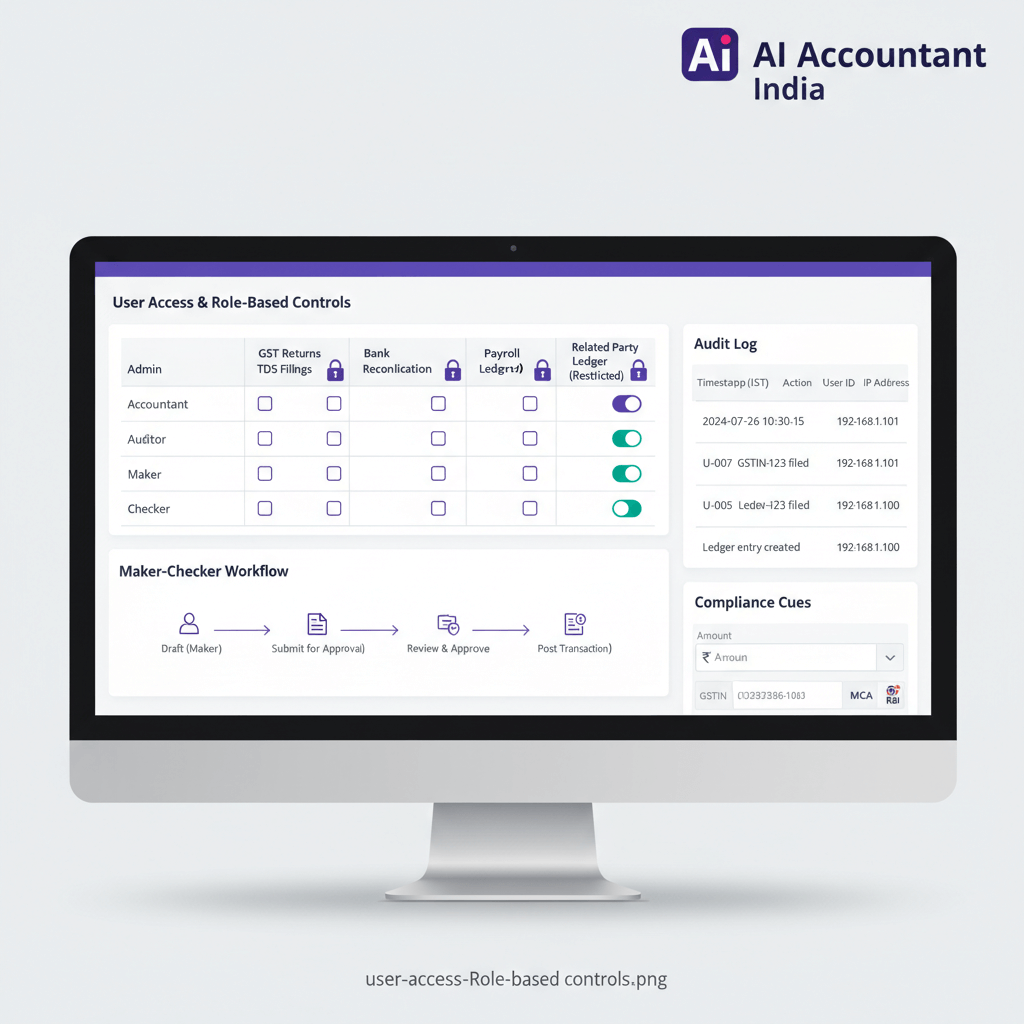
- Admin: System configuration, user management, security settings. No transaction posting.
- Checker/Approver: Reviews and approves bills, payments, journals, and vendor master changes. Posts to sensitive ledgers.
- Maker/Specialist: Creates vendor invoices, drafts payment requests, enters journal vouchers. Cannot approve own entries.
- Viewer: Read only access to dashboards and reports. No edit or export rights on sensitive data.
Enable MFA and IP restrictions for admin and finance users. Use roles and groups. Eliminate shared logins. Activate audit trails on day one.
For credit card controls by role, department, or use case, issuers can configure spending limits, merchant category restrictions, and approval requirements per card. The same principle applies: limit authority to what the role demands.
Maker Checker Enforcement
Maker checker creates a hard barrier against fraud and errors. No single user can initiate and approve value bearing actions.
Configure approvals in your ERP (such as Tally) for bills, invoices, credit notes, payments, journals, and new master creation. Use status transitions:
- Draft → Pending Approval → Approved → Posted or Paid
- Restrict any direct post without approval
- Limit bulk import as approved to very few roles
- Lock edit rights of approved documents to Checker or Admin with full logging
Watch for red flags: same user as Maker and Checker on high value transactions, admins posting bills or journals, emergency admin access without post incident reviews, workflows that exist but are bypassed with overrides.
Restrict Sensitive Ledgers
Identify and lock down ledgers where misuse can hide fraud or distort results.
Allow only Checkers or Admins to post directly to sensitive ledgers. Makers propose entries that require approval.
Block direct journals to GST and suspense entirely. Allow GST entries via return and reconciliation workflows. Permit suspense clearing only through approved entries.
Set thresholds:
- Journals over ₹1 lakh need extra approval
- Payments over ₹5 lakh need dual approval
- Very high value items may require two Checkers
Mark restricted ledgers in your ERP so only specific roles can select them. Design mapping rules to prevent standard transactions from posting to restricted ledgers without explicit approval.
When using practice management or AI tools, ensure mapping proposes entries but does not auto post to sensitive ledgers. Human checkers confirm in your ERP before anything hits the general ledger.
Audit User Activity
Auditing user activity transforms your access control from preventive to detective, catching issues that slip through other controls. Logs become your control and your evidence.
Structure your audit user activity reviews so they actually catch issues before month end:
- Daily: Anomaly scans for failed logins, off hours approvals, and unusual ledger entries
- Weekly: Spot checks on sensitive ledger postings and same user maker checker cases
- Monthly: Summaries to management with remediation notes and auditor ready documentation
Create saved views for sensitive ledger entries, same user maker and checker, high value journals, and out of hours access.
Maintain evidence packs with exported logs, change histories for vendor bank details, approval records, and documented exceptions with resolutions. This is exactly what auditors verify when assessing user access control evidence, as outlined by ICAI guidance on internal financial controls.
Periodic Access Review
Recertification aligns permissions to current roles and prevents lingering risks from staff changes.
Checklist for your monthly or quarterly review:
- Validate all active users against HR lists
- Check role appropriateness for each user
- Remove dormant accounts immediately
- Eliminate shared logins
- Confirm maker checker separation across all value bearing workflows
- Re verify sensitive ledger restrictions
- Track remediation of issues flagged in previous audit activity summaries
Document who reviewed, date completed, changes made, escalations, and management approvals. Align your calendar with audit cycles and year end.
30 Day Implementation Roadmap
Convert concepts into a working control environment in four weeks.
- Week 1: Inventory all user accounts across systems. Map current permissions. Identify shared logins and dormant accounts.
- Week 2: Define role taxonomy (Admin, Checker, Maker, Viewer). Assign users to roles. Enable MFA and IP restrictions.
- Week 3: Configure maker checker workflows for bills, payments, journals, and vendor masters. Mark sensitive ledgers. Set monetary thresholds.
- Week 4: Activate audit logging. Run your first weekly review. Document SOPs. Brief the team and schedule the first monthly recertification.
How AI Accountant Fits Your Access Control Framework
AI Accountant provides multi org support with role based access per org. Users see only relevant entities. It acts as a Maker by extracting data from PDFs and emails, while approval and posting remain in your ERP.
It includes vendor mismatch detection, row level error reporting, and read only dashboards for safe visibility.
AI Accountant complements your controls by pushing clean data only, while Tally stays the system of record. Approvals, sensitive ledger restrictions, and audit logging live in your ERP. The platform's encrypted infrastructure, ISO 27001, and SOC 2 Type II certification align with India's evolving data protection expectations under the DPDP Act framework.
Common Pitfalls and How to Fix Them
- Shared logins: Even in a two person team, each user needs their own credentials. Shared logins destroy audit trail credibility.
- Over privileged admins: Admins should configure systems, not post transactions. Separate configuration from operations.
- Maker checker bypass: If workflows exist on paper but get overridden in practice, the control is worthless. Audit logs catch this.
- Stale access: Former employees or role changed staff retaining old permissions is one of the most common audit findings.
- No thresholds: Without monetary limits, low risk and high risk transactions get the same treatment. Set clear thresholds for escalated approval.
Small teams can still do this. Use monetary thresholds, strengthen audit activity reviews, and keep clear SOPs to maintain control.
Practical Templates for Your Implementation
Use these as starting points and adapt to your organization:
- Role Permission Matrix: A spreadsheet listing each role against every system function (create, edit, approve, delete, export, configure) with Yes/No flags.
- Maker Checker Workflow Map: A visual diagram showing each transaction type, who initiates, who approves, and at what threshold dual approval kicks in.
- Monthly Recertification Checklist: The checklist from the Periodic Access Review section above, formatted as a sign off document with reviewer name, date, findings, and management approval columns.
- Audit Evidence Pack Template: A folder structure with sections for user listings, role configs, activity logs, sensitive ledger reports, exceptions, and resolutions.
Take Action Today
Map your current setup to these requirements. Define permissions by role. Enforce maker checker on all value bearing transactions. Restrict sensitive ledgers now.
Enable audit activity logging today. Schedule your first weekly review. Start documented access recertification with the next month end close.
Test how AI Accountant strengthens controls while automating routine work. Book a demo to see role based access per organization, strong audit logging, and ERP friendly approvals.
The cost of weak controls (penalties, fraud losses, and audit qualifications) far exceeds the effort to implement proper access control. Start with one workflow, prove value, expand systematically.
FAQ
How do I enforce maker checker for GST ledgers in Tally Prime without breaking month end timelines?
Set security levels so only Checker roles can post to GST ledgers. Makers draft entries with supporting documentation. Configure approval for journal vouchers and GST adjustments, and add a threshold rule for entries above ₹1 lakh. Use a daily approval window post cut off to keep timelines intact while maintaining separation. Under the tightened GST compliance requirements in 2026, this discipline also helps avoid mismatches flagged during automated return reconciliation (2026 update).
What is the recommended segregation of duties for AP in an Indian SME?
AP Specialist creates vendors and bills, Checker approves bills, Treasury executes payments, Accountant handles TDS computation and reconciliations, and Admin manages configurations. No single person should both create vendors and release payments. Add dual approval above ₹5 lakh. This split satisfies both Companies Act internal financial control requirements and auditor expectations for documented segregation.
Which ledgers should I mark as sensitive to satisfy statutory auditors?
Flag cash, each bank account, GST input and output, ITC and RCM, suspense, payroll and salary, related party loans, advances, write offs, and provisions. Block direct journals to GST and suspense entirely. Keep posting rights limited to Checker and Admin for remaining sensitive ledgers. Auditors verify these restrictions as part of internal financial control assessments.
Is maker checker a detective or preventive control type?
Maker checker control is generally a preventive control type. It stops unauthorized or erroneous transactions before they are posted to the ledger by requiring a second person to review and approve. Detective controls, like audit log reviews and exception reports, catch issues after they occur. A strong control framework combines both.
Can a two person finance team implement maker checker effectively?
Yes. The Accountant acts as Maker and the Partner or CFO acts as Checker. Set monetary thresholds so only higher value items require dual approval, and strengthen weekly audit log reviews. Using AI tools as the Maker for data capture lets you approve entries in your ERP without adding headcount while maintaining real separation.
How can issuers configure credit card controls by role, department, or use case?
Issuers can set per card spending limits, restrict merchant categories, require pre approval for transactions above a threshold, and assign cards to specific departments or cost centers. Role based rules ensure that only authorized personnel can modify card settings or approve exceptions. The same least privilege and audit logging principles from financial access control apply to corporate card programs.
How do I prevent vendors with changed bank details from being used for fraud?
Restrict vendor bank detail edits to Checker or Admin roles, and force re approval of any payment to vendors whose bank data changed in the last thirty days. Log the full change history. AI tools can flag vendor mismatches during data extraction, but your ERP approvals still control posting and payment release.

A results-driven finance and sales professional with hands-on experience through finance internships and a fast-paced sales role. With a strong interest in accounting and business finance, Harsh focuses on turning complex topics into clear, practical takeaways for founders and finance teams.