-01%201.svg)
Key Takeaways
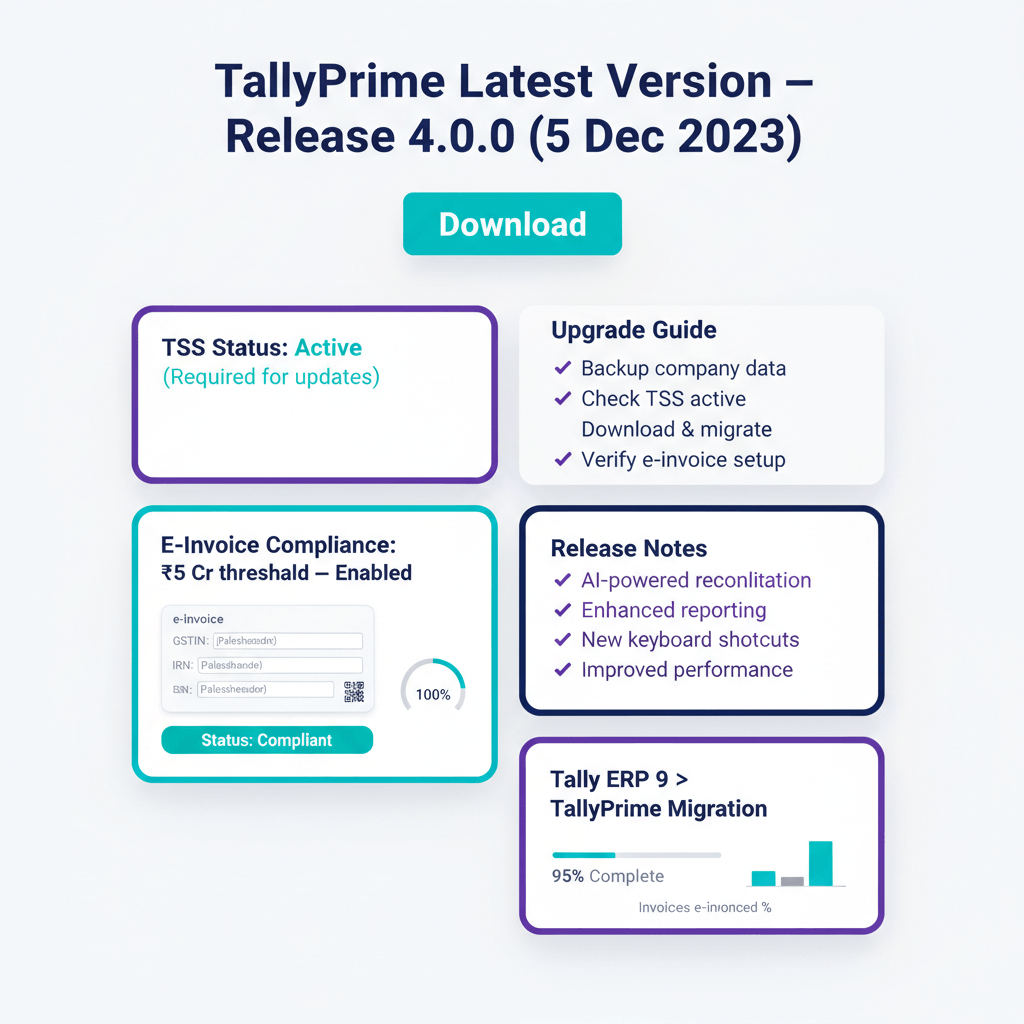
- Current TallyPrime Release And Build. TallyPrime Release 4.0.0, dated 5 December 2023, is the latest version of Tally Prime. Verify your installed build via Help (F1) > About > Product & Features inside TallyPrime. If your release number is lower, you are missing statutory and e-invoice updates delivered since your install date.
- TSS Subscription Determines Update Eligibility. An active TSS subscription gates access to statutory updates, e-invoice schema changes, and new product releases. Without TSS, your copy remains licensed but frozen — no GST rate changes, no IRN related fixes, no GSTR-2B import enhancements will reach your instance.
- E-Invoice Threshold Is Now ₹5 Crore AATO. Effective 1 August 2023, every GST registered person with AATO above ₹5 crore in any year from FY 2017–18 onwards must generate an IRN for B2B supplies.
- Tally ERP 9 Is Effectively End Of Support. Tally.ERP 9 Release 6.6.3 is the last version. Statutory updates and e-invoice support are available only in TallyPrime. Staying on ERP 9 means unsupported GST and IRN flows.
- Upgrade Takes One Session If You Pre Check Three Things. Back up data, disable third party TDLs, and in multi user setups update the server first, then clients. Keep the old installer and backup to enable rollback.
Why the latest Tally build matters for compliance
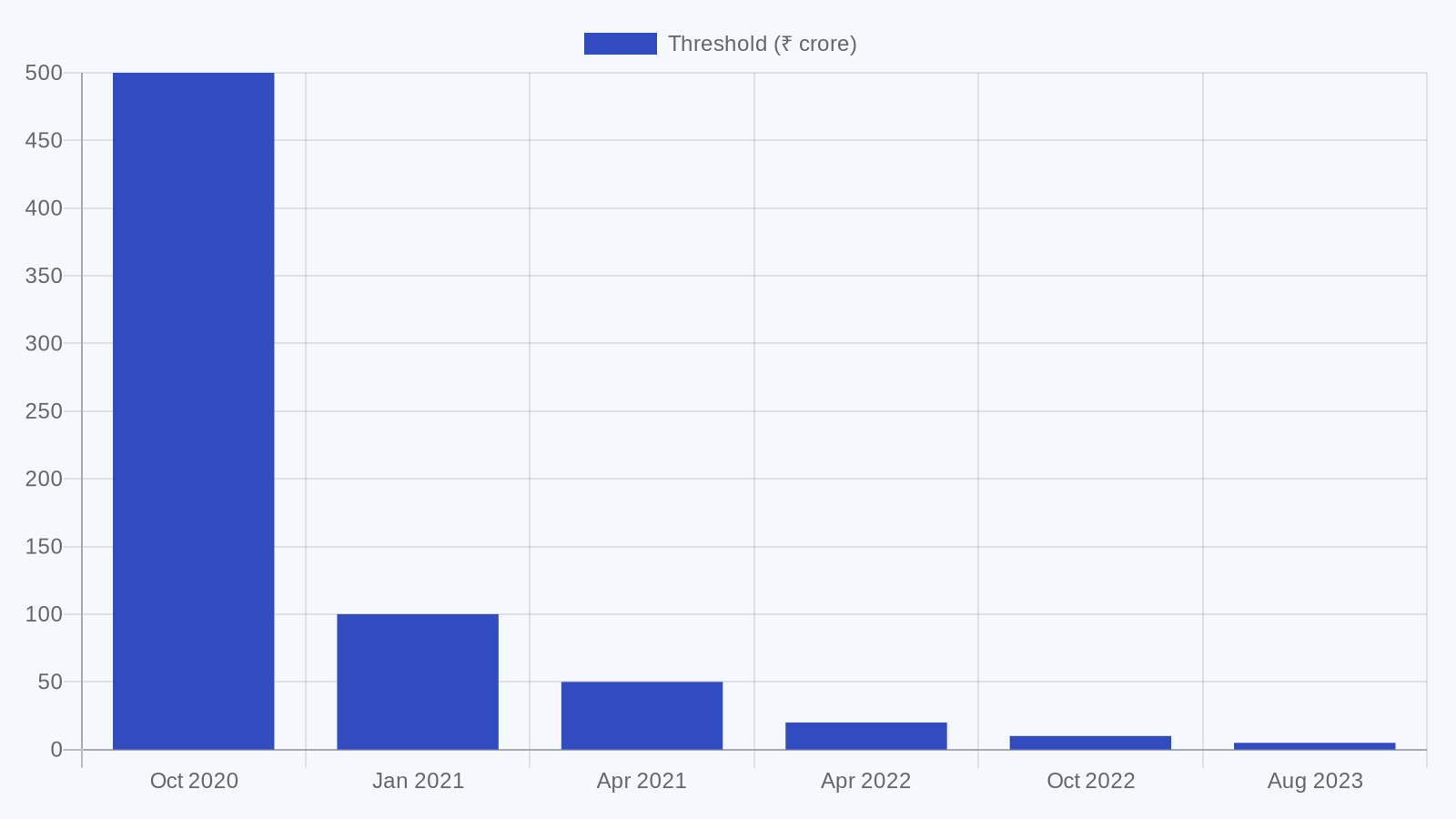
Issuing a B2B invoice without an IRN when your turnover crosses ₹5 crore is not a technicality, it voids the invoice under Rule 48(5) of the CGST Rules, 2017 and blocks your buyer’s ITC. The most common way teams miss schema changes is by running an outdated Tally build, assuming things will “just work.”
Bottom line: If IRN is mandatory for you, invoices generated without a valid IRN are invalid, your buyer’s ITC will be denied, and penalties can apply. Staying current on TallyPrime is a compliance control, not a luxury.
TallyPrime latest version: the short answer
TallyPrime Release 4.0.0 is the latest version of Tally Prime, released on 5 December 2023.
| Detail | Value |
|---|---|
| Latest Release | TallyPrime Release 4.0.0 |
| Release Date | 5 December 2023 |
| Where To Download | Tally Solutions official download page |
| In App Version Check | Help (F1) > About > Product & Features |
| TSS Required For Updates | Yes, statutory packs and e-invoice updates |
| Supported OS | Windows 7, 8.1, 10, 11 (64 bit only) |
| Last ERP 9 Release | Release 6.6.3, no further updates |
The most common mistake is assuming the software auto updates. TallyPrime does not update itself silently, you must download the installer and apply it, and you need an active TSS subscription to unlock the new build.
What is the latest Tally Prime version and where do I download it?
TallyPrime Release 4.0.0, dated 5 December 2023, is the current production release. It is available on the official Tally Solutions download page, and access to the installer and statutory updates requires an active TSS subscription.
How to check your installed version
Open TallyPrime and press F1 (Help), then choose About > Product & Features. If your release is below 4.0.0, you are missing e-invoice and GST updates delivered since that release.
TSS and update eligibility
TSS is Tally’s annual subscription. Only users with an active TSS can download new releases and receive statutory updates, including GST rate changes, IRN related fixes, and GSTR-2B import enhancements. If your TSS has lapsed, renew it before upgrading. A lapsed TSS leaves your licence functional, but your compliance content remains frozen at the last update.
System requirements for TallyPrime Release 4.0.0
TallyPrime requires a 64 bit operating system. Supported Windows versions include Windows 7, 8.1, 10, and 11. For multi user deployments, a server class OS is recommended for reliable concurrent access. 32 bit systems are not supported.
E-invoice improvements in Release 4.0.0
Release 4.0.0 enhances connected e-invoicing flows, making IRN creation faster and more direct. Earlier releases introduced QR code generation, IRN issuance via IRP, and digital signature embedding. If your AATO exceeds ₹5 crore, staying current is non negotiable for valid IRNs.
Is Tally ERP 9 still supported, and what is its latest build?
Tally.ERP 9 Release 6.6.3 is the final build. Tally Solutions has shifted all statutory updates and development to TallyPrime. No new GST, e-invoice, or TDS packs will be issued for ERP 9.
What “no new statutory updates” means in practice
Any GST rate revision, e-invoice schema update, or GSTR format change issued after ERP 9’s last update will not reach your ERP 9 instance. For businesses above ₹5 crore AATO, this creates a live IRN compliance risk, as ERP 9 may not align with the current IRP schema, making invoices invalid under Rule 48(5) of the CGST Rules, 2017.
The migration decision: when to move
| Situation | Action |
|---|---|
| AATO above ₹5 crore, B2B invoices | Migrate immediately, IRN risk is live |
| Active GST filer | Migrate, ERP 9 lacks statutory pack support |
| TDL heavy customisation | Migrate after testing TDLs in a TallyPrime sandbox |
| Single user, low volume, no GST | Migration still recommended, ERP 9 receives no security patches |
| Recently renewed TSS | Renewal on ERP 9 does not restore statutory updates, move to Prime |
Where to get the ERP 9 installer if you still need it
Tally Solutions keeps a previous versions page for ERP 9, intended for licence continuity and data access. Use ERP 9 to extract historical data or to stage migration, not as a live working environment.
Tally ERP 9 latest version download: caveats
The tally erp 9 latest version download is Release 6.6.3. Take a full backup first. TallyPrime provides an in place data migration on first open, so no separate utility is required. Keep your ERP 9 backup until you verify ledgers, balances, and reports in TallyPrime.
How to update to the latest TallyPrime safely
Upgrading typically completes within an hour for single company setups. The real risk is skipping pre checks. Follow this sequence.
Step 1: Back up all company data
Use Alt+Y (Data) > Backup. Store the backup outside the Tally data folder. Verify with a test restore before proceeding. This is your only reliable rollback path.
Step 2: Disable TDLs before installing
Unload third party TDLs via F1 (Help) > TDL & Add-on. Note what was active so you can test and reload after upgrade. Backward compatibility is the goal, but edge cases exist.
Step 3: Install in the right order for multi user setups
Upgrade the server first. Close Tally on all clients, install on the server, confirm data opens, then install the same release on each client. Mismatched releases cause data access errors.
Step 4: Migrate ERP 9 data if moving from ERP 9
Install TallyPrime and point it to your ERP 9 data folder. TallyPrime migrates data on first open. Keep ERP 9 backups and do not delete the original data until validation is complete.
Step 5: Rollback if needed
Rollback means restoring your pre upgrade backup with Alt+Y > Restore in the previous version. You cannot recover entries posted after the upgrade, so limit live entries until validation is done.
Once you are on the latest TallyPrime release, connecting AiA syncs your Tally masters and pushes cleaned entries back. AP automation and bank feed ingestion layer directly on top of your current TallyPrime setup.
Related reading
- Tally Prime Download: Versions, Install Steps, and Setup Guide
- Tally Prime Pricing In India: Silver, Gold, And What To Buy
- Tally Software: Price, Download, and When To Add Automation
References
- CBIC Notification No. 10/2023 – Central Tax, 10 May 2023
- Rule 48 and Section 122, CGST Act 2017 – indiacode.nic.in
FAQ
How do I confirm the current TallyPrime release on my machine, and what is the latest build today?
The latest production release is TallyPrime Release 4.0.0, dated 5 December 2023. On your machine, open TallyPrime, press F1 (Help), then choose About > Product & Features to see the release and build. If your release is lower than 4.0.0, you should plan an upgrade to pick up e-invoice and GST updates.
My AATO is ₹5.2 crore, do I need IRN for B2C invoices or only B2B?
The IRN mandate applies to B2B supplies and certain documents like credit and debit notes. B2C invoices do not require IRN. If your AATO exceeds ₹5 crore in any year from FY 2017–18 onwards, you must generate IRN for B2B invoices. Failing to do so makes the invoice invalid under Rule 48(5), which can also block your buyer’s ITC and invite penalties.
Does TallyPrime auto update or push silent patches, or do I have to install releases manually?
TallyPrime does not auto update. You must manually download and install new releases. Access to installers and statutory packs requires an active TSS subscription. For multi user setups, install on the server first, then clients, to avoid data access errors.
What is the cleanest way to reconcile GSTR-2B, and when should I add an AI layer like AiA?
TallyPrime supports import of GSTR-2B JSON and comparison with your purchase register, which is suitable for smaller volumes. For higher volumes, multi GSTIN groups, or vendor follow up workflows, an AI layer can save time. For example, using AI Accountant, you can pull 2B, auto match with Tally masters, and push cleaned entries back to Tally via GSTR-2B reconciliation and bookkeeping automation, reducing manual touchpoints and turnaround time.
Our TSS expired a few months ago. Can we keep using TallyPrime, and what exactly do we lose?
You can continue to use TallyPrime, your licence and data remain intact. However, you will not receive new releases, GST rate changes, e-invoice schema updates, or GSTR format updates after the lapse date. To restore update eligibility, renew TSS, then install the current release.
Is there any reason to stay on Tally.ERP 9, or should all GST filers move now?
ERP 9 receives no statutory packs or e-invoice updates. For any GST filer, especially those issuing B2B invoices, remaining on ERP 9 introduces a compliance gap that grows over time. The recommended path is to migrate to TallyPrime, validate your migrated data, and standardise your IRN and return workflows there.
Can I roll back after installing Release 4.0.0 if a TDL breaks in production?
Yes. If you took a verified backup before upgrade and kept the previous installer, rollback is straightforward: restore the backup using Alt+Y > Restore in the previous version, reinstall the older release if needed, and reopen your company. Limit new postings until testing confirms the new release and TDLs are stable.

Rohan Sinha is a fintech and growth leader building aiaccountant.com, focused on simplifying accounting and compliance for Indian businesses through automation. An IIT BHU alumnus, he brings hands-on experience across 0 to 1 product building, growth, and strategy in B2B SaaS and fintech.