-01%201.svg)

You can automate GST 2B reconciliation by replacing your manual Excel VLOOKUP workflow with an AI-based tool that imports your GSTR-2B and purchase register, matches invoices using multi-field logic, and surfaces only genuine exceptions for review.
Instead of spending 6 to 10 hours per GSTIN cleaning data and chasing false mismatches, automation reduces the process to under 1 hour with:
- Better ITC visibility
- Fewer errors
- Clear audit trail
Key Takeaways
- Automate GST 2B reconciliation by replacing Excel VLOOKUPs with AI powered multi-field matching that resolves format differences, rounding gaps, and period shifts automatically.
- Manual reconciliation at 500+ invoices per month leads to missed ITC claims, conservative filing, and audit exposure. Automation cuts reconciliation time from 6 to 10 hours to under 1 hour per GSTIN.
- Fuzzy matching engines catch probable matches (like INV-4587 vs 4587) that VLOOKUP treats as mismatches, eliminating the largest time sink in manual workflows.
- Exception bucketing and ITC impact classification let your team focus only on genuine discrepancies that affect filing, not formatting noise.
- Every matching decision, override, and vendor follow up gets logged automatically, giving you a structured audit trail that manual Excel processes rarely achieve.
- If your team regularly runs out of time to investigate all mismatches before filing GSTR-3B, automation is overdue. AI Accountant's GST reconciliation engine handles this end to end, from data ingestion to ITC risk flagging.
GST 2B Reconciliation Automation: What's New in 2026
The GST compliance landscape for 2026 has tightened considerably compared to 2025. The GST portal now enforces stricter auto-population of GSTR-3B from GSTR-2B data, leaving almost no room for manual overrides when claiming Input Tax Credit. Until mid-2025, businesses could still adjust ITC figures in GSTR-3B with some flexibility. From January 2026, any ITC claim exceeding the auto-populated GSTR-2B amount by more than a narrow threshold triggers an automated compliance flag, making accurate 2B reconciliation non-negotiable before every filing cycle.
The operational impact is direct. Finance teams now need to complete reconciliation earlier in the month, not in the last 48 hours before the filing deadline. Every invoice missing from GSTR-2B must be traced to a specific vendor action (late filing, incorrect upload, or amendment) before GSTR-3B submission. The CBIC's push toward real time compliance monitoring means that repeated ITC mismatches can now attract automated notices faster than before.
Who does this hit hardest? Businesses processing 500+ purchase invoices per month across multiple GSTINs, especially those still relying on Excel based matching. CA firms managing 10 or more clients face compounding pressure because each GSTIN now demands earlier, cleaner reconciliation. Firms below the ₹5 crore turnover threshold are not exempt; the auto-population rules apply regardless of business size.
The cost of inaction is measurable: blocked ITC claims, interest at 18% on excess claims, and compliance notices that consume weeks of back and forth. If your current workflow cannot complete reconciliation at least 5 days before the GSTR-3B deadline, here is what to do now:
- Audit your current reconciliation turnaround time per GSTIN and identify bottlenecks.
- Shift to an automated vendor bill matching workflow that handles fuzzy matching and exception bucketing natively.
- Set up structured vendor follow up processes for invoices missing in 2B, with clear deadlines tied to your filing calendar.
AI Accountant's reconciliation engine already reflects the 2026 auto-population rules and flags ITC risks against the updated thresholds, so teams can act on exceptions well before filing pressure builds.
The standard workflow looks the same in almost every finance team:
- Download GSTR-2B from the GST portal.
- Export the purchase register from Tally or your ERP.
- Open both files in Excel.
- Run VLOOKUP to match invoice numbers.
- Spend the next several hours manually investigating every mismatch.
At 100 invoices a month, this is tedious but manageable.
At 500 or 1,000 invoices, it collapses, not because accountants lack skill, but because Excel was never designed for GST reconciliation logic.
This guide breaks down:
- Why manual reconciliation fails at scale
- How automated matching works
- How to transition to automation without disrupting your current accounting setup
Why Manual GST 2B Reconciliation Breaks Down at Scale
VLOOKUP Compares Text Only
VLOOKUP checks whether one cell exactly matches another cell. That is all it does. It has no understanding of GST context, transaction relationships, amendments, or compliance impact.
This creates a specific, recurring problem.
Example: Your purchase register shows invoice number INV-4587. The vendor uploads the same invoice in GSTR-2B as 4587, without the prefix. The GSTIN matches.
The taxable value matches. The tax amounts (CGST, SGST, or IGST) also match.
Any experienced accountant would immediately recognize this as the same invoice, just formatted differently.
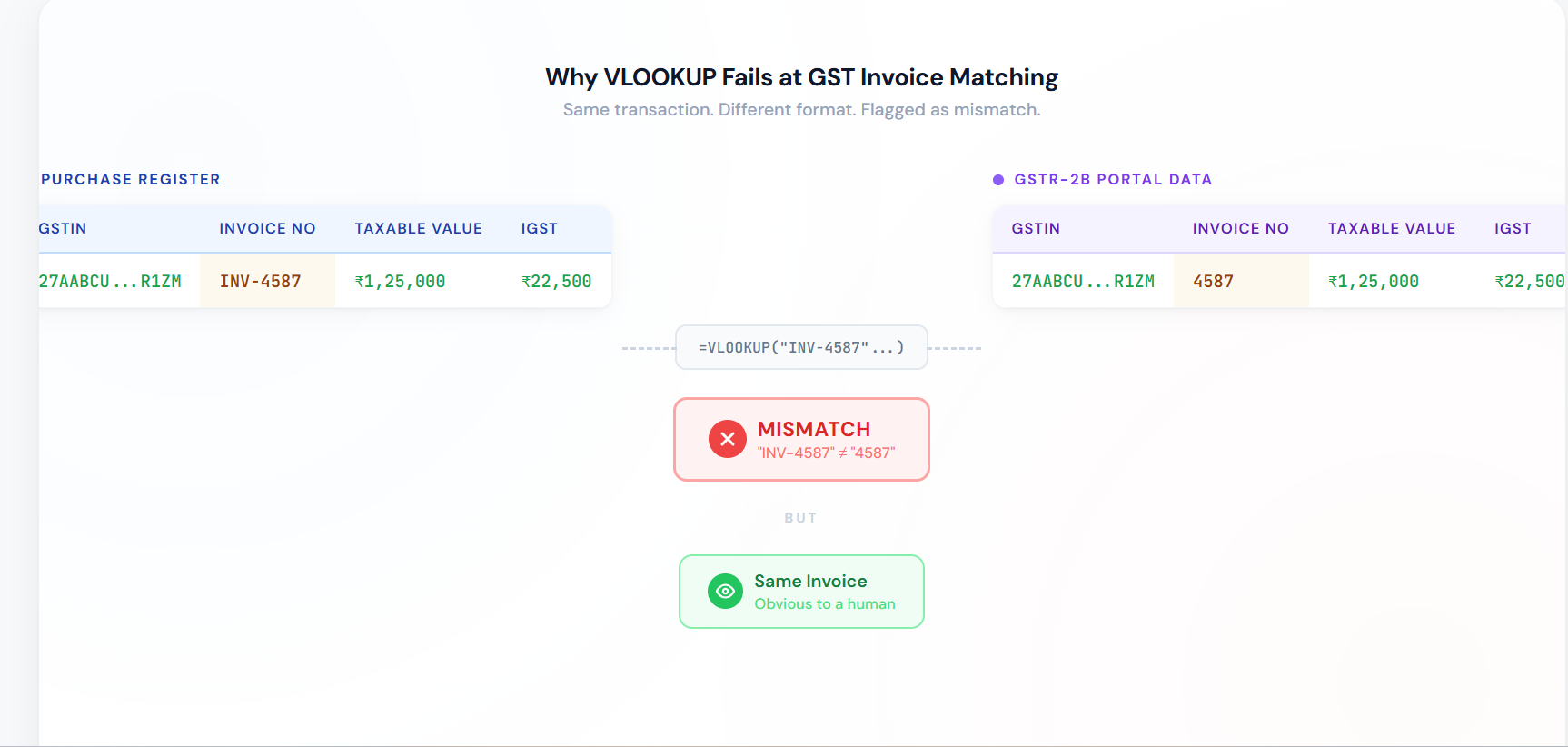
VLOOKUP marks it as a mismatch.
Now multiply this across hundreds of invoices where vendors use slightly different formats. Slashes instead of hyphens, leading zeros dropped, extra spaces, or abbreviated series names.
Each one gets flagged. Each one requires someone to manually search, filter by GSTIN, compare amounts, and confirm whether it is a real discrepancy or just a formatting difference.
This is not reconciliation. This is manual pattern recognition disguised as a compliance process.
No Way to Prioritize What Actually Matters
Excel shows you a flat list of mismatches. It does not tell you:
- Which mismatches directly impact your ITC eligibility.
- Which vendors are repeatedly defaulting or filing late.
- Which discrepancies are high value and need action before GSTR-3B.
- Which ones are low risk formatting differences you can safely ignore.
Everything looks equally urgent. Teams either spend time reviewing trivial differences while high value ITC risks sit unnoticed in the same spreadsheet, or they take a conservative approach.
Under-claiming ITC to avoid scrutiny directly hits cash flow.
The Real Cost Is Not Time Alone
The downstream impact of a manual reconciliation process goes beyond hours spent:
- Delayed ITC claims because reconciliation finishes too close to filing deadlines.
- Missed reversals that should have been caught during matching.
- Incorrect GSTR-3B reporting due to fatigue driven errors in the final hours.
- Incomplete vendor follow ups because there is no structured system to track who owes what correction.
None of these are capability problems. They are scale problems. And they get worse every month as invoice volumes grow and compliance scrutiny tightens.
According to the GST Council's ongoing push toward tighter compliance, the window for manual workarounds keeps shrinking.
How Automated GST 2B Matching Actually Works
Finance teams and accountants are already using AI to automate GST reconciliation end to end.
The video below shows how AI Accountant automates reconciliation using smart matching and GST validation to:
- Auto import GSTR-2B and purchase data
- Match invoices with fuzzy logic
- Detect and classify mismatches
- Highlight ITC risks before filing
Any well-built automated GST reconciliation tool works somewhat similar to the steps below.
Step 1: Data Ingestion
The tool imports your GSTR-2B, either fetched directly from the GST portal or uploaded as JSON or Excel, and your purchase register exported from Tally or any ERP.
Both datasets are normalized. Date formats get standardized, whitespace cleaned, and number formats unified.
Step 2: Multi-Field Matching
Instead of checking a single field like VLOOKUP does, the engine validates across multiple dimensions simultaneously:
- GSTIN validation (exact match required)
- Invoice number similarity (fuzzy matching that recognizes INV-001 and 001 as probable matches)
- Taxable value comparison (with configurable tolerance for rounding differences)
- Tax amount verification (CGST, SGST, IGST breakup)
- Invoice date proximity (catches period shift entries)
A match is confirmed only when enough fields align above the confidence threshold.
This eliminates the vast majority of false mismatches that consume hours in Excel. Think of it as intelligent transaction matching rather than simple text comparison.
Step 3: Exception Bucketing
Every invoice that does not achieve a confident match gets categorized into specific buckets:
- Matched: Confirmed, ready to claim ITC.
- Probable match: High similarity but one field differs, for example slight invoice number variation. It needs a quick human confirmation.
- Missing in 2B: Present in your books but not uploaded by the vendor. Requires vendor follow up.
- Missing in books: Present in 2B but not recorded in your purchase register. Needs investigation, possibly an unrecorded vendor bill or ledger entry.
Step 4: ITC Impact Classification
The system flags which exceptions directly affect your ITC eligibility for the current period. Your team knows exactly what needs resolution before filing GSTR-3B and what can wait.
This is especially critical given the CBIC's tightened rules around ITC claims exceeding GSTR-2B auto-populated values.
Step 5: Audit Trail
Every matching decision, manual override, and vendor communication gets logged.
This is not just good practice. It is what protects you during scrutiny. The ICAI has consistently emphasized the importance of maintaining documentation for ITC claims, and automated logs meet that standard more reliably than scattered Excel files.
The Benefit of Automating GST Reconciliation With AI
Consider a mid-sized business reconciling 1,200 invoices for a single GSTIN.
| Aspect | Before Automation | After Automation |
|---|---|---|
| Time Spent | 6–8 hours running VLOOKUPs and cleaning data | 10–20 minutes to upload data |
| Exception Investigation | Manually checking false mismatches like format differences, rounding issues, period shifts | System automatically filters and categorizes exceptions |
| Team Workload | Team exhausted before reaching real exceptions | Focus on high-value exceptions only |
| Invoice Matching | Manual matching; prone to errors and delays | ~1,100 invoices auto-matched with high confidence |
| Exception Volume | Large volume of manual review | ~80–100 genuine exceptions for review |
| Exception Classification | No structured categorization | Exceptions categorized by type and ITC impact |
| Vendor Follow-ups | Ad hoc and reactive communication | Structured and prioritized follow-ups |
| ITC Visibility | Clear only at the last moment before filing | Clear well before filing deadline |
| Decision Making | Rushed and conservative | Proactive and data-driven |
The team is not working less. They are working on the right things. Resolving real discrepancies, managing vendor compliance, and making informed filing decisions instead of debugging spreadsheet formulas.
"After using AI Accountant, we haven't missed a single deadline. What we love most is that it pinpoints exactly why a mismatch occurred, saving us hours of manual work."
See How AI Accountant Works
How to Automate GST 2B Reconciliation Without Changing Your Accounting System
One of the most common misconceptions is that automation requires migrating away from Tally or your current ERP.
It does not.
The reconciliation layer sits on top of your existing accounting system. Your books stay in Tally or whatever system you use. The automation tool simply imports the purchase register from your system, imports GSTR-2B from the portal, runs the matching, and gives you a reconciled output.
Here is a practical migration path:
Step 1: Export Your Purchase Register
Export your purchase data from Tally or your ERP in Excel, CSV, or JSON format.
Most tools also support direct integrations that pull data automatically. Even a manual export works to get started.
Step 2: Import GSTR-2B
Either upload the GSTR-2B JSON downloaded from the GST portal or use a tool that fetches it directly via API.
The key is that both datasets land in the same system for matching.
Step 3: Run Reconciliation
The tool matches invoices across both datasets using multi-field logic.
This typically takes seconds to a few minutes, depending on volume.
Step 4: Review Exceptions
Focus your team's time on the exceptions the system cannot confidently resolve. These include missing invoices, value mismatches, and vendor defaults.
Everything else is already matched and categorized.
Step 5: Act Before Filing
Use the ITC impact view to prioritize what needs resolution before GSTR-3B.
Send structured follow ups to vendors for missing or incorrect uploads.
File with confidence instead of filing under pressure.
You are not replacing your accounting system. You are replacing the manual Excel matching layer, the part that consumes hours and adds the least analytical value.
When Should You Stop Using Excel for 2B Reconciliation?
There is no single threshold, but here is a practical framework:
Below 200 invoices per month
Excel is clunky but survivable. A disciplined accountant can manage it within a reasonable timeframe, though it is still not the best use of their expertise.
200 to 500 invoices per month
The cracks appear. Reconciliation starts eating into other work. False mismatches pile up. Vendor follow ups become inconsistent.
You start noticing that the same formatting issues waste time every single month.
500 to 1,000 invoices per month
Excel becomes a bottleneck. Reconciliation consistently pushes up against filing deadlines. Team members dread month end.
ITC claims get conservative because there is not enough time to investigate everything properly.
1,000+ invoices per month
Manual reconciliation is an operational liability. The risk of missed ITC, incorrect filings, and audit exposure outweighs any perceived savings from avoiding a tool subscription.
The real question is not volume alone. It is whether reconciliation time is affecting your filing confidence and ITC accuracy.
If your team regularly runs out of time to investigate all mismatches before filing GSTR-3B, you have already passed the threshold.
What to Look for in a GST 2B Reconciliation Tool
If you are evaluating options, here are the capabilities that separate useful tools from superficial ones:
Fuzzy matching, not just exact matching
Any tool can match identical invoice numbers. The value is in catching probable matches like INV-001 vs 001, leading zeros, and slashes vs hyphens without flagging them as GST-2B mismatches.
Multi-field validation
Matching should use GSTIN, invoice number, taxable value, tax amount, and date together, not just one field.
Clear exception buckets
Mismatches should be categorized by type such as missing in 2B, value mismatch, GSTIN mismatch, or amendment, so your team knows exactly what action each one requires.
ITC impact visibility
The tool should tell you which exceptions affect your ITC eligibility for the current period, so you can prioritize accordingly.
Vendor tracking
Repeat defaults should be visible at a vendor level, not buried in invoice level data.
This drives procurement conversations and compliance improvements over time.
Audit trail
Every match, override, and resolution should be logged. This is non-negotiable for compliance and scrutiny readiness.
Integration with your ERP
The tool should import from Tally or your system cleanly, not require you to restructure your data before every reconciliation cycle.
Frequently Asked Questions
Can I automate GSTR-2B reconciliation without leaving Tally?
Yes, automation tools work alongside Tally without replacing it. You export your purchase register from Tally, the tool runs reconciliation against GSTR-2B, and the results can often be posted back to your books. Your accounting workflow stays the same; only the matching layer changes.
Why does VLOOKUP flag mismatches when GSTIN and tax amounts are identical?
VLOOKUP only checks exact cell values in a single field. If invoice numbers differ by even one character (a prefix, a hyphen, or a space), Excel treats them as completely different entries. This creates false mismatches that require manual verification, which is where most reconciliation time gets wasted.
How much time should GSTR-2B reconciliation realistically take?
With automation, total reconciliation drops to under 1 hour per GSTIN, including data upload (10 to 20 minutes) and exception review. For most mid-sized businesses, this compares to 6 to 10 hours of manual work in Excel.
How do I know which mismatches actually affect my ITC before filing GSTR-3B?
Automated tools categorize exceptions by type (missing in 2B, value mismatch, GSTIN mismatch, amendment, credit note impact) and flag which ones put ITC at risk for the current period. In 2026, this is especially critical because GSTR-3B ITC claims exceeding the auto-populated GSTR-2B value now trigger automated compliance flags from the portal (2026 update).
What happens if vendors upload invoices late?
Automated tools track invoices present in your books but missing in GSTR-2B. When a vendor uploads in a later period, the system re-matches automatically and updates the status. Instead of manually checking last month's pending list, you get a structured trail that rolls forward.
We have multiple GSTINs. Can an AI tool handle reconciliation for all of them?
Yes, multi-GSTIN reconciliation is where automation provides the most leverage. Automated tools run separate matching per registration, provide consolidated dashboards across entities, and track vendor compliance centrally. Manual Excel reconciliation becomes exponentially harder with each additional GSTIN.
Is automated GST reconciliation reliable enough for audits?
Automated reconciliation is typically more audit friendly than manual processes, provided the tool maintains a complete audit trail. This includes logs of matching logic, original data files, exception handling steps, and resolution notes. Automation removes fatigue driven inconsistencies and provides structured documentation that manual Excel workflows rarely achieve.

A results-driven finance and sales professional with hands-on experience through finance internships and a fast-paced sales role. With a strong interest in accounting and business finance, Harsh focuses on turning complex topics into clear, practical takeaways for founders and finance teams.



