-01%201.svg)
Key takeaways
- Scaling BI refresh in India starts with incremental loads: switch from full refreshes to delta-only processing for Tally and SAP data, and you can cut refresh time and compute by 70 to 90 percent.
- Partition by date and business keys like GSTIN to handle predictable Indian spikes at quarter ends, GST deadlines, and March year close, then prune and archive intelligently to control costs.
- Schedule around IST working hours and GST filing windows, stagger jobs to respect platform concurrency limits, and cap parallelism at 70 percent of capacity to avoid contention.
- Use smart cache control: short TTLs for bank and cash data, longer TTLs for master data, and blend Import with DirectQuery where it makes sense to balance speed and freshness.
- Build robust alerting with exponential backoff, idempotent retries, and runbooks so GST crunch times do not derail operations or leave your CFO staring at stale dashboards.
- Automating the ingestion layer removes the biggest bottleneck. AI Accountant's bookkeeping automation handles change detection and incremental syncing from Tally natively, so your BI pipeline only processes what actually changed.
BI Refresh Optimization for Indian Finance Teams: What's New in 2026
Until mid 2025, most CA firms running 100+ client entities relied on full dataset refreshes or manually configured incremental pulls with basic timestamp filters. That approach buckled under volume. In 2026, the tooling has caught up meaningfully.
The biggest shift is in connector maturity. Tally and SAP integrations now support true bi-directional delta syncing out of the box. Tools like APPSeCONNECT enable instant syncing of sales orders, inventory, and financial transactions between SAP S/4HANA and CRM platforms, mirroring order numbers back for traceability (2026 update). This means your Power BI incremental refresh no longer depends on synthetic workarounds for sources that lacked native change tracking. For SAP API sources that still do not support full query folding, you can use RangeStart and RangeEnd parameters on audit timestamps, a technique documented by Esbrina for SAP API incremental loads, combined with 1 to 3 day backfill windows.
Who does this hit hardest? Multi-entity CA firms and SME finance teams processing high volumes of GST invoices. If you are still running nightly full refreshes across dozens of client GSTINs, you are burning compute and risking stale data during filing windows. The GSTN portal continues to throttle aggressively during peak filing periods, and 2026 has seen tighter rate limits on bulk API calls around the 11th and 20th of each month.
What to do now:
- Audit your heaviest datasets. If any still use full refresh, convert them to incremental with high watermark columns this week.
- Test your backfill windows against March 2026 year close adjustments, backdated TDS and GST corrections still break naive watermarks.
- If you manage multiple client entities, isolate workloads by GSTIN partition to prevent one heavy client from blocking others.
For firms managing GST reconciliation across many GSTINs, the ingestion layer is where most time gets wasted. Automating change detection at the source, before data even reaches your BI tool, is the practical path to sub 30 minute refreshes at 99 percent success rates.
Understanding the BI Refresh Challenge in Indian Context
Indian finance teams juggle diverse data sources daily. Bank statements arrive in PDF and MT940. GSTN returns change frequently. Tally exports carry thousands of vouchers and invoices, and ledger entries evolve throughout the day.
Refresh patterns vary. Cash flow dashboards often need hourly updates. GST compliance reports demand daily refreshes. Management dashboards can be weekly. Yet month end and GST deadlines create predictable surges that stress every layer of the pipeline.
What defines success? Keep refresh duration under 30 to 60 minutes. Hold success rates above 99 percent. Avoid data staleness beyond 4 hours. Keep cloud costs sane.
India adds unique constraints: bandwidth variability across tier 2 and tier 3 cities, government API rate limits from GSTN and banking portals, and strict data residency requirements in Azure Central India or AWS ap-south-1 regions.
Practical target: 30 minute refreshes at 99 percent success, with 4 hour freshness SLAs, delivered reliably during GST crunch windows.
Further reading: see Power BI community guidance on optimizing refresh of data.
Core Principle 1: Master Incremental Loads for Speed
Full refreshes across 100 plus client entities are slow and expensive. Incremental loads transform the equation. Process only changed records rather than the entire history, and reduce compute time and cost dramatically.
- Use high watermarks like transaction_date or last_update_ts. Combine with CDC streams or hash based diffing for robust upsert detection.
- Adopt dbt incremental models for controlled transformations. Use Power Query parameters like RangeStart and RangeEnd in Power BI for partitioned pulls. Use MERGE statements in Snowflake or BigQuery for efficient upserts.
- Handle late arriving entries common in India: Tally retro edits and JMR adjustments. Add small rolling backfill windows of 1 to 3 days to catch them.
- Partition by April to March fiscal years. Include detection for month end corrections to avoid missing accountant adjustments.
For SAP data sources that lack full query folding, you can still configure incremental refresh using synthetic parameters on audit timestamps. This approach works reliably when paired with a short backfill window to catch late posted vouchers and vendor invoices.
Tools to streamline incremental data refresh include AI Accountant, which auto-detects changes in Tally and supports incremental syncing, plus native Power BI Incremental Refresh, Fivetran, Stitch Data, and Matillion.
Core Principle 2: Smart Partition Strategies for Indian Volumes
With millions of GST invoices at peak, well designed partitions deliver speed, predictability, and cost control. Date partitions suit time series: daily or weekly for hot data, monthly for historical. Business key partitions by GSTIN, bank account, or cost center give multi-entity firms clean isolation.
- Choose platform aware options: BigQuery partition and cluster, Snowflake micro-partitions, data lake folder structures, and Power BI's logical partitions from Incremental Refresh.
- Define retention smartly. Keep hot partitions for the current fiscal year. Archive older data after statutory needs. Consider the 7 year GST audit window per CBIC guidelines on record retention.
- Align with Indian cycles: quarter ends, festival seasons, and GST deadlines. Plan exceptions for March year end where adjustments spike.
For multi-entity setups with 100 plus clients, partitioning by GSTIN or client_id alongside date gives you the isolation needed to prevent one heavy client from blocking others. This is especially important during GST filing surges when every firm is pulling data simultaneously.
Core Principle 3: Navigate Concurrency Limits Like a Pro
Respect platform ceilings. Power BI Pro has limited slots per day. Premium increases capacity. GSTN and vendor APIs throttle aggressively. Snowflake queues on contention. Intelligent scheduling prevents bottlenecks.
An operational playbook for continuously optimizing global performance and egress spend with latency and cost SLOs starts with mapping your actual concurrency usage against hard limits. Most firms discover they are either wasting capacity during off peak hours or hitting walls during filing windows.
- Prioritize CFO dashboards. Stagger refreshes. Avoid GST filing windows when servers are under stress.
- Scale horizontally when vertical limits bite. Split Premium capacities. Isolate client warehouses to eliminate noisy neighbor effects.
- Implement backpressure: cap parallelism at 70 percent of hard limits, reserve lanes for critical datasets, and add circuit breakers to prevent cascading failures.
Core Principle 4: Cache Control for Indian Networks
Caching exists at multiple levels: BI query caches, semantic layer caches, warehouse result caches, and HTTP proxies. Tune TTLs by data volatility. Use 1 to 2 hours for cash and bank data, 24 hours or more for GSTIN master data, then invalidate on source changes.
- Warm caches post deployments. Preload hot datasets during off peak hours to avoid morning stampedes.
- Deploy in Indian regions for compliance and latency. Optimize HTTP caches to mitigate bandwidth constraints in tier 2 cities.
- Leverage Power BI Import mode for speed. Blend with DirectQuery and aggregation tables for freshness. Enable query caching to cut redundant pulls.
Smart caching can often yield 50 percent gains in perceived performance. Pre-aggregating financial metrics at the ingestion layer keeps Import tables small and fast, which is critical when your network bandwidth is unpredictable.
Core Principle 5: Bulletproof Alerting and Retries
Observability is non-negotiable. Define dataset SLOs, log comprehensively, and maintain lineage. Retries should use exponential backoff with jitter, idempotent upserts, and partial partition recovery across failures.
For BI per-attempt backfill scenarios, track each retry independently. Log the partition range attempted, the failure reason, and the duration. This gives you the data to tune your backoff intervals and identify whether failures are transient (API throttling) or structural (bad source data).
- Route alerts by urgency. Notify accountants and engineers in Slack or Teams. Auto-create tickets as GSTR-3B deadlines approach. Escalate recurring failures quickly.
- Prepare runbooks for gateway outages, API throttling, and data quality issues. Include stepwise checks and recovery methods.
- Monitor Power BI via REST APIs and gateway health. Automate retries with Power Automate. Alert on refresh failures.
Power BI Specific Optimization Playbook
Setting Up Incremental Refresh
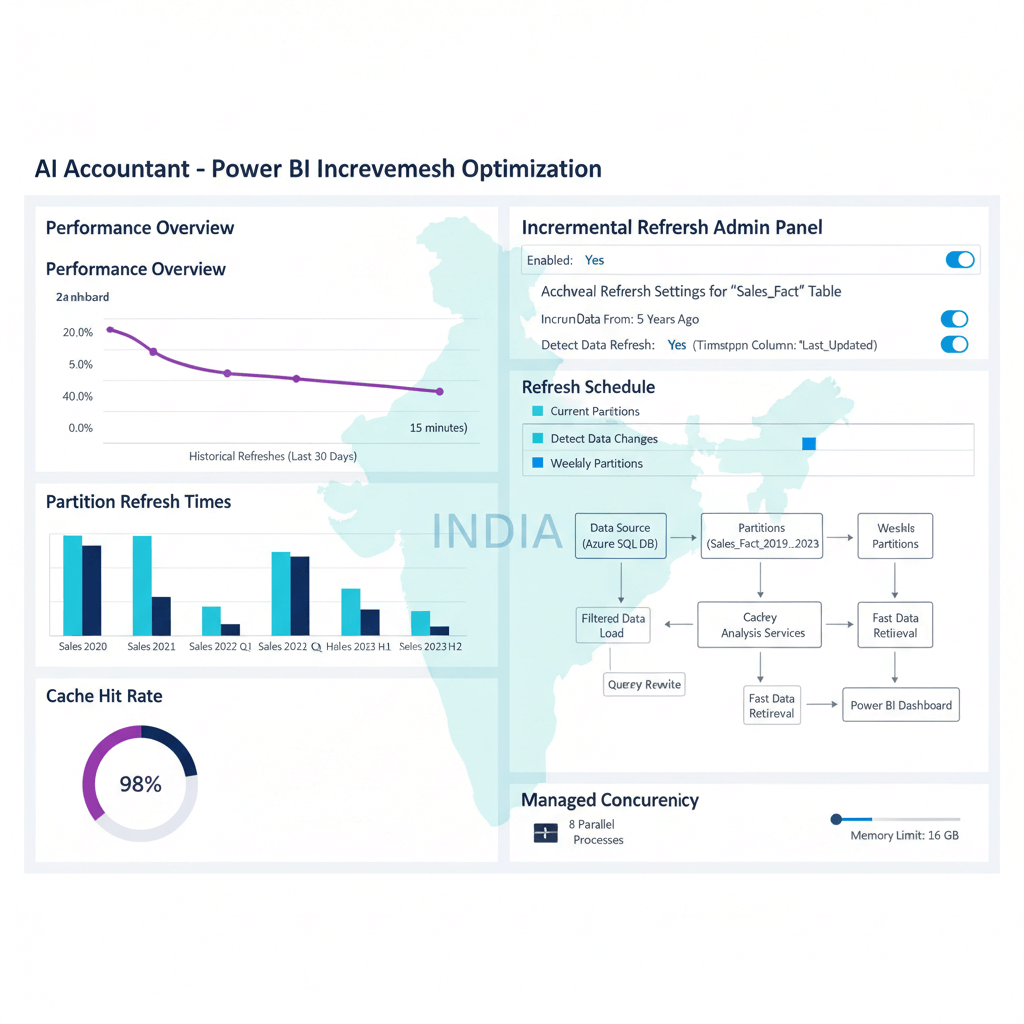
Define RangeStart and RangeEnd parameters in Power Query. Use daily partitions for recent data and monthly for historical. Exclude static tables from refresh using Power Query logic.
Test transformations thoroughly in Desktop first, then deploy to Service. This catches issues before they affect production dashboards and lets you validate that query folding is working as expected for your data source.
Managing Concurrency in Premium
Stagger schedules across Premium workspaces. Roll out via deployment pipelines. Monitor capacity metrics carefully. Tune parallelism based on observed usage patterns.
Keep a buffer of at least 30 percent capacity headroom during GST filing weeks. This prevents the situation where a single large client refresh consumes all available slots and blocks critical CFO dashboards.
Optimizing Cache and Queries
Prefer Import mode where volumes permit. Blend DirectQuery for real time components with aggregation tables. Simplify DAX. Minimize visual level queries that bypass caches.
Composite models let you keep high volume historical transaction tables in Import while reserving DirectQuery for live balances or exception reports. This combination gives you speed without sacrificing freshness where it matters.
Monitoring and Maintenance
Poll REST APIs for refresh status. Alert on gateway instability, which is common on Indian networks and ISP connections. Trend refresh durations to catch slow degradation. Archive old datasets to reduce clutter.
More guidance: see Power BI community discussion on optimizing data refresh.
Balancing Cost and Performance for Indian Businesses
Compute Optimization
Rightsize resources. Auto-scale Snowflake warehouses for peaks. Use BigQuery flat rate slots for predictability. Adjust Azure Synapse capacities to workload.
Schedule heavy processing between 2 and 6 AM IST for lower contention and potential savings. Keep data in India regions to reduce egress costs, a key factor in any operational playbook for continuously optimizing global performance and egress spend with latency and cost SLOs.
Performance vs Cost Matrix
High performance setups favor larger warehouses, Import mode, and peak hour freshness. Cost optimized setups rely on incremental updates, partitioning, auto-suspend, selective DirectQuery, and off peak scheduling. Match the approach to business criticality.
Regional Considerations
Local processing ensures compliance and reduces latency, sometimes at higher sticker price. Yet the total cost of compliance risks is far higher than the regional premium. Choose Indian regions for sensitive financial workloads.
For data residency verification, refer to MeitY's data governance framework to ensure your cloud deployment meets current Indian regulatory expectations.
Common Pitfalls and India-Specific Challenges
Traffic Spikes That Break Systems
Month end reconciliations, GST filing surges, and heterogeneous bank PDFs trigger spikes and parsing issues. Buffer capacity, fail gracefully, and add fallbacks.
The 11th and 20th of each month are particularly brutal for GSTN API availability. Plan your refresh schedules to avoid these windows for bulk GST data pulls.
Time Zone and Fiscal Year Confusion
IST does not move, yet backdated TDS and GST entries can break watermark assumptions. April to March fiscal years do not align with calendar based tools. Code for these explicitly.
Synthetic watermarks that combine transaction_date with an audit updated_on field are more reliable than either alone. Add a 1 to 3 day rolling backfill window to catch late arriving corrections.
Reliability Issues
Tally APIs may throttle unpredictably. Gateways can drop on unreliable ISP links. Government portals can be unavailable without notice. Design for failure at every layer.
Circuit breakers that pause and retry with backoff are essential. Without them, a single GSTN outage can cascade into dozens of failed refreshes across your client base.
Data Quality Surprises
Indian datasets often mix date formats, use varied currency symbols like Rs, INR, and ₹, and occasionally swap decimal separators. Build defensive parsing, validate types, and standardize early.
Bank statement formats remain a persistent challenge. Even within a single bank, PDF layouts can change across branches. Normalize at ingestion: detect encoding, unify date formats, strip currency symbols, and reconcile opening and closing balances as a sanity check.
Real-World Schedule Templates for CA Firms
24 Hour Incremental Refresh Calendar
2 to 5 AM, Priority Tier 1
Run 20 CFO dashboards with parallelism limited to 4. These complete with minimal contention.
6 to 10 AM, Tier 2 Processing
Queue 50 client GST refreshes. Cap concurrency at 8. Aim to finish before business hours.
11 AM to 10 PM, Tier 3 Ad hoc
Stagger 30 ad hoc refreshes hourly to fill capacity without blocking critical paths.
Align caps with Power BI Service limits. Isolate by GSTIN partitions to prevent interference.
Alerting and Retry Playbook
Thresholds: alert on failure rates above 5 percent or delays over 2 hours. Notify teams instantly.
Retry logic: 1 minute, 5 minutes, then 15 minutes with 20 percent jitter. Stop after 3 attempts to avoid loops. Track each BI per-attempt backfill independently to identify patterns.
Escalation: three consecutive failures open a ticket and page on call for critical datasets. Include runbook links.
Recovery: check gateway health and logs. Attempt partial backfill on the failed partition range. Roll back to last successful refresh if required.
Leveraging Modern Tools for Indian BI Challenges
Automated Data Ingestion
Consider solutions purpose built for Indian finance. AI Accountant handles native Tally integrations plus 50 plus bank formats. Its change detection enables true incremental loads and its parsers cut manual cleanup. Other proven options include Talend, Informatica, Apache NiFi, and Pentaho.
In 2026, connector maturity has improved significantly. Tally and SAP integrations now support bi-directional delta syncing natively, reducing the need for custom CDC implementations. This means your ingestion layer can detect and process only changed vouchers, ledger entries, and vendor invoices without manual watermark configuration.
Monitoring and Observability
Track refresh trends. Detect gradual performance drift. Correlate failures with external events like GSTN downtime. Use distributed tracing for multi step pipelines.
Pay special attention to P95 and P99 latencies, not just averages. A refresh that usually takes 10 minutes but occasionally takes 90 minutes will wreck your SLAs during crunch periods.
Automation Frameworks
Automate schedules, retries, and performance reporting. Power Automate, Apache Airflow, and Prefect are proven orchestration tools for managing complex refresh dependencies across multiple client entities.
Building Your Implementation Roadmap
Phase 1: Foundation, Weeks 1 to 2
Enable incremental refresh on your largest datasets. Set baseline metrics for duration, success rate, and freshness. Configure basic failure alerts. Expect significant reductions immediately.
Start with one heavy Tally dataset per the research: convert it to incremental, measure the impact, then replicate across remaining clients.
Phase 2: Optimization, Weeks 3 to 4
Add partitioning tuned to volume. Implement exponential backoff with jitter for retries. Tune caches by usage patterns. Optimize high impact DAX queries and data model relationships.
Phase 3: Scale, Weeks 5 to 6
Introduce controlled concurrency with backpressure. Build comprehensive observability dashboards. Create automated runbooks. Test disaster recovery by simulating gateway failures and API outages.
Phase 4: Excellence, Ongoing
Continuously optimize with metrics. Adapt to fiscal cycles and regulatory changes. Update for new GSTN API behaviors. Share learnings across teams and build institutional memory.
Measuring Success and Continuous Improvement
Key Performance Indicators
Refresh Duration: aim for 80 percent reduction. Track P50, P95, and P99 latencies. The P99 matters most during GST crunch windows.
Success Rate: maintain 99 percent or higher. Analyze failure patterns by source type, time of day, and client volume. Fix root causes, not symptoms.
Data Freshness: meet SLAs consistently. Measure source to dashboard latency and alert on staleness beyond 4 hours.
Cost Efficiency: track cost per refresh. Monitor compute utilization. Optimize for unit economics as you scale to more clients.
Continuous Improvement Process
Review weekly with the team. Run monthly deep dives on failure patterns and latency trends. Hold quarterly business reviews to align refresh SLAs with business priorities. Create user feedback loops so accountants can flag data freshness issues directly.
Document lessons learned and build institutional memory. The team that inherits your pipeline next year will thank you.
Final Implementation Checklist
- Scaling BI refresh India considerations: deploy in Central India or ap-south-1, verify residency compliance per MeitY guidelines, and test with Indian formats and volumes.
- Incremental loads: select high watermarks, backfill 1 to 3 days, and test late arriving handling including backdated TDS and GST corrections.
- Partition strategies: date plus GSTIN partitions, fiscal year retention aligned with the 7 year audit window, and validate pruning on your specific warehouse.
- Concurrency limits: map quotas, implement queues and isolation, test under peak loads simulating GST filing week volumes.
- Cache control: tune TTLs by data volatility, invalidate on change, and warm caches post deployment.
- Alerting and retries: define SLOs, implement backoff with jitter, prepare runbooks for gateway outages and API throttling.
Your Next Steps
Scaling BI refresh in India needs a disciplined approach tailored to local data realities. Start with incremental loads for quick wins. Add partitioning for scale. Manage concurrency to prevent bottlenecks. Optimize caches for speed. Build resilient alerting and retries.
Perfect can wait. Start small, measure, iterate, and improve.
Pick one slow refresh today. Apply incremental loading. Measure the impact. Build momentum. Your CFO wants faster dashboards, your accountants need timely data, and your business deserves predictable updates.
FAQ
How do I configure incremental refresh in Power BI for Tally data across 100 client entities?
Create RangeStart and RangeEnd parameters in Power Query, filter source queries by these parameters, then enable Incremental Refresh at the table level. Partition recent data daily and historical monthly for balance. Use GSTIN or client_id as a dimension to isolate refresh impact. For sources that lack full query folding, such as certain Tally and SAP APIs, apply these parameters on audit timestamps with a 1 to 3 day backfill window to catch late posted vouchers (2026 update). Let an AI Accountant managed pipeline detect changes at source so your Power BI dataset only ingests deltas.
What is the most reliable watermark for Indian financial data, transaction_date or last_update_ts?
Use last_update_ts if your source system populates it consistently, since it captures retro edits and backdated entries. If unavailable, combine transaction_date with an audit updated_on field, then add a 1 to 3 day backfill window to catch late arriving edits. Synthetic watermarks derived from change logs are increasingly common in 2026 for sources with inconsistent native timestamps (2026 update). AI Accountant can compute a synthetic watermark from change logs when native timestamps are unreliable.
How should a CA firm schedule Power BI refreshes around GST deadlines to avoid failures?
Stagger high priority CFO dashboards between 2 and 5 AM IST, run GST compliance datasets 6 to 10 AM before business hours, and spread ad hoc refreshes hourly through the day. Avoid the 11th and 20th of each month for bulk GSTN pulls, as rate limits tighten during peak filing periods. Cap parallelism at 70 percent of capacity, reserve slots for critical paths, and use queue based orchestration to handle overflow gracefully.
What is an operational playbook for continuously optimizing global performance and egress spend with latency and cost SLOs?
Start by mapping your actual concurrency usage against hard platform limits and defining latency SLOs per dataset tier (for example, 15 minutes for CFO dashboards, 4 hours for management reports). Deploy compute and storage in Indian regions to eliminate cross region egress costs. Schedule heavy processing during 2 to 6 AM IST for lower contention. Track cost per refresh as a KPI, auto-scale warehouses for peak periods, and auto-suspend during off hours. Review weekly against your SLOs and adjust scheduling, partitioning, and caching to close gaps.
How do I design retry logic for GSTN or bank API throttling with per-attempt backfill tracking?
Use exponential backoff with jitter: 1 minute, 5 minutes, then 15 minutes delays with 20 percent randomness. Stop after 3 attempts to avoid loops. Log each BI per-attempt backfill independently, recording the partition range attempted, failure reason, and duration. Ensure idempotent upserts to prevent duplication on retry. Route alerts by severity and include runbook links for common failure patterns like gateway drops and GSTN unavailability.
What KPIs should I track to prove refresh optimization to management?
Track refresh duration reductions at P50, P95, and P99 latencies, not just averages. Maintain success rate above 99 percent, freshness under 4 hours, and cost per refresh trending downward. Correlate improvements with release changes and visualize trends weekly. The P99 metric matters most because it reveals worst case behavior during GST crunch windows, which is exactly when management is watching closest.
Why do my watermark assumptions fail at fiscal year end in India?
April to March fiscal cycles produce backdated adjustments during year close, and TDS or GST corrections can arrive days or weeks after initial postings. Introduce 1 to 3 day rolling backfills and extend detection windows for March 31st activity. Partition by fiscal year to isolate heavy adjustments. In 2026, bi-directional delta syncing from Tally and SAP connectors reduces the risk by surfacing corrections automatically (2026 update), but you should still maintain backfill windows as a safety net.

Rohan Sinha is a fintech and growth leader building aiaccountant.com, focused on simplifying accounting and compliance for Indian businesses through automation. An IIT BHU alumnus, he brings hands-on experience across 0 to 1 product building, growth, and strategy in B2B SaaS and fintech.