-01%201.svg)
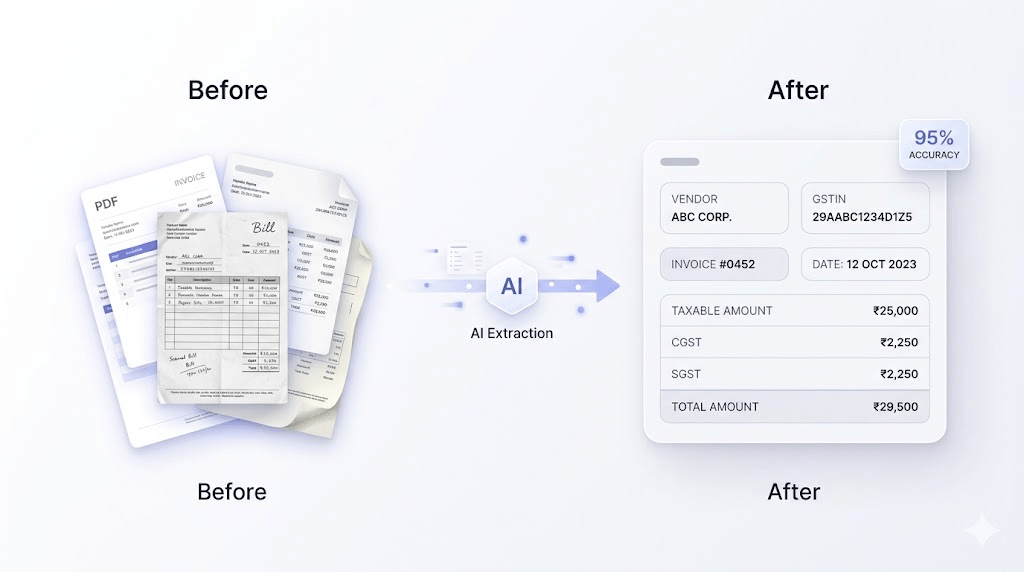
Purchase bill entry in Tally can be automated using AI-powered invoice extraction tools such as AI Accountant. These tools read PDFs, scanned invoices, and even images, extract key GST fields automatically, and push entries directly into TallyPrime.
Accountants can also use TallyPrime’s native Excel import for structured vendor data or rely on API integrations for direct system-to-system entries.
Indian SMBs handling high invoice volumes (100–1000+ bills per month) prefer automation because manual entry is time-consuming, error-prone, and difficult to scale as the business grows.
Why Manual Purchase Bill Entry Becomes a Problem at Scale
Manual purchase entry in Tally may feel manageable at low volumes, but it quickly becomes a bottleneck as invoice count increases.
Manual entry typically takes 10–15 hours for every 100–150 bills. The time lost creates operational consequences including:
- Delays in book closure, impacting reporting and business decisions
- Slower vendor payments, which can strain relationships
- Less time for GST reconciliation and compliance checks
- Increased need for hiring as workload grows
- Higher risk of employee burnout and attrition due to repetitive, low-value work
Over time, accountants spend most of their day on data entry instead of analysis. This leads to frustration, lower job satisfaction, and higher turnover, especially in high-volume environments.
It also introduces predictable human errors. These errors often go unnoticed during entry and only surface later as GST mismatches, especially during GSTR-2B reconciliation or audits, when fixing them becomes more complex and time-sensitive.
The Difference: 50 Bills vs 300 Bills
At lower volumes, manual entry is still manageable. But beyond a certain point, it starts affecting accuracy, timelines, team stability, and overall efficiency.
The Three Methods for Automating Purchase Bill Entry in Tally
Short answer: There are three ways to automate purchase bill entry:
- AI-powered invoice extraction
- Excel import
- API integration
Each method fits a different type of business, depending on invoice volume and format.
Method 1: AI-Powered Invoice Extraction Tools
How it works:
You upload purchase invoices as PDFs, scanned images, or photos. AI tools use OCR and machine learning to extract key fields like vendor name, GSTIN, invoice number, date, line items, CGST, SGST, IGST, and totals.
The system maps this data to your existing ledgers and pushes entries into TallyPrime as purchase vouchers after a quick review step.
Tools that do this: AI Accountant, VouchrIt, etc
Best for:
Manufacturing companies, healthcare businesses, and distributors handling 100+ invoices monthly, especially with mixed formats from multiple vendors.
What stands out:
AI Accountant offers 95%+ accuracy, even for handwritten bills, reducing manual effort significantly.
Limitation:
Accuracy can drop with poor-quality scans or unclear handwriting. A review step is still required for flagged entries.
Method 2: TallyPrime Excel Import
How it works:
Invoice data is first structured into a predefined Excel format. This file is then imported into TallyPrime using its built-in import feature.
There is no OCR involved since the data is already clean and structured.
Best for:
Businesses that receive invoices in Excel or structured formats, such as large distributors or vendors sharing bulk transaction data.
Limitation:
Does not work for PDFs, scanned invoices, or handwritten bills. These still need manual structuring before import.
Method 3: API and Direct System Integration
How it works:
External systems connect directly with TallyPrime via APIs. Invoice data flows automatically from ERPs, procurement tools, or payment platforms into Tally without manual uploads.
This creates a seamless, real-time data flow across systems.
Best for:
Large businesses with ERP systems, vendor portals, or structured procurement workflows. Also useful when integrating payment platforms like Razorpay for syncing transaction data.
Limitation:
Requires technical setup, ongoing maintenance, and structured upstream data. Not suitable for businesses relying on unstructured invoices.
Comparison Table: Which Method Should You Choose?
In most cases, AI-powered tools strike the right balance between flexibility and automation. They work well for Indian SMBs dealing with varied invoice formats without requiring heavy technical setup.
How AI-Powered Extraction Works: Step by Step
Invoice goes in as a PDF or image, AI extracts GST fields and maps the vendor, the accountant reviews and approves, and the entry posts to Tally. The entire process takes minutes per batch rather than hours.
Step 1 - Upload
Purchase invoices are uploaded in bulk - PDFs from email, scanned documents, or image files. Invoices from multiple suppliers can be processed together in a single batch.
Step 2 - Extract
The OCR engine reads each invoice and identifies the accounting-relevant fields: vendor name, GSTIN, invoice number, invoice date, taxable value, CGST, SGST, IGST, and total invoice value. For Indian GST invoices, these fields are extracted to the component level, not just the total.
Step 3 - Map
The system matches each vendor against the existing Tally ledger master. Recognised suppliers are mapped automatically. New suppliers are flagged for manual ledger creation before posting, preventing silent duplicate ledger generation.
Step 4 - Review
The accountant sees a structured queue of extracted entries. Clean entries with high confidence scores can be batch-approved. Flagged entries, such as low confidence, missing fields, or unrecognised vendors, are reviewed individually.
Step 5 - Post
Approved entries are pushed directly into TallyPrime as properly structured purchase vouchers. The source invoice document is attached to the entry for audit traceability.
GSTR-2B Reconciliation After Automated Entry
Automated purchase entry improves GSTR-2B reconciliation by eliminating value mismatches and missing invoices at the entry point. AI Accountant reconciles extracted invoices against GSTR-2B automatically, flagging discrepancies before the filing deadline.
Every purchase invoice from a GST-registered supplier should appear in your GSTR-2B, the government's auto-populated record of your inward supplies. When it does not, or when the values do not match, input tax credit gets blocked or a notice gets generated.
Manual entry creates three types of GSTR-2B mismatches:
Missing invoices - paid but never entered in Tally. The ITC is unclaimed.
Value mismatches - invoice entered with a wrong amount. The ITC claim does not match the GSTR-2B figure.
GSTIN errors - vendor's tax number typed incorrectly. The system cannot match the invoice to the right supplier in the portal.
Automation addresses all three. GSTIN is extracted from the invoice document rather than typed. Invoice values come from the source rather than from manual entry. Missing invoices are caught when GSTR-2B matching identifies portal entries that have no corresponding record in the books.
For a business claiming ₹5–10 lakhs in input tax credit monthly, this reconciliation step, done automatically before filing rather than discovered later, is the highest-value output of the automation process.
What to Look for When Choosing an Automation Tool
Always prioritize GST field accuracy, native TallyPrime integration, vendor master matching, and GSTR-2B reconciliation capability. These four determine whether the tool actually reduces your compliance risk or just speeds up data entry.
GST field accuracy
The tool must extract CGST, SGST, and IGST as separate values, not just the total. A tool that gets the total right but misreads the component breakdown creates a tax ledger problem that is harder to catch than a manual error.
Native TallyPrime integration
The tool should push entries directly into Tally as properly structured purchase vouchers, not export a spreadsheet for manual import. Direct integration handles ledger mapping within Tally's data structure. Manual import introduces an additional step where errors can occur.
Vendor master matching
Suppliers should be matched against existing ledgers automatically. New vendors should be flagged for review, not auto-created, which risks generating duplicate ledgers, and not rejected, which creates a backlog of unposted invoices.
GSTR-2B reconciliation
Purchase entry and GSTR-2B matching should be connected within the same workflow. Reconciliation that requires exporting data and running a separate process adds friction that most finance teams will skip when under deadline pressure.
Bulk processing
Batch upload of 200 invoices processed overnight matters more than elegant single-invoice handling. Evaluate tools on their batch processing reliability, not their demo workflow.
Audit trail
Every automated entry should link back to the source invoice document. If an auditor asks to see the bill behind a specific purchase voucher, it should be one click away, not a manual archive search.
Common Challenges and How to Handle Them
Poor scan quality, complex invoice formats, and unclean vendor masters are the three most common implementation problems. Each has a straightforward fix.
Poor-quality scans
OCR accuracy drops for blurry images, handwritten bills, and invoices photographed at an angle. The fix is process-level: standardise how invoices are captured before upload. A clear PDF from a scanner or a well-lit phone photo produces significantly better results than a crumpled bill photographed under bad lighting. Flag these entries for closer review rather than relying on automation to handle them perfectly.
Complex multi-line invoices
Invoices with 30 or more line items, common in manufacturing and distribution, take longer to extract and are more likely to have field-level errors. Review these individually rather than batch-approving them with single-line invoices.
Vendor master problems
If the existing Tally vendor master has duplicate or inconsistently named ledgers, automation will surface those problems rather than solve them. A vendor master cleanup before implementation, consolidating duplicate ledgers and standardising naming conventions, is worth the one-time effort.
New vendor onboarding
The first invoice from a new supplier always requires manual ledger creation. Build a simple process: flagged new-vendor entries go to one person who creates the ledger and approves the entry. Subsequent invoices from the same supplier are handled automatically.
Who Benefits Most from Automating Purchase Bill Entry
Short answer: Manufacturing companies, healthcare businesses, distribution firms, and CA practices managing multiple clients see the largest impact, in that order.
Manufacturing companies receiving 200 or more raw material, consumable, and logistics invoices monthly. Accurate purchase entry directly affects inventory valuation and COGS, and errors here distort every margin calculation downstream.
Healthcare and diagnostic businesses managing daily consumables alongside equipment invoices and service vendor bills. Invoice format variety is high, volumes are significant, and equipment misclassification, such as booking as consumable instead of fixed asset, affects both P&L and balance sheet.
Distribution and trading businesses where both purchase and sales invoice volumes are high and GSTR-2B reconciliation pressure is greatest. Original entry errors on purchase invoices create the most direct and traceable compliance exposure in this segment.
CA firms managing multiple clients. The leverage effect is largest here, as hours saved on purchase entry across 10 or more clients compound into days each month, shifting capacity from data entry to review and advisory.
Frequently Asked Questions
Can purchase bill entry in TallyPrime be fully automated?
Largely yes, but not entirely. AI-powered tools handle 85–95% of invoices without manual intervention. The remaining 5–15%, such as poor-quality scans, new vendors, and unusual formats, require a review step. The accountant's role shifts from entering every invoice to reviewing exceptions.
Which tools automate purchase bill entry in Tally?
AI Accountant, Suvit and VouchrIt are among the tools that extract invoice data using OCR and push entries directly into TallyPrime. Each integrates with Tally at different levels, so confirm whether the integration creates native purchase vouchers or requires an import step.
How accurate is OCR extraction for Indian GST invoices?
For clean digital PDFs from registered suppliers, accuracy is typically 90–98% on primary fields. GST component extraction, including CGST, SGST, and IGST, is the most critical accuracy requirement. Accuracy drops for handwritten invoices and poor-quality scans.
Does automation work with TallyPrime and Tally ERP 9?
Most tools support TallyPrime. Tally ERP 9 support varies by provider. Confirm compatibility before implementation, and verify whether the integration uses Tally's XML import or a direct API connection.
Will automation create new vendor ledgers in Tally automatically?
Reputable tools flag unrecognised vendors for manual review rather than auto-creating ledgers. Auto-creation risks generating duplicates, the same problem that manual free-text entry creates. Confirm this behaviour before choosing a tool.
How does automated purchase entry help with GSTR-2B reconciliation?
Accurate extraction eliminates value mismatches and GSTIN errors that cause GSTR-2B discrepancies. When combined with automated GSTR-2B matching, as in AI Accountant, the reconciliation runs automatically after entry, surfacing mismatches before the filing deadline rather than during it.
Is automation worth it for businesses processing fewer than 100 invoices a month?
At 50–100 invoices, the time saving is modest, but error reduction is still meaningful. The primary benefit at lower volumes is accuracy, eliminating the commission and original entry errors that manual entry produces regardless of volume. Above 100 invoices, the time saving becomes significant enough to change how the accounting team's month is structured.
What file formats can automation tools process?
Most tools support PDF invoices, scanned documents, JPG and PNG images, and mobile photos. This covers invoices received via email, WhatsApp, and physical copies.

Rohan Sinha is a fintech and growth leader building aiaccountant.com, focused on simplifying accounting and compliance for Indian businesses through automation. An IIT BHU alumnus, he brings hands-on experience across 0 to 1 product building, growth, and strategy in B2B SaaS and fintech.