-01%201.svg)
Key takeaways
- A cash flow dashboard template gives you a ready to use financial control center that consolidates bank balances, inflows, outflows, and trends into one clear view, no complex setup required.
- Real time cash position tracking across all bank accounts eliminates the need to log into multiple portals or reconcile spreadsheets manually.
- Daily dashboard updates paired with weekly reviews help small businesses and CA firms spot payment delays, spending creep, and seasonal dips before they become crises.
- Excel based dashboards offer complete data control, offline access, and zero subscription cost, ideal for Indian SMEs and CA practices on tight budgets.
- Forward looking projections layered onto historical data turn a reporting tool into a decision tool, helping you time vendor payments, plan hiring, and negotiate better terms.
- For CA firms managing dozens of clients, AI Accountant's bookkeeping automation eliminates the manual grind of statement extraction and transaction categorization, so clean data flows into dashboards without spreadsheet chaos.
Cash Flow Dashboard Templates: What's New in 2026
Dashboard workflows have shifted meaningfully since early 2025, driven by regulatory changes and faster adoption of automation across Indian finance teams.
Until March 2025, GST e-invoicing applied to businesses with turnover above ₹5 crore. From April 2025, the threshold dropped to ₹1 crore, as notified by the Central Board of Indirect Taxes and Customs (CBIC). This pulled lakhs of additional SMEs into the e-invoicing net, meaning cash flow dashboards now need to account for IRN generation timelines and their impact on receivables aging. If your template does not tag e-invoice status against outstanding invoices, you risk misjudging collection timelines.
The GST portal also introduced enhanced GSTR-2B reconciliation in late 2025, tightening ITC claim windows. CA firms that rely on manual matching between purchase registers and GSTR-2B now face higher rejection rates. Dashboards tracking payables should flag invoices where supplier filing status is pending, because unclaimed ITC directly erodes your effective cash position.
On the banking side, RBI's 2025 push toward real time account aggregation means more businesses can pull consolidated bank data through APIs instead of downloading CSVs from five different portals. This changes the daily update workflow: what once took 30 minutes of downloads and imports can now happen in under five minutes with the right automation layer.
The cost of ignoring these shifts is concrete. Missed e-invoicing deadlines attract penalties of ₹10,000 per invoice under Section 122 of the CGST Act. Unclaimed ITC due to reconciliation gaps locks up working capital that shows as "available" on an outdated dashboard but is not actually recoverable.
What to do now:
- Audit your dashboard categories to include e-invoice status and GSTR-2B match flags by the end of this quarter.
- Replace manual CSV downloads with API based bank feeds wherever your bank supports it.
- Review ITC exposure by running a reconciliation against the latest GSTR-2B for all active clients.
Teams using automated GST reconciliation can surface mismatches the day GSTR-2B is published, keeping dashboard cash figures aligned with actual recoverable amounts.
Table of contents
- What is a Cash Flow Dashboard?
- Key Features of Our Free Dashboard Template
- How to Download Cash Flow Dashboard Template
- Benefits of Using Cash Flow Dashboard Excel
- Cash Flow Analysis Dashboard Components
- Small Business Cash Flow Dashboard Best Practices
- Financial Dashboard for CA Firms
- Business Cash Flow Tracker Setup Guide
- Cash Flow Reporting Dashboard Benefits
- Free Tools and Templates Available
- Common Mistakes to Avoid
- Conclusion
- FAQ
What is a Cash Flow Dashboard?
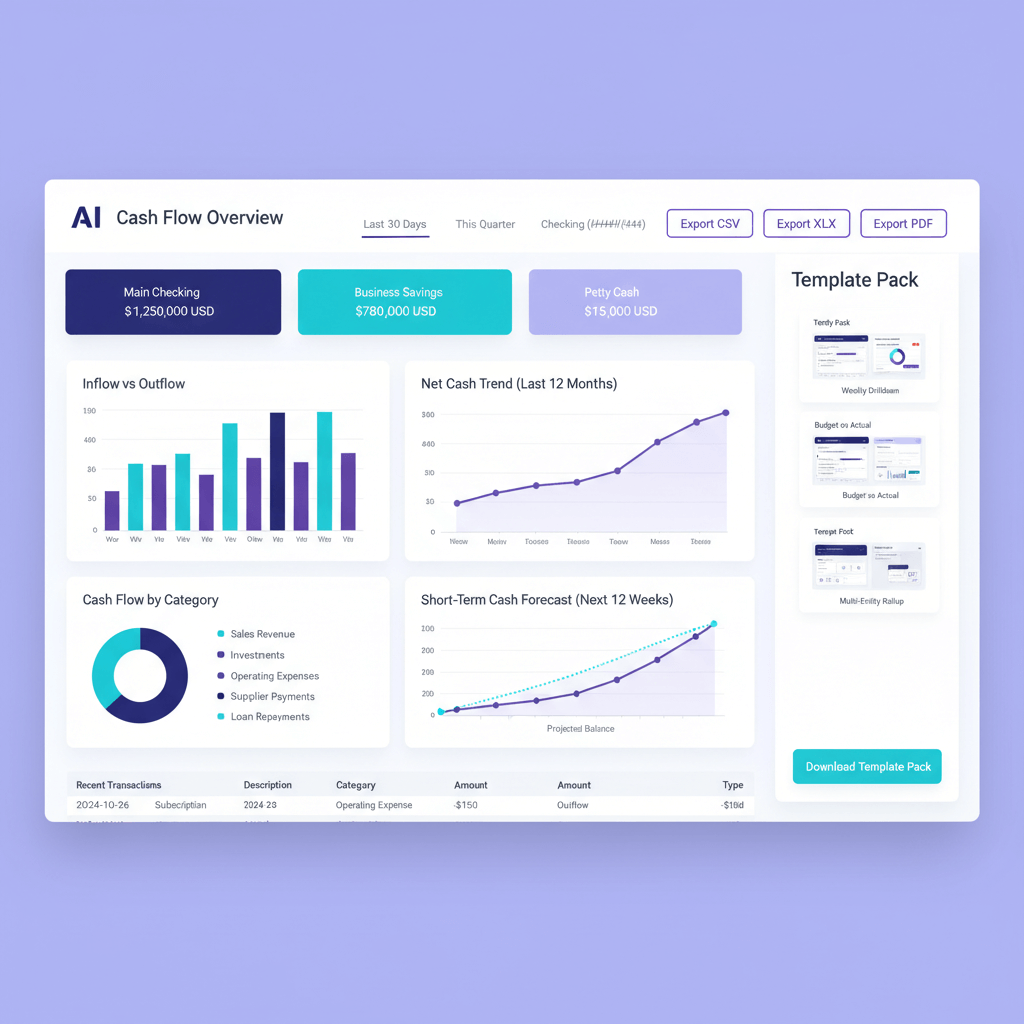
A cash flow dashboard is your financial control center. It consolidates bank statements, accounting records, and payment data into one clear view. Instead of drowning in spreadsheets, you see how much cash you have, where it is coming from, and where it is going.
Picture this: Monday morning, you open your laptop. Within seconds you know current balances, receivables due, vendor obligations, and payroll readiness. A strong cash flow dashboard template delivers answers before you ask the questions.
Most reports tell you what happened last month. A dashboard tells you what is happening right now.
For CA firms managing multiple clients, dashboards multiply impact. Switch between entities in seconds, strengthen advisory conversations, and reduce routine reporting effort.
According to ICAI guidance on practice management, real time financial visibility is increasingly considered a baseline expectation in client servicing, not a premium offering.
Start with a free cash flow dashboard template, then tailor it to your chart of accounts and workflows.
Key Features of Our Free Dashboard Template
Real time cash position tracking
See your exact cash position, combined and per account. Gain confidence in decisions without logging into multiple banking portals.
This single view eliminates the guesswork that comes from checking three bank apps and a credit card statement separately.
Inflow and outflow visualization
Categorized streams make patterns obvious. Customer payments, loans, vendor payouts (sometimes called disbursements), and salaries each get their own color and trend line. Risks and opportunities stand out at a glance.
Monthly and weekly trend analysis
Toggle time views instantly. Compare months, examine week by week cash crunches, and uncover seasonal rhythms that shape working capital needs.
This is especially useful for businesses with cyclical revenue, such as retail or agriculture linked SMEs.
Automated bank reconciliation markers
Smart flags highlight unmatched items, duplicates, and gaps. Reconciliation (the process of matching your books to bank records) shifts from days to hours. Clarity replaces guesswork.
Category wise spending breakdown
Operations, marketing, salaries, utilities: customize categories to mirror your chart of accounts. Review current month, budget comparisons, and year to date totals.
Customizable alert thresholds
Set warning levels for low balances, high spend, and overdue receivables. Prominent alerts ensure you act on the issues that matter most, not the ones that shout loudest.
How to Download Cash Flow Dashboard Template
- Access the template: visit the library and download. You get Excel and Google Sheets versions with sample data to understand structure before importing your own numbers.
- Choose your format: Excel for offline speed and macros, Google Sheets for real time collaboration and multi user updates.
- Import your data: Tally exports, Zoho Books connections, or manual records via a data entry sheet that feeds the dashboard automatically.
- Customize categories: align income and expense groups to your chart of accounts. Merge or rename as needed. The dashboard updates instantly.
- Set preferences: financial year start, currency symbol (₹ for most Indian businesses), date format, alert thresholds, and primary metrics. Save once, use daily.
Initial setup takes about 30 to 45 minutes. Once configured, updates happen as new transactions (ledger entries) arrive. No advanced technical skills required.
Download the free cash flow dashboard template and begin with the sample walkthrough.
Benefits of Using Cash Flow Dashboard Excel
Complete control over your data
Your data stays with you. Local files, no subscriptions, and no internet dependency. Sensitive financial information remains under your control, an important consideration given RBI's data localization guidelines for financial records.
Familiar interface
Finance teams know Excel. Adoption is immediate. Formulas and custom reports evolve as your needs grow.
Seamless workflow integration
Bank CSVs, budgets, and management reports link smoothly. Export charts for presentations without compatibility headaches.
Advanced calculations
Weighted average terms, scenario modeling, payment policy simulations: Excel handles complex logic inside one dashboard file.
Offline continuity
Month end closing continues even during internet outages. Travel days do not block visibility into cash positions.
Customization without coding
Modify charts, alerts, and layouts through standard Excel features. No developer queue required.
Cost efficiency
Use existing licenses. Avoid per user fees. Keep total cost low for small teams and startups, particularly relevant for bootstrapped Indian SMEs watching every rupee.
Cash Flow Analysis Dashboard Components
Executive summary panel
Instant metrics: current cash, net flow, days of cash left, and quick ratio. Decision makers get clarity at a glance.
Think of this as your dashboard's homepage. If a founder or partner only looks at one section, this is the one.
Receivables aging tracker
Outstanding invoices sorted by bucket: 0 to 30 days, 31 to 60 days, and over 60 days. Prioritize collections and surface chronic delays early.
Payables management view
Upcoming vendor obligations (vendor invoices and bills) sorted by due date. Track totals, terms, and early payment discounts to optimize cash usage.
Bank balance trends
Daily and weekly lines reveal rhythms. Mid month dips, end month surges. Overlay multiple accounts for combined insight.
Cash conversion cycle metrics
DSO (days sales outstanding), DPO (days payable outstanding), and inventory turnover tie operations to cash realities. Improvements here directly strengthen liquidity.
Variance analysis
Actual versus budget by category. Green for positive, red for negative. Percentage gaps highlight where to investigate.
Scenario modeling tools
Delay a large receipt, accelerate sales, adjust payment terms. Compare scenarios side by side to build contingency plans. This is where a reporting tool becomes a planning tool.
Small Business Cash Flow Dashboard Best Practices
- Update daily, review weekly: ten minutes each morning keeps data current. A Friday deep dive drives plans for the coming week.
- Track leading indicators: quotes in pipeline, payment behavior shifts, upcoming term changes. Act before issues escalate.
- Start simple: cash in, cash out, and balance. Then layer advanced metrics as adoption grows.
- Assign ownership: one person maintains the dashboard, resolves discrepancies, and trains other users.
- Attach decisions: make the dashboard central to vendor payment runs, period close, and planning sessions for consistent usage.
- Document categories: define what belongs where. Ensure consistency across users. Support audits and onboarding.
- Right size alerts: set thresholds that trigger action, not noise. Revisit quarterly.
- Add context: annotate one time events, explain unusual transactions (such as large advance tax payments in March and September), and flag large upcoming obligations.
Financial Dashboard for CA Firms
CA practices need multi client visibility, compliance tracking, and standardized reporting, all in one place.
- Multi client architecture: switch entities quickly, isolate data by client, maintain customized categories and reporting formats.
- Compliance tracking: GST, TDS, and advance tax calendars. Color coded views for due, upcoming, and overdue items. This aligns with the quarterly and monthly filing schedules published on the Income Tax Department portal.
- Client profitability analysis: time spent, fees realized, and margin by engagement. Support pricing and scope decisions.
- Working paper integration: link dashboard figures to documentation. Accelerate reviews and train junior staff.
- Standard reporting templates: cash summaries, aging reports, and forecasts. Customize once, scale across clients.
- Audit trail: track who changed what and when. Strengthen governance and compliance.
- Collaborative workflows: match access to roles (partners, managers, and staff). Protect data across portfolios.
Combine your dashboard with AI Accountant to automate bank and ledger extraction, categorize transactions with machine learning, and feed clean data into dashboards without the manual grind.
The result is faster reporting cycles, fewer errors, and more time for advisory work.
Business Cash Flow Tracker Setup Guide
Gather your data sources
List every source: bank and card statements, accounting exports, payment gateway logs, expense apps, and cash registers. Missing even one source creates blind spots.
Standardize your chart of accounts
Merge duplicates. Align to tax needs. Separate revenue streams by product or service to improve visibility.
Set up bank connections
Use direct feeds where possible. Otherwise establish a consistent CSV format, date range, and a clear folder structure for downloads.
Configure opening balances
Enter bank starts, receivables, payables, uncleared checks, and pending transfers. Anchor reality from day one.
Build import templates
Bank template: date, description, debit, credit. Invoice template: customer, amount, due date. Payment template: vendor, amount, method. Consistent formats prevent import errors.
Test with sample data
Import one week of data. Validate calculations and category mappings. Confirm charts render correctly. Fix mapping issues early before rolling out to the full team.
Establish update procedures
Document download sources, import orders, and exception handling for refunds and inter account transfers. Consistency beats ad hoc habits every time.
Create backup protocols
Automate cloud backups. Keep local copies. Run quarterly restore tests. Protect financial history from accidental loss or corruption.
Cash Flow Reporting Dashboard Benefits
Faster decisions
Discounts, equipment purchases, hiring: make calls in minutes because relevant cash data is already visible. No waiting for the accounts team to compile a report.
Improved stakeholder communication
Generate executive ready visuals. Help lenders and investors understand trends quickly. Reduce explanation time during board meetings or bank reviews.
Early problem detection
Spot subtle shifts in payment behavior and creeping expenses. Act before risks turn into crises.
Stronger negotiating position
Use data to obtain better terms, secure financing, and justify timing flexibility with suppliers.
Reduced team stress
Replace manual uncertainty with automated clarity. Let analysts focus on insights rather than data compilation.
Better forecasts
Historical trends sharpen projections. Budgets become realistic. Cash planning becomes accurate.
A dashboard becomes even more valuable when paired with structured cash flow forecasting. By combining historical trends with expected receipts and payments, businesses can anticipate shortages early and make better funding and spending decisions.
Compliance documentation
Maintain audit trails and reconciliations. Accelerate assessments and prove control frameworks to auditors and regulators.
Operational efficiency
Time saved on reporting shifts to profitability analysis and strategy. These gains compound as the business grows.
Free Tools and Templates Available
- Cash Flow Forecast Template: project 12 weeks forward, run sensitivity analysis, and prepare for shortfalls before they occur.
- Invoice tracking spreadsheet: monitor creation to payment, compute average days to pay per customer, and target chronic late payers.
- Expense budget planner: plan by category and month, compare actual versus budget, and project full year run rate.
- Bank reconciliation worksheet: import statements, auto match entries, highlight differences, and track uncleared items to closure.
- Payment calendar template: visualize obligations across the month. Schedule payment runs to smooth out daily peaks.
- ROI calculator for cash management: quantify returns from early payment discounts, extended terms, and financing choices.
- Vendor payment optimizer: prioritize vendor invoices to capture discounts while maintaining healthy liquidity.
Pair these resources with AI Accountant to automate data extraction from statements and ledgers, reduce entry errors, and feed dashboards that you trust.
Common Mistakes to Avoid
- Mixing personal and business transactions: keep accounts clean. Reimburse documented out of pocket spending properly.
- Ignoring small recurring expenses: subscriptions and fees compound. Track them to prevent silent cash drains.
- Overusing miscellaneous categories: specificity reveals patterns. Review and recategorize regularly.
- Updating sporadically: establish daily or weekly routines. Consistency preserves accuracy.
- Skipping reconciliation: uncleared items distort reality. Reconcile at least weekly.
- Missing seasonal patterns: track over a full year. Plan cash buffers for slow periods, such as post Diwali demand dips in retail or Q1 slowdowns in services.
- Staying purely historical: add forward projections. Prepare for upcoming obligations and receipts.
- Making the dashboard too complex: start simple. Add metrics as adoption grows.
Conclusion
Cash flow clarity is achievable with the right tools and rhythm. Begin with a free cash flow dashboard template, tailor categories to your business, and commit to daily updates.
Whether you are a small business owner or a CA handling multiple entities, these dashboards deliver confidence, reduce stress, and improve outcomes.
Take action today: download, import, and experience the difference. Your future decisions will be faster, your financial conversations will be clearer, and your cash will work harder for your goals.
FAQ
What is a cash flow dashboard template and who should use it?
A cash flow dashboard template is a pre built Excel or Google Sheets file that visualizes your business inflows, outflows, and cash balances in one view. It is designed for small business owners, CA firms managing multiple clients, startup founders, and finance teams who want instant cash visibility without building reports from scratch. Import your bank and accounting data, customize categories, and start tracking within 30 to 45 minutes.
How should a CA reconcile dashboard figures with Tally ledgers, step by step?
Export Tally vouchers for the period, import bank statements into the dashboard, and run reconciliation to match amounts and dates. Investigate unmatched items, post adjustments in Tally, and re export to validate. An AI assisted approach with AI Accountant can auto categorize bank lines, reducing manual mapping time and errors.
What alert thresholds are practical for low cash balances in SME clients?
Set two layers: a caution level at one payroll cycle of cash, and a critical level at half a cycle. Adjust for seasonality and payment variability. Document thresholds client by client, and let the dashboard trigger email or in app reviews.
How can a CA automate bank statement ingestion and categorization?
Create standardized CSV formats, align columns to the dashboard import template, and apply rules for narration based categorization. With AI Accountant, upload statements and let the model classify inflows and outflows, then push the clean dataset into Excel or Google Sheets dashboards for instant visualization.
What is the best way to track GST, TDS, and advance tax in a cash flow dashboard?
Maintain dedicated compliance categories and a payment calendar view. Tag liabilities when returns are prepared, convert tags to payable events on their due dates, and reconcile after payment. Dashboards should highlight upcoming statutory obligations two weeks in advance. With the e-invoicing threshold now at ₹1 crore (2026 update), ensure your template also flags IRN generation status against receivables.
How do I treat inter account transfers to avoid double counting in my cash flow dashboard?
Tag transfers as neutral cash movement and exclude them from inflow or outflow totals, but include them in account balance trends. For contra entries, map the counterpart to a transfer category. Verify both sides reconcile to bank lines, and ensure net cash remains unaffected. This is one of the most common errors in multi account dashboards.
What is the simplest way to add forward looking cash projections to a historical dashboard?
Combine the main dashboard with a 12 week cash flow forecast template. Input expected receipts and payments, then merge projection charts alongside actual trend lines. Maintain assumptions in a separate sheet and track forecast accuracy monthly to improve over time.

Rohan Sinha is a fintech and growth leader building aiaccountant.com, focused on simplifying accounting and compliance for Indian businesses through automation. An IIT BHU alumnus, he brings hands-on experience across 0 to 1 product building, growth, and strategy in B2B SaaS and fintech.



