-01%201.svg)
Key takeaways
- A revenue expense dashboard in India must show net revenue (excluding GST), refunds as contra lines, fixed versus variable costs, and segment level profitability to give founders daily control without touching journals.
- The operational dashboard is separate from the statutory P&L: use the first for daily cost control and channel mix decisions, and the second for board packs, filings, and audits.
- Include drillable KPI cards for gross margin percent, operating margin percent, and net profit alongside contribution bridges that decompose profit changes into price, volume, mix, and expense drivers.
- Segment every metric by product, channel, customer type, geography, and cost center so each filter reveals a mini P&L, exposing where margin leaks hide.
- Variance analysis (actual versus budget and prior period) backed by waterfall charts turns vague narratives into numbered decisions, reducing month end review time significantly.
- When transaction volume grows, manual categorization breaks down. Automated MIS reporting from AI Accountant surfaces these operational views directly from Tally data, so CA teams and founders see accurate numbers without spreadsheet rework.
Revenue Expense Dashboard in India: What's New in 2026
Until March 2025, GST e-invoicing applied only to businesses with aggregate turnover above ₹5 crore. From April 2025, the threshold dropped to ₹1 crore, pulling lakhs of additional SMEs into the e-invoicing net. This matters for dashboard design because every outward supply now generates a structured IRN that feeds directly into GSTR-1 auto-population. Your revenue figures must reconcile to these IRNs, not just internal billing systems.
Operationally, this means the dashboard data pipeline needs a validated e-invoice reference for each sales entry. Mismatches between your billing software totals and the GST portal's auto-drafted returns create ITC blocks for your buyers and compliance flags for you. Penalties for non-generation of e-invoices stand at ₹10,000 per invoice (or 100% of tax due, whichever is higher) under CBIC's penalty provisions for e-invoice non-compliance.
Who gets hit hardest? SMEs between ₹1 crore and ₹5 crore turnover, especially those on Tally or legacy ERPs without native e-invoice APIs. These firms now need real time validation before the dashboard can even show accurate net revenue.
What to do now:
- Confirm your billing system generates IRNs for every B2B invoice before month end close.
- Reconcile dashboard revenue totals against the GST portal's GSTR-1 auto-draft monthly, not quarterly.
- Ensure refunds and credit notes also flow through the e-invoice cancel or amend workflow so contra revenue stays clean.
Teams using AI Accountant's GST reconciliation engine can match e-invoice data against Tally ledgers automatically, catching mismatches before they become notices. The goal is simple: your operational dashboard numbers and your statutory filings should never disagree.
CA-led Virtual Accounting, at a glance
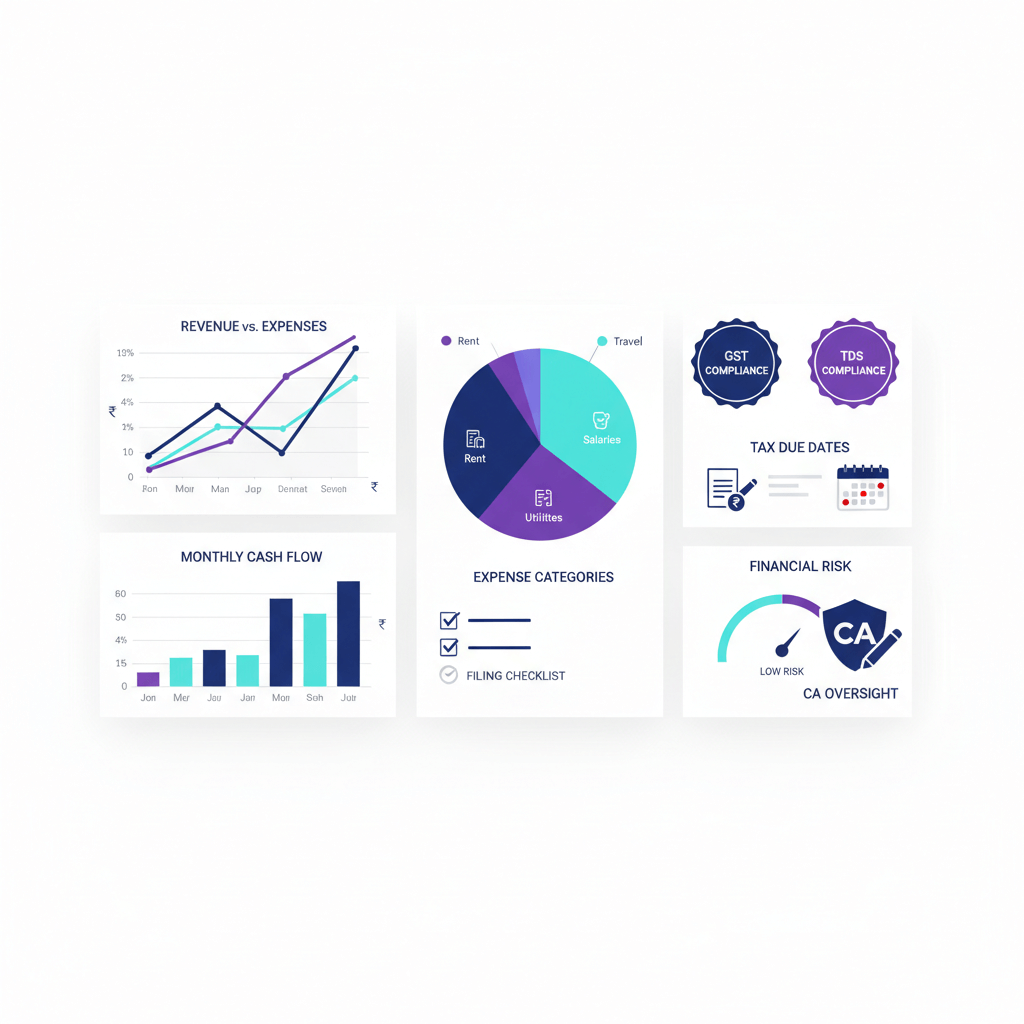
Virtual Accounting should feel simple and safe. A CA team handles your books, GST, TDS, income tax, payroll compliance, and monthly closes. The AI dashboard sits on top for visibility. It shows revenue, expenses, and profitability trends, with drill downs, alerts, and commentary threads. You get clarity without touching journals or ledgers.
Founders and finance heads stay in control of outcomes, while Chartered Accountants do the accounting work.
With CA led processes, you get maker checker workflows, reconciliations, and compliance hygiene. With the AI dashboard, you get daily and monthly signals, segment views, and contribution analysis you can act on.
Important: the dashboard is not for self accounting. It is for oversight, tracking, and evidence that everything is posted, reconciled, and reviewed.
Revenue expense dashboard versus profit loss dashboard
A revenue expense dashboard is deliberately operational. It helps teams break down revenue by product, channel, and customer segment. It tracks refunds and discounts and makes expense behavior obvious.
A profit loss dashboard mirrors the statutory income statement format. It is suitable for board packs, filings, and audit trails. For deeper context see ICAI guidance on financial statement formats.
Use the revenue expense dashboard for ongoing tracking and cost control. Use the profit loss dashboard for structured reporting and ratios.
Mixing these use cases confuses decisions. Teams miss discounts, returns, or channel mix effects because the view is not tuned to the question: what is driving revenue, expenses, and profit.
Revenue metrics to include
Revenue is the top line. If it is not clean, growth decisions go wrong. Build drillable cards for the following metrics.
- Total revenue for the selected period, with month to date and year to date views.
- Revenue by category, product or service line, and by channel (direct, distributor, marketplace, e commerce).
- Recurring versus one time revenue: subscription, AMC, and maintenance versus projects.
- Refunds, discounts, and returns as separate negative lines. Keep gross and net revenue visible.
- Revenue growth rate: current minus prior, divided by prior, multiplied by 100.
These views answer where growth is coming from, and whether it is healthy. They prevent chasing volume that destroys margin.
Expense metrics to include
Expenses decide how much revenue turns into profit. Structure expense views with clear classification to support variance analysis and unit economics.
- Total expenses with month to date and year to date views. This is your burn rate and annual trend.
- Fixed versus variable expenses: rent, core salaries, insurance versus raw materials, commissions, shipping, payment gateway fees.
- Expense category breakdown: payroll and benefits, rent and utilities, marketing and advertising, technology and software, travel and admin.
- COGS or cost of services separated from operating expenses.
- Expense growth rate overall and by category: current minus prior, divided by prior, multiplied by 100.
Clean classification prevents leaks. Misclassification also causes wrong tax positions and notices under the Income Tax Act provisions for disallowance of expenses.
Derived profitability summaries
Connect top line and cost lines to outcomes. These derived KPIs show the quality of your revenue and prevent margin dilution.
- Gross profit equals revenue minus COGS.
- Gross margin percent equals gross profit divided by revenue, multiplied by 100.
- Operating profit or EBIT equals gross profit minus operating expenses. Exclude interest and tax.
- Operating margin percent equals operating profit divided by revenue, multiplied by 100.
- Net profit equals operating profit minus interest minus taxes, plus or minus other income and expenses.
- Revenue run rate for fast growing businesses: latest period multiplied by periods per year.
These summaries prevent cash stress by surfacing margin pressure early.
Margin interpretation tips
Use contribution bridges to separate price, volume, and mix effects. Isolate discount impact, shipping surcharges, or marketplace fees. A small change in mix can move gross margin percent meaningfully.
For example, a D2C brand selling through both its own site and a marketplace might see 55% gross margin on direct orders but only 38% through the marketplace after commissions. Without segment level margin views, the blended number hides a structural problem.
Time views to reveal trends and momentum
Static numbers hide seasonality, momentum, and volatility. Build time views that put spikes and slumps in proper context.
- Daily, weekly, monthly trends for revenue, expenses, and profit using line charts.
- Month to date and year to date progress, with targets or budgets where relevant.
- Period over period comparisons: month over month, quarter over quarter, year over year.
- Rolling averages: 7 day, 30 day, and 3 month smoothing.
These views prevent knee jerk reactions. A single bad week looks alarming on a daily chart but irrelevant on a 90 day rolling average.
Segmentation and filters that explain where and why
Segments explain drivers. Filters let managers see segment level profit inside the same dashboard.
- Product or service line.
- Customer segment: enterprise, SME, retail.
- Geography: state, region, country.
- Sales channel: direct, partner, e commerce, marketplace.
- Project or contract.
- Cost center or department.
All metrics should update with these filters. Revenue, COGS, operating expenses, and profit should all respond so every segment reveals a mini P&L.
This is especially useful for marketplace sellers who need to isolate commissions, shipping costs, and returns by platform. Without it, blended numbers mask channel level losses.
Visualizations that best surface patterns
Choose visuals that reduce confusion and accelerate review.
- Line charts for revenue, expenses, profit, growth rates, and margins over time.
- Stacked bar charts for revenue mix by product, channel, geography, and expense mix by category.
- Waterfall charts from gross revenue to net revenue to gross profit to operating profit to net profit.
- Heatmaps for seasonality or concentration: months by product lines or expenses by department versus month.
- KPI cards for revenue, expenses, gross margin percent, operating margin percent, and net profit.
Good visuals make rising discounts, shifts to low margin channels, and unit economics gaps obvious at a glance.
Variance and contribution analysis views
Variance shows whether you are on plan. Contribution analysis explains what changed and by how much.
- Actual versus budget or forecast for revenue, COGS, key expense categories, and profit, with variance value and percent.
- Actual versus prior period: month over month, quarter over quarter, year over year.
- Contribution analysis: break net profit change into drivers (revenue volume, price, mix, COGS changes, and specific expense categories).
- Waterfall or bridge charts to visualize net profit change versus last month.
Quantify impact to prevent vague narratives. Numbers drive decisions when stories are backed by bridges. For instance, if net profit dropped ₹3 lakh month over month, the bridge might show ₹1.5 lakh from higher shipping costs and ₹1.5 lakh from increased discounts, making the corrective action obvious.
Data inputs and classification with Indian GST handling
A dashboard is only as good as its data, and the tax treatment behind it.
- Consistent chart of accounts: separate revenue types, COGS, operating expenses, finance costs, taxes, other income or expense.
- Choose cash basis or accrual basis. Label it clearly. Accrual is usually better for performance analysis.
- Handle Indian GST correctly: show revenue net of GST in the dashboard. Maintain GST ledgers separately in the books.
- Record refunds, credit notes, and discounts in contra revenue accounts. Keep gross and net revenue clear.
- Use tagging for categories and segments: capture product, service, customer segment, geography, channel, project IDs, and cost center codes at source.
These controls prevent errors that turn into tax notices or wrong decisions. Overstating revenue by including GST or double counting marketplace fees are common traps. The GST portal's return filing guidelines require that taxable value excludes GST, so your dashboard should match this treatment exactly.
Common pitfalls to avoid
Some mistakes repeat across Indian businesses. They break trust in numbers and lead to penalties.
- Mixing cash and accrual data in the same view. Always label accounting basis.
- Inconsistent categorization: the same cost posted to COGS and operating expenses. Enforce posting rules.
- Not flagging one offs or non recurring items. Trends and run rates get misread.
- Double counting when pulling from multiple systems. Define a single source of truth.
- Timing errors: accrue expenses and defer revenue where needed. Amortize prepaid costs.
Governance and reconciliations protect decisions. Cash surprises reduce. Vendor payments stay on schedule.
What the AI dashboard gives founders and finance heads
The dashboard is a comfort layer, not a do it yourself accounting tool. You get daily signals, clean drill downs, and CA commentary. The CA team continues to post, reconcile, and file.
- Real time KPI cards for revenue, expenses, gross margin percent, operating margin percent, net profit, with MTD and YTD views.
- Segment filters by product, channel, customer segment, geography, project, and cost center.
- Refunds and discounts tracked as contra lines. Gross versus net revenue clarity.
- Variance and contribution bridges that explain net profit movement: price versus volume versus mix.
- Workflow views: month end close status, reconciliations completed, GST, TDS, and tax filings calendar.
- Commentary threads: CA notes on anomalies, and follow ups on data quality issues.
Outcome: founders review drivers and approve actions, CAs execute accounting and compliance.
Implementation steps and handoffs
Implementation is structured so the dashboard stays reliable and the books stay compliant.
- Discovery and scope: chart of accounts review, segment taxonomy, compliance calendar.
- Data piping: connect accounting, billing, ERP, and bank feeds. Define single source of truth.
- Classification rules: fixed versus variable, COGS versus OPEX, discounts and refunds via contra accounts.
- Indian GST handling: revenue net of GST, separate ledgers, reconciling outward and inward supplies.
- Dashboard build: revenue expense views, profitability summaries, time trends, segmentation filters, visuals, and bridges.
- UAT and sign off: compare to trial balance and P&L. Variance tolerances defined.
- Run: monthly closes, reconciliations, commentary, and continuous improvement.
Governance, security, and audit comfort
Governance safeguards are embedded: access controls, maker checker approvals, audit trails, and evidence capture.
- User roles for founders, finance heads, and auditors. Read only dashboard access for reviewers.
- Change logs for mapping and classification rules.
- Document vault for GST workings, TDS reconciliations, and tax computation papers.
- Month end checklists, close status, and exception reports.
Audit comfort grows when the dashboard ties back to the books and reconciliations are visible with CA notes. This aligns with ICAI Standards on Auditing requirements for documented evidence of internal controls.
Who is this for
Indian SMEs, startups, and mid market companies that want daily visibility with CA managed rigor.
- Product and D2C brands that need clean channel mix views.
- SaaS and subscription businesses that track recurring versus one time and churn.
- Services and projects firms that need project level profitability and billing versus collection clarity.
- Marketplace sellers that must isolate commissions, shipping, and returns.
Pricing models and scope boundaries
Typical pricing uses monthly retainers based on transaction volume, entities, and compliance scope.
- Core scope: bookkeeping, GST, TDS, payroll compliance, monthly closes, dashboard access.
- Add ons: consolidation, multi entity reporting, audit support, due diligence packs.
- Out of scope examples: founders posting entries, redoing legacy books without a separate cleanup mandate, litigation representation unless contracted.
- SLAs: monthly close by a defined day, GST and TDS filings per statutory timelines, dashboard refresh cadence daily for operational metrics, monthly for audited metrics.
FAQ
What does CA-led Virtual Accounting mean versus a software only solution?
CA-led Virtual Accounting means a Chartered Accountant team performs bookkeeping, GST, TDS, payroll compliance, and monthly closes, while the AI dashboard provides visibility and analysis. You do not post entries yourself. You review trends, segment profitability, and CA commentary, with the CA team handling all accounting work and statutory filings.
Can founders use the dashboard to do accounting themselves?
No, the dashboard is designed for visibility, tracking, and comfort, not for self accounting. Founders and finance heads review revenue, expenses, profitability, variances, and segment drivers. The CA team posts, reconciles, and files.
How is a revenue expense dashboard different from a profit loss dashboard in practice?
The revenue expense dashboard is operational: it breaks down revenue by product, channel, and customer segment, and shows refunds, discounts, and expense behavior for daily control. The profit loss dashboard mirrors the statutory income statement format used for board review, filings, and audits.
How do you classify expenses to improve control and unit economics?
Split fixed versus variable, keep COGS separate from operating expenses, and categorize into payroll, rent, utilities, marketing, technology, travel, and admin. This structure supports variance analysis and contribution bridges that explain profit changes by driver, making monthly reviews faster and more actionable.
How is Indian GST handled so revenue is not overstated?
Revenue is shown net of GST in the dashboard, with GST ledgers maintained separately in accounting. Refunds and credit notes are recorded through contra accounts. From April 2025, businesses above ₹1 crore turnover must generate e-invoices, and dashboard revenue totals should reconcile to IRN validated amounts on the GST portal (2026 update).
What governance and audit comfort do I get with CA-led service?
You get maker checker workflows, reconciliations, close checklists, change logs, and CA commentary embedded in the dashboard. Audit trails are visible, and reviewers can trace dashboard KPIs back to books and working papers, meeting ICAI Standards on Auditing documentation requirements.
How quickly can we go live, and what handoffs are required?
Most implementations complete in two to four weeks. You provide the chart of accounts, system access, segment taxonomy, and compliance calendar. The team sets up data pipelines, classification rules, GST handling, and validates dashboards against the trial balance before go live.