-01%201.svg)
Key takeaways
- Task management software for bookkeeping teams eliminates deadline chaos by embedding India's compliance cadence (monthly GST, quarterly TDS, annual ITR, statutory audits) into recurring templates with built-in SLA timers and escalation logic.
- Clear task ownership with reviewer and approval stages, plus internal deadlines set two days before statutory dates, prevents last minute firefighting during peak seasons like March and September.
- Capacity dashboards with drag and drop redistribution improve utilization by 15 to 20%, prevent burnout, and protect filing quality even during surge periods.
- Role based progress views cut status meetings: partners see firm wide completion rates, managers see team capacity, and staff see exactly what needs attention next.
- Recurring templates with conditional logic (e.g., add e-invoice checks above ₹5 crore turnover) reduce manual task creation, errors, and rework across hundreds of clients.
- When reconciliations and bank statement processing complete, AI driven bookkeeping automation can trigger review tasks automatically, closing the gap between data work and human judgment.
- Start with one pain point (GST returns or missed reviews), run a 30 day pilot, measure on time filing rates, then expand, waiting for perfection costs more than iterating early.
Task Management for Bookkeeping Teams: What's New in 2026
Until March 2025, the GST e-invoicing threshold sat at ₹5 crore turnover. From April 2025, it dropped to ₹5 crore for all remaining businesses, pulling a significant chunk of SMEs into the e-invoicing net for the first time. For bookkeeping teams managing multiple clients on Tally, this means new subtasks in every GST workflow: generating IRNs, validating JSON schemas, and reconciling e-invoice data against GSTR-1 before the 11th.
India's Digital Personal Data Protection (DPDP) Act 2023 enforcement rules are now active. CA firms handling client financial data must ensure task management platforms store data within India, maintain consent records, and support data erasure requests. Non-compliance penalties reach up to ₹250 crore under the DPDP Act provisions. Every firm should audit their tool's data residency and retention policies now.
On the AI front, 2026 platforms use machine learning on historical task data to predict crunch weeks, flag burnout risk two weeks ahead, and auto-generate tasks from bank feeds and email parsing. Firms adopting these capabilities report 25 to 40% reduction in late filings and 10 to 15% capacity gain without adding headcount.
What to do now:
- Confirm your task platform meets India data residency requirements before July 2026 enforcement reviews.
- Update GST workflow templates to include e-invoice generation and IRN validation steps for all clients above ₹5 crore.
- Enable predictive workload alerts if your tool supports them, or evaluate platforms that do.
For firms already running automated GST reconciliation, the transition is simpler: reconciliation outputs feed directly into task triggers, so review tasks appear the moment data is ready rather than when someone remembers to check.
What Makes Task Management Software Different for Chartered Accountants
The Compliance Cadence
Your practice runs on India's regulatory heartbeat. Monthly GST returns, quarterly TDS, annual ITR, plus audits with fixed timelines. CA specific platforms bake these cycles into task templates and calendar logic.
Tools like MyTask, Turia, and Practive come preloaded with Indian compliance calendars. They know GSTR-1 on the 11th, GSTR-3B on the 20th, and advance tax quarters. From April 2025, these calendars also factor in e-invoicing obligations for businesses crossing the ₹5 crore threshold, per CBIC Notification No. 10/2023.
Compliance tasks are repetitive by design. The winning system replaces memory and manual lists with reliable templates and reminders.
Integration with Your Existing Stack
Your books live in Tally, client documents in email and Drive. CA task software should connect these systems. It pulls client masters, pushes status, and reflects reconciliations on one dashboard. You see pending Tally reconciliations next to upcoming GST filings without switching screens.
Bi-directional sync matters. When a ledger entry updates in Tally, the linked task should reflect it. When a task moves to "filed," the client master should log the completion date automatically.
Built-in Security and Audit Trails
Client financial data requires serious security. Look for ISO 27001 and SOC 2 certifications. Under the DPDP Act, you also need India data residency and consent management built into the platform.
Audit trails capture who did what and when: assignment changes, checklist ticks, uploads, and sign-offs. When a client asks about a late filing, you show time stamped evidence instead of guessing from memory.
Must-Have Features for CA Task Management
Assign Tasks and Deadlines with Clear Ownership
Accountability matters. Every task needs an owner, a reviewer, a deadline, and escalation logic. Smart assignment routes by skill, workload, and client preference.
An SLA for preparation, review, and approval creates predictability. When a task breaches its SLA, the system escalates to a backup automatically. No one has to chase anyone in a WhatsApp group.
See Turia and Practive for practical implementations of ownership based workflows.
Recurring Task Templates Save Hours
Monthly GST, bank reconciliation, and TDS deposit repeat endlessly. Recurring templates with subtasks, checklists, and approvals eliminate manual creation every month.
Conditional logic adds steps when thresholds are hit. For example, add e-invoice generation checks above ₹5 crore turnover (updated from the earlier ₹10 crore threshold). Add advance tax reminders in June, September, December, and March quarters.
Browse Turia and Practive for template libraries tailored to Indian CA workflows.
GST and ITR Calendars Keep Everyone Aligned
Calendars should auto adjust for holidays and government extensions. They trigger task creation, send reminders, and flag conflicts long before crunch weeks.
The best calendars handle composition scheme exceptions and entity specific ITR dates. They account for state level holidays that shift due dates, and push notifications when CBIC issues circulars extending deadlines, something that happened multiple times in FY 2024-25 per the GST portal's notification archive.
Workload Balancing Prevents Burnout
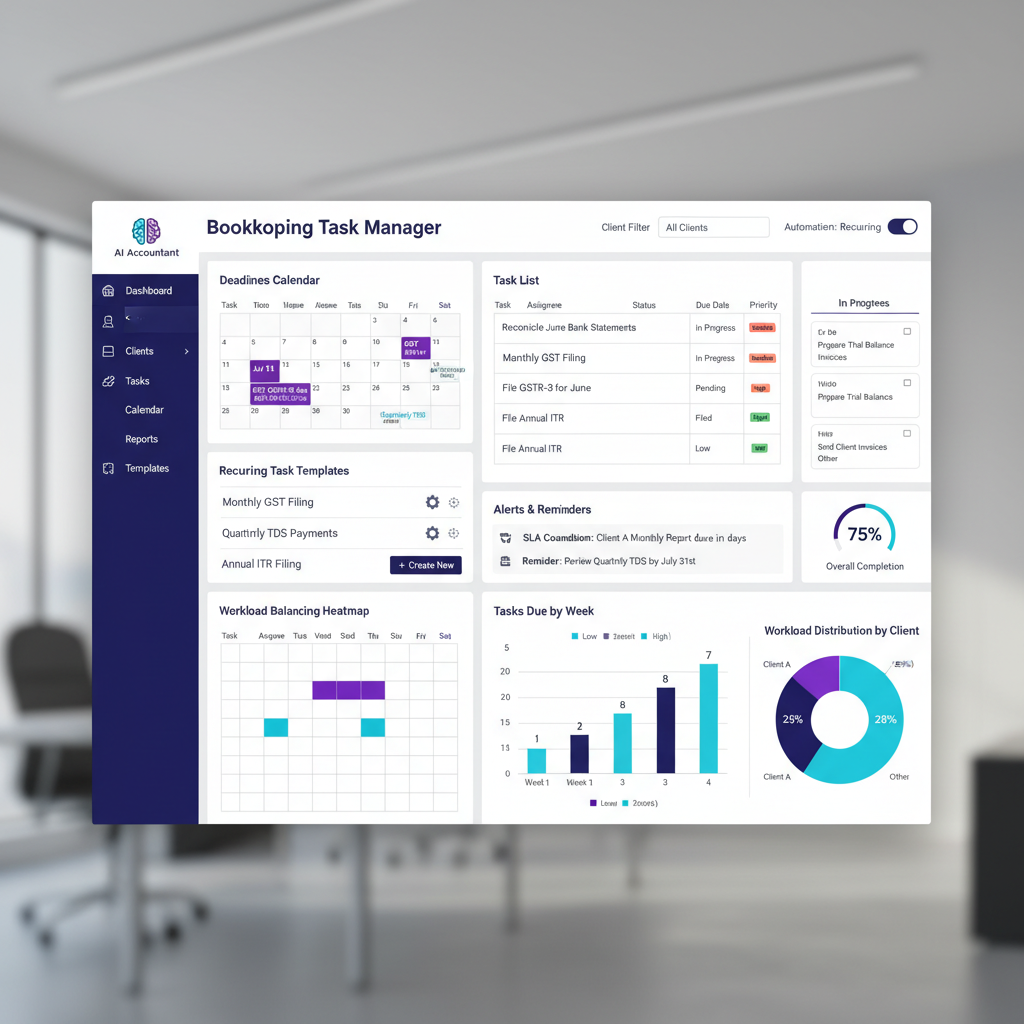
Capacity dashboards show task counts, estimated hours, and deadline spread per team member. Drag and drop redistribution avoids overloading any single person.
Surge rules help in March (year-end closing) and peak ITR periods (July to September). Set blackout dates for leave, pre-assign backups, and mark deferrable advisory tasks that can wait a week.
Historical data helps predict crunch weeks. ML based platforms now forecast bottlenecks two weeks ahead, giving managers time to redistribute or bring in freelance support.
Progress Dashboards Provide Instant Visibility
Partners need firm wide visibility. Managers need team capacity and risk flags. Staff need clear, prioritized lists with no ambiguity about what comes next.
Visual indicators highlight overdue (red), at risk (amber), and done (green). Benchmarks and exports simplify weekly reviews and client update calls. A good dashboard replaces three meetings a week with a five minute glance.
Additional CA-Specific Features
- Document management with auto attachment and version control, no more emailing v3-final-FINAL.xlsx.
- Client portals for uploads, approvals, and status, which reduce email chaos and WhatsApp clutter.
- Email to task capture: create tasks by forwarding client mails with parsing rules for deadlines and owners.
- Approval chains: junior prepares, senior reviews, partner signs. Digital signatures recorded in the audit trail.
- Mobile access for field audits and on the go approvals, essential for partners travelling between client sites.
How to Evaluate Task Management Software
Technical Evaluation Checklist
- Model your services and entities. Test recurring templates for your top five workflows (monthly GST, TDS, bank reconciliation, ITR, audit).
- Validate GST and ITR calendar logic: reminders, extensions handling, and internal review buffers before statutory dates.
- Check workload balancing depth: skills mapping, availability, leave integration, and drag drop reassignment.
- Assess dashboard filters, saved views, and export options that match partner and manager needs.
- Verify DPDP Act compliance: data residency, consent logs, and erasure request workflows.
Integration Requirements
- Confirm Tally sync: client masters, invoice status, and task triggered ledger entries flowing both ways.
- Test email capture: threaded replies into task history, calendar invite sync, and attachment parsing.
- Align document tools: Drive for small teams or advanced OCR for larger firms processing vendor invoices at scale.
- Verify APIs and webhooks for MIS and custom automation. Check uptime SLAs and rate limits.
Security and Compliance
- Request ISO 27001 and SOC 2 reports, renewal dates, and control summaries.
- Understand data residency (must be India for DPDP compliance), encryption at rest and transit, backups, and DR policies.
- Audit trail completeness, exportability, and retention for periods required by ICAI standards and client agreements.
- Granular access controls: client or service level restrictions, two factor authentication, and password policies.
Pricing and Support Considerations
- Clarify per user or per client pricing. Understand limits on tasks, storage, or integrations.
- Surface hidden costs: training, migration, custom report development, and API usage fees.
- Support hours aligned to India (IST business hours minimum). CA aware support staff who understand filing deadlines.
- Vendor stability: funded roadmap, references from similar Indian firms, and clear update cadence.
Recommended Tools for CA Firms
Top Task Management Solutions
- AI Accountant integrates bookkeeping automation with task triggers. Bank statement processing and ledger mapping create review tasks automatically. ISO 27001 and SOC 2 Type II certified, DPDP compliant, with India data residency. 450+ customers and 300M+ transactions processed.
- MyTask purpose built for Indian CA firms. Compliance calendars, workflow templates, SLA timers, and a strong client portal. Pricing starts around ₹300 per user per month.
- Turia comprehensive practice management across tasks, billing, and client management. Robust GST and ITR tracking with entity level calendar rules. ISO 27001 certified.
- Practive modern interface, powerful conditional automation, balanced ease of use. SOC 2 certified with good email to task capture.
- Zoho Projects flexible general tool for firms in Zoho's ecosystem. Needs configuration for CA compliance workflows but scales well for larger teams.
- Karbon global practice platform with excellent email integration and workflow automation. Better suited for firms with international clients.
Implementing Task Management in Your CA Firm
Step-by-Step Workflow Setup
Map your services first. Write down steps, owners, and timeframes for each. Create service categories: GST, income tax, audits, advisory.
Build recurring templates for monthly GST with stages: collection, preparation, review, and filing. Add approval gates and realistic internal deadlines (two days before statutory dates, not the day before).
Configure calendars with buffer days. Enter capacity per team member. Define backups and escalation rules for overdue tasks. Build dashboards for partners, managers, and staff separately.
Import active client data carefully. Start recurring tasks by client and service combinations. Don't try to onboard 200 clients on day one. Pick ten and get the workflow right.
30, 60, 90 Day Implementation Roadmap
Days 1 to 30: Foundation
Select your platform. Set users and permissions. Import core clients. Create templates for five common workflows. Configure GST and ITR calendars. Train power users. Pilot with ten GST clients. Gather feedback and refine templates based on what people actually skip or find confusing.
Days 31 to 60: Expansion
Roll out to more teams and services. Enable workload balancing and management dashboards. Integrate Tally. Configure SLA reminders. Measure baseline completion rates and on time filings. Compare against pre-tool numbers.
Days 61 to 90: Optimization
Adjust timelines based on actual task durations. Rebalance workloads using capacity data. Enable advanced approvals and client portals. Add mobile access for field audits. Schedule weekly management reports. Target 20 to 30% time savings on filings by end of this phase.
Change Management Best Practices
Time implementation away from peak seasons. July (ITR rush) and March (year-end) are terrible months to roll out new software.
Explain the benefits clearly: fewer late nights, fair workload distribution, less chasing on WhatsApp. Train in small groups. Record sessions. Assign mentors within each team.
Celebrate on time streaks publicly. Address concerns quickly. People adopt tools when they feel relief, not surveillance.
Common Pitfalls and Solutions
Overcomplicating Templates
Start simple. Keep checklists under fifteen steps. Focus on high risk items you actually miss. Evolve quarterly based on real errors and skipped steps. Let professional judgment drive exceptions rather than building every edge case into the template.
Missing Calendar Exceptions
Designate a regulatory watcher in your firm. Subscribe to CBIC's tax information portal for official notifications. Update calendars immediately when extensions are announced. Build cushions before due dates so extensions feel like bonuses, not last minute rescues.
Fuzzy Task Ownership
Enforce single ownership. Every task has exactly one person responsible. Log transfers with acknowledgments. Require acceptance before closing or reassigning. "I thought someone else was doing it" should never be an explanation in a well configured system.
Ignoring Capacity Data
Update capacity settings for role changes, seasonal variations, and training time. Review utilization monthly. If someone consistently runs at 120% capacity, something is broken. Adjust assignments or hire, don't just let people burn out quietly.
Creating Dashboards Without Action
Link dashboards to weekly rituals: Monday deadline reviews and Friday planning sessions. Set automated alerts for overdue thresholds and capacity spikes. A dashboard nobody looks at is decoration, not management.
Measuring ROI and Success
Quantifying Time Savings
Measure time per filing before and after templates and automation. Count reduced status meetings (firms report cutting these by 50 to 70%). Track fewer crisis escalations. Even modest savings of 30 minutes per user per day compound to clear ROI across a team of ten.
Compliance Metrics
- On time filing percentage: target above 95% (industry leaders hit 98%).
- Error rates in filings: fewer revisions and corrections, aim below 2%.
- Late fee avoidance: ₹50 per day per return adds up across hundreds of clients.
- Client retention linked to reliable compliance delivery.
Team Satisfaction Indicators
- Quarterly stress surveys showing reduced uncertainty and rush.
- Overtime hours trending down as load is balanced (firms report 15 to 20% reduction).
- Employee retention improvements and lower training costs from reduced turnover.
Building the Business Case
Total software, training, and implementation costs versus quantified savings and additional capacity. Most CA specific platforms cost ₹300 to ₹1,200 per user per month. If a tool saves each user even two hours per week at a billing rate of ₹500 per hour, the math is obvious.
Soft benefits matter too: happier teams, better compliance quality, stronger client relationships, and the ability to take on more clients without proportional headcount increases.
Where AI and Automation Add Value
Intelligent Task Creation
AI suggests services on client onboarding by entity type and turnover. It parses emails into tasks with correct deadlines and owners. When regulatory changes are notified, it creates tasks automatically across affected clients.
Bank feed integration means transaction data flows into the system, gets categorized, and creates reconciliation tasks without anyone manually checking "did the statement arrive?"
Smart Workload Distribution
Predicted task durations by client complexity and task type improve capacity planning accuracy. Analytics flag future bottlenecks two weeks ahead for proactive balancing.
Instead of discovering on Thursday that someone has 40 hours of work due Friday, the system warns you on Monday. That is the difference between managed workload and midnight panic.
Automated Quality Checks
Integration with bookkeeping automation tools triggers review tasks when books reconcile successfully. Anomaly detection creates investigation tasks for missing invoices, rate mismatches, or calculation risks before they escalate into filing errors.
Pre-filing checks compare purchase and sales registers against expected GST positions. Discrepancies surface as tasks with clear context, not buried in spreadsheets someone might check.
Continuous Improvement
Machine learning surfaces consistently late running tasks and suggests timeline adjustments. It highlights staff who excel at specific work types, informing smarter routing. Patterns emerge: "Bank reconciliation for manufacturing clients always takes 2x longer than retail," leading to better estimation and scheduling.
Conclusion: Your Next Steps
Task management software for chartered accountants and bookkeeping teams turns chaotic deadlines into predictable operations. Start small with one pain point: GST returns or missed reviews. Run a pilot, measure results, and iterate.
Do not aim for perfection on day one. Keep improving templates and dashboards quarterly. Technology serves people. The simplest tool that your team actually uses will beat a complex system that nobody touches.
Download trials, map a workflow, set up a pilot for next month, then act on the data. Your future self at 6 PM, your calmer team, and your happier clients will thank you.
FAQ
How do I structure GST, ITR, and audit tasks so reviewers never miss a step in peak season?
Use recurring templates with explicit owner, reviewer, and partner approval stages, plus SLA timers for each stage and internal deadlines set two days before statutory dates. Build conditional subtasks (e.g., e-invoice checks above ₹5 crore turnover from April 2025) and auto escalate overdue items to backups. Platforms with AI driven reconciliation can trigger review tasks automatically when data processing completes, reducing last minute scrambles. (2026 update)
What is the fastest way to align calendars for multiple entities with different GST regimes and holiday exceptions?
Adopt a CA specific platform with preloaded Indian compliance calendars and entity level rules. Configure holiday packs by state, composition or regular scheme variations, and updated e-invoicing thresholds. When the government issues extensions via CBIC notifications, update once centrally so all downstream tasks adjust automatically across clients.
How should a CA firm assign tasks based on skills and capacity without micromanaging?
Set competency matrices per service (junior preparer, reviewer, approver roles) and enable workload dashboards showing task counts and estimated hours per person. Route complex tasks to proven preparers, and reassign with drag and drop when capacity spikes. Predictive analytics in 2026 platforms flag burnout risk two weeks ahead, letting managers rebalance proactively rather than reactively. (2026 update)
What audit trail artifacts do I need for client disputes about delayed filings?
Your system must log assignment dates, status changes, checklist ticks, uploads, review sign-offs, and escalations with timestamps and user IDs. Export the audit trail to show when data was received, when preparation and review occurred, and reasons for any delay. Under DPDP Act requirements, these logs must be retained within India and exportable on demand.
Can I auto create tasks from client emails and keep the conversation in one place?
Yes. Configure an email to task address, forward client requests, and let parsing set the owner, deadline, and service tag automatically. Replies thread back into the task history so reviewers see full context without inbox hunting. Pair with a client portal for document uploads to eliminate attachment chaos across WhatsApp and email.
How do I measure ROI from task management beyond time saved per filing?
Track on time filing percentage (target above 95%), reduced error and revision rates (below 2%), fewer emergency escalations, and decreased overtime hours (firms report 15 to 20% reduction). Multiply capacity gained per user monthly by billing rates to estimate revenue potential. Include qualitative gains: lower stress, better retention, and stronger client references that compound long term.
What does DPDP Act compliance mean for CA task management software in 2026?
Your task platform must store all client financial data within India, maintain consent records for data processing, and support data erasure requests within mandated timelines. Non-compliance penalties reach up to ₹250 crore. Verify your vendor's data residency, retention policies, and consent management features before July 2026 enforcement reviews begin. (2026 update)